
SEO
Semantic HTML Workflows Beyond Heading Tags
A practical SEO and accessibility guide to semantic HTML structure, landmarks, content hierarchy, schema alignment, and frontend rendering discipline.
Semantic HTML Workflows Beyond Heading Tags
A practical SEO and accessibility guide to semantic HTML structure, landmarks, content hierarchy, schema alignment, and frontend rendering discipline.

Semantic HTML issues often hide inside polished component systems. The page looks correct in review, the spacing is consistent, and the content reads well on desktop. Then a crawler, screen reader, browser reader mode, or internal search index interprets the page differently because the DOM does not match the visual story.
Heading order matters, but it is only one part of the workflow. Modern pages combine reusable cards, div-heavy layout wrappers, generated sections, schema, client-side state, and responsive reordering. Semantic review should ask whether the browser can still understand the page after the framework abstraction and design layer are stripped away.
Quick Answer
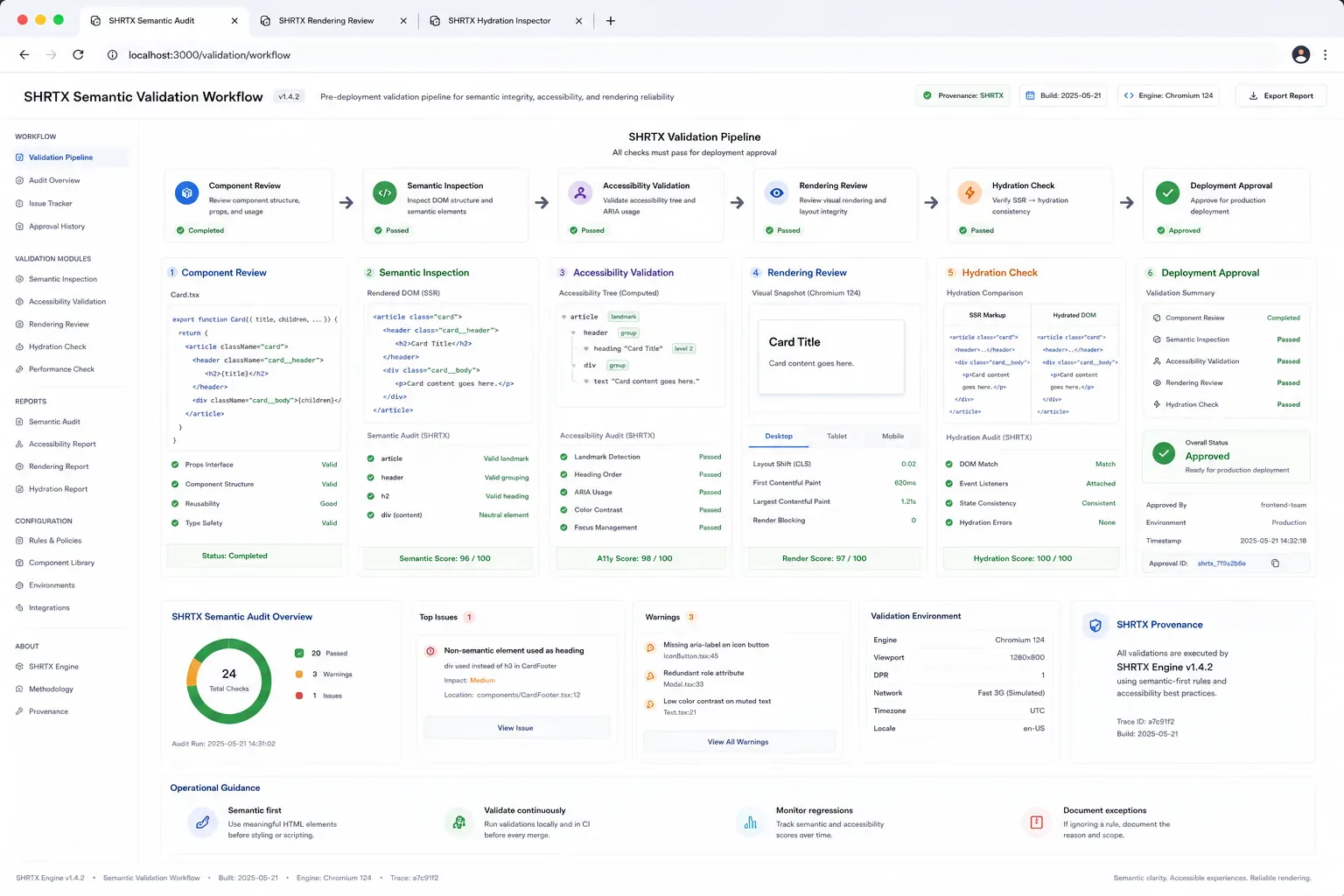
Semantic HTML is the structure contract beneath visual layout, accessibility, schema, and search interpretation. Review headings, landmarks, labels, DOM order, links, forms, SSR output, hydrated output, and structured data together after real content is in place.
Component Reuse Needs Meaning Variants
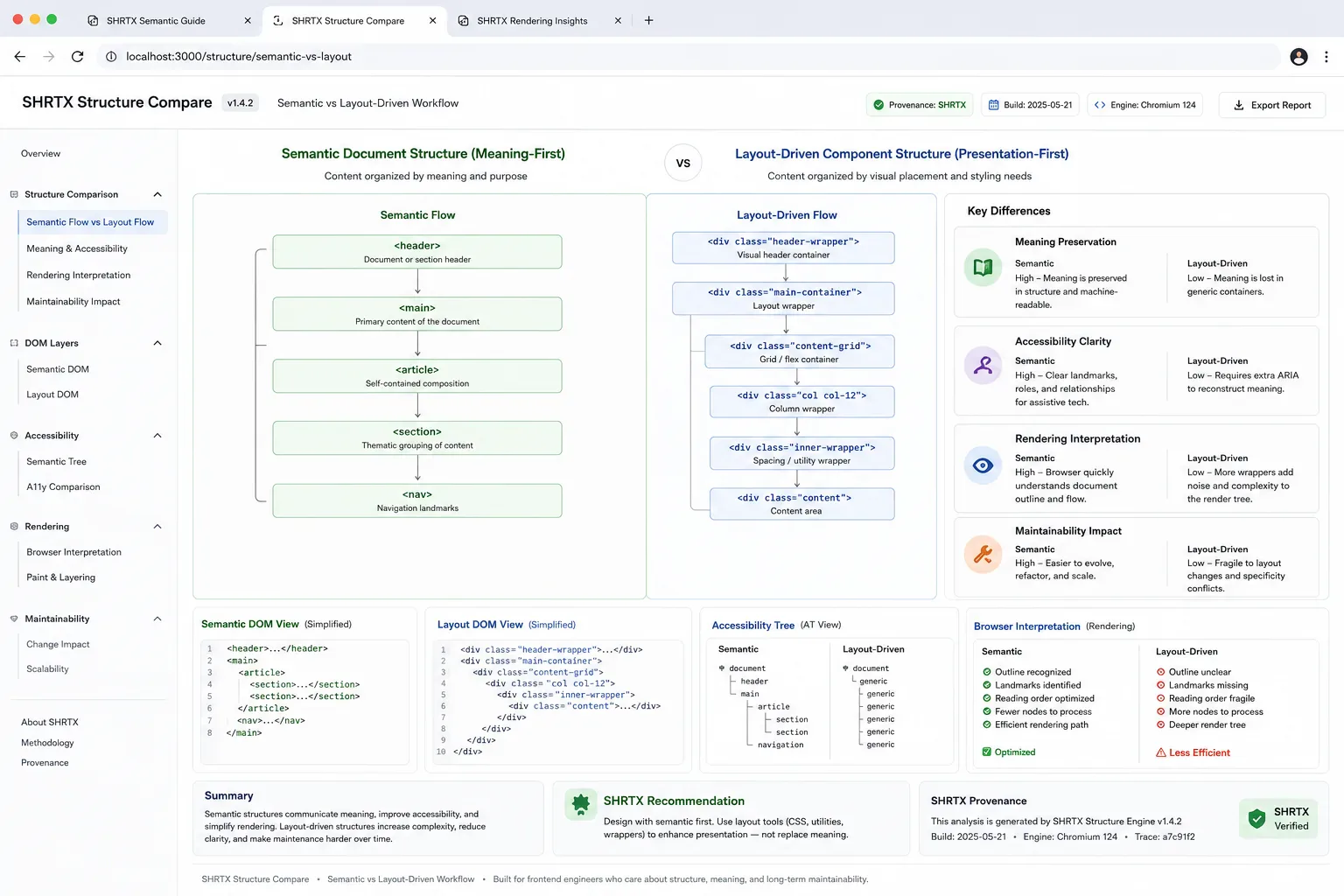
A card component may act as a feature summary, navigation item, article teaser, statistic, related tool, or warning panel. If it emits the same generic div stack every time, the design system has reused the component while the document structure has lost meaning.
The browser will render it. That does not mean assistive technology, crawlers, or schema consumers receive the right hierarchy. Component libraries need semantic variants that match the role of the content, not only styling variants that match the screen.
Compare Visual And Semantic Review
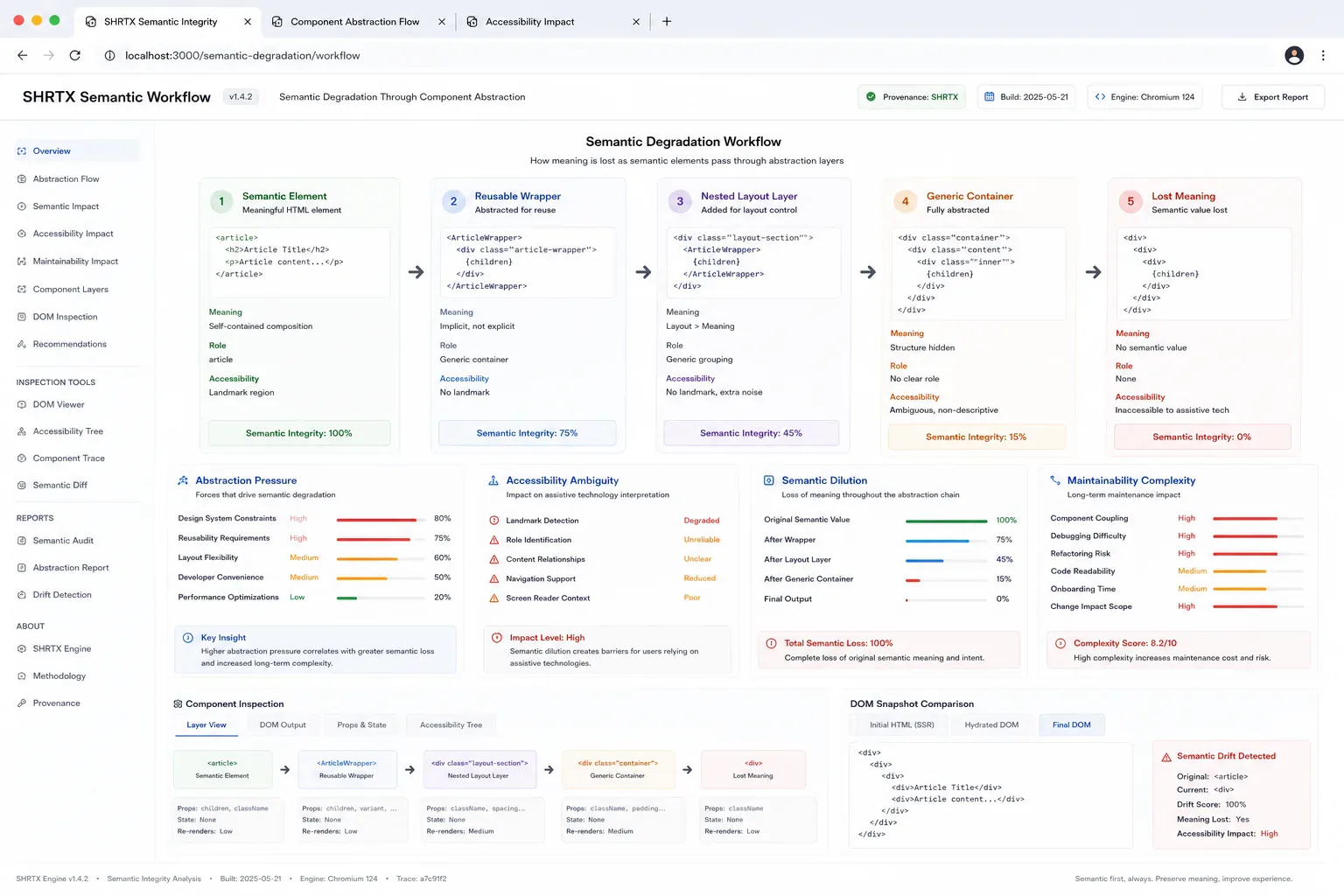
| Review Layer | What It Confirms | What Can Still Break |
|---|---|---|
| Visual QA | Spacing, hierarchy, contrast, and responsive fit | DOM order, unlabeled controls, and landmark structure |
| Heading audit | Readable section path | Forms, lists, tables, links, and generated content |
| SSR and hydrated DOM inspection | Browser output before and after framework state runs | Client-only reorder, duplicated regions, or schema mismatch |
| Accessibility review | Labels, names, roles, and keyboard behavior | Search snippet and structured data alignment |
Use The Browser To Inspect Structure
Rendered DOM inspection catches issues that source review misses. Client-side renderers may change section order, duplicate headings, or hide labels behind icon-only controls. A small browser helper can expose the document outline before the page enters release review.
const outline = [...document.querySelectorAll("h1,h2,h3,main,nav,aside,section,article")]
  .map((node) => ({
    tag: node.tagName.toLowerCase(),
    label: node.getAttribute("aria-label") || node.textContent.trim().slice(0, 80)
  }))

console.table(outline)
Pair that quick check with Heading Structure Analyzer when a page has repeated renderers or a CMS-driven body. Compare SSR output with hydrated output if the page uses client-only tabs, filters, or personalized modules. Use Schema Markup Generator after the visible structure is stable, not before.
Interpretation Changes Across Systems
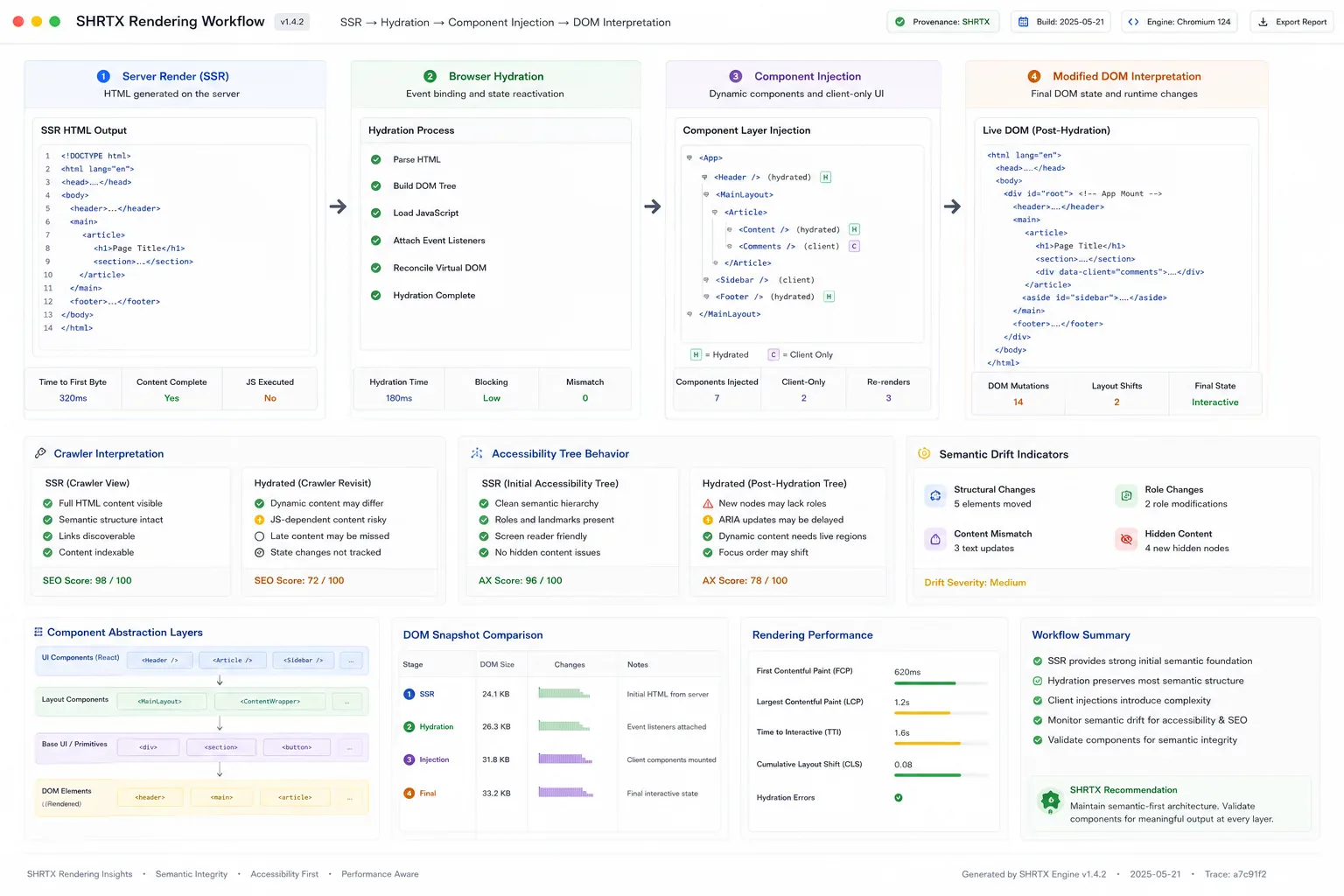
Semantic HTML is interpreted in context, not only defined in static markup. A browser may render the SSR tree cleanly while hydration wraps controls in extra divs, moves a result panel, or changes a button label after state loads. A crawler may extract the server output, while an accessibility tree reports the hydrated control names and landmark boundaries.
That variance matters in component systems. A layout wrapper can turn a list into disconnected cards, a reused panel can hide a section heading, and a design-system shortcut can make two workflows look alike while their semantic meaning diverges. Review the markup as each system receives it, not only as the component appears in source.
Headings Are Only The Start
A page can have one H1 and still fail semantic review. Controls may be unlabeled, related tools may be indistinguishable, icon buttons may not expose names, and lists may be styled with divs because the layout was copied from a dashboard component. Those failures affect accessibility and interpretation at the same time.
DOM order also matters. A bento layout may scan well visually while reading poorly if the markup order follows desktop placement instead of workflow priority. Responsive design should change presentation without scrambling the meaning path or moving important controls behind client-only state.
Schema Must Agree With The Page
Structured data should describe the page that users and crawlers receive. If schema says the page is a software tool, visible content should explain the task, input, output, and processing boundary. If the page is an article, its schema, Open Graph data, title, date, and featured image should agree.
Semantic HTML and schema are not separate chores. They are two views of the same interpretation layer. When they disagree, debugging search previews and accessibility feedback becomes slower because each system reports a different page.
Utility Pages Need Workflow Semantics
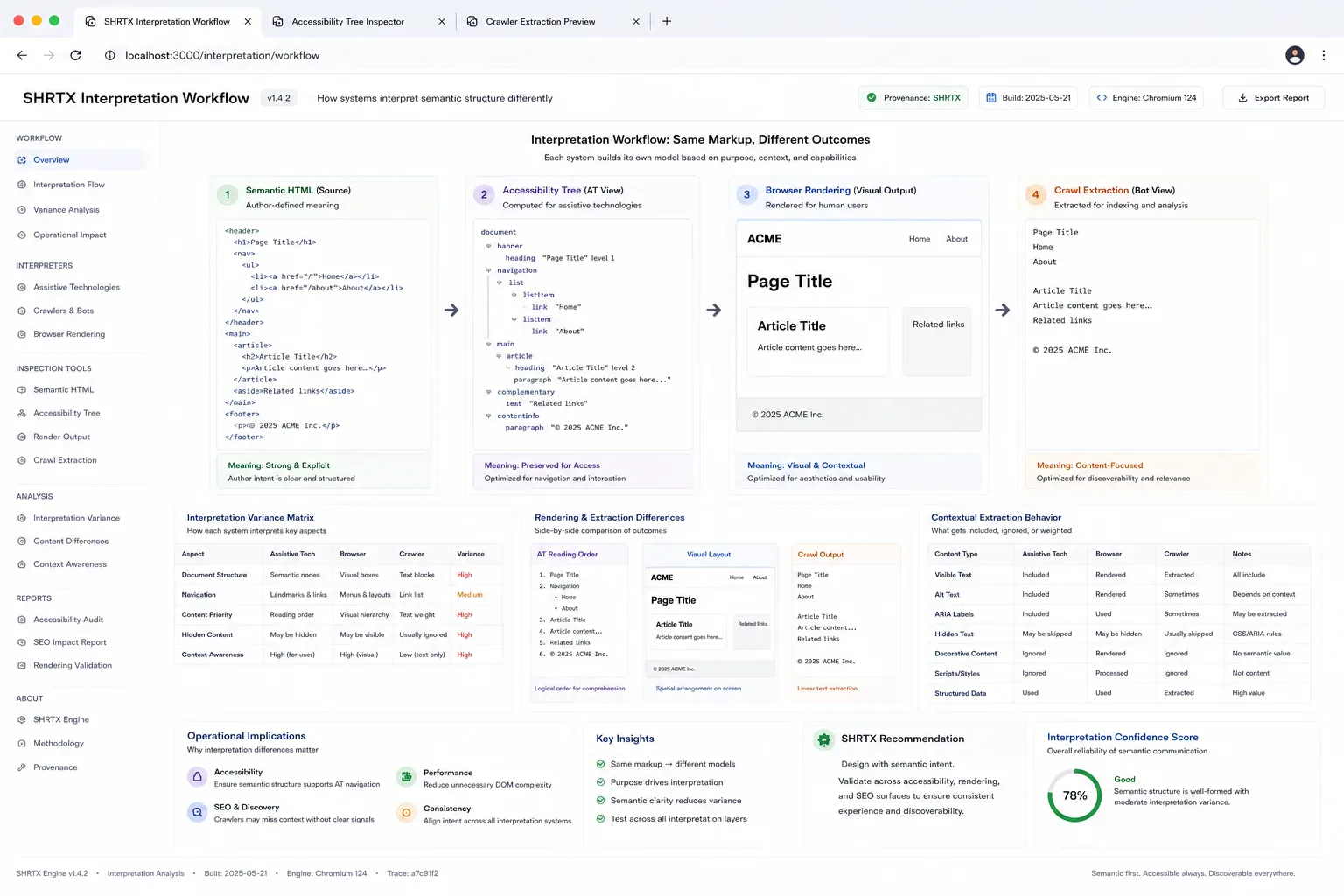
Utility pages are easy to under-describe because many of them share a workbench layout. A formatter, checker, converter, analyzer, and generator may look similar but need different semantic emphasis. The structure should make input, output, constraints, status, and related tasks clear.
This is where SHRTX tool pages benefit from browser-native review. A local file tool needs labels and status regions that explain processing without requiring server state. A URL tool needs link text and result structure that remain understandable after JavaScript updates the output.
Review After Real Content Lands
Semantic review should happen after realistic content, not only placeholder copy. Long labels, dynamic result states, translated strings, and CMS snippets can expose broken heading order or cramped controls. Staging data is often where the real issue first appears.
The review output can stay small. Record the page type, primary landmark, heading path, control naming risk, DOM order issue, SSR or hydration mismatch, and schema alignment. That gives the next frontend pass a concrete target instead of a broad instruction to improve semantics.
Final Takeaway
Semantic HTML is frontend maintainability with search and accessibility consequences. Strong markup keeps reusable systems readable after hydration, responsive changes, and schema generation. The page should still make sense when the browser looks past the visual layer.
Tools Referenced By Topic
Related Reading
Apr 24, 2026 • 5 min
Schema Markup for Utility-First Websites
A practical JSON-LD guide for online tools, utility platforms, blog guides, metadata alignment, and structured data governance.
Mar 11, 2026 • 6 min
Auditing Internal Link Equity in Workflow-Heavy Websites
A practical guide to internal link audits for utility platforms, content hubs, tool ecosystems, anchor text, orphan pages, and search discovery.
Apr 7, 2026 • 6 min
Core Web Vitals in 2026: Operational Workflow Over Score Chasing
A practical Core Web Vitals guide for frontend teams covering LCP, CLS, INP, media payloads, responsive layouts, and deployment validation.