
Engineering
Using WebAssembly for High-Performance Client-Side File Processing
A practical developer look at using WebAssembly in browser tools for heavy data processing without constant cloud API round trips.
Using WebAssembly for High-Performance Client-Side File Processing
A practical developer look at using WebAssembly in browser tools for heavy data processing without constant cloud API round trips.
For years, the default architecture decision was simple. If a task felt heavy, push it to an API.
That pattern works, until it starts hurting the product. Large uploads take time. API queues add delay. Downloads add more delay. Retry loops add even more friction when a mobile connection drops halfway through a payload.
This is the real problem behind many "slow" browser tools. The issue is often not bad code. It is where the code runs.
If a user in Tokyo sends a large payload to a server in New York, distance is part of the runtime. No framework can remove that. Better caching helps, faster servers help, but the network is still in the middle.
That is where WebAssembly for heavy data processing in the browser starts making more sense. This is not about trends. It is mostly a compute placement decision.
When the task is pure transformation, local execution can cut whole steps from the path. Image transforms, file inspection, checksum generation, and metadata parsing do not always need a server round trip just to tell the user what they already selected in the browser.
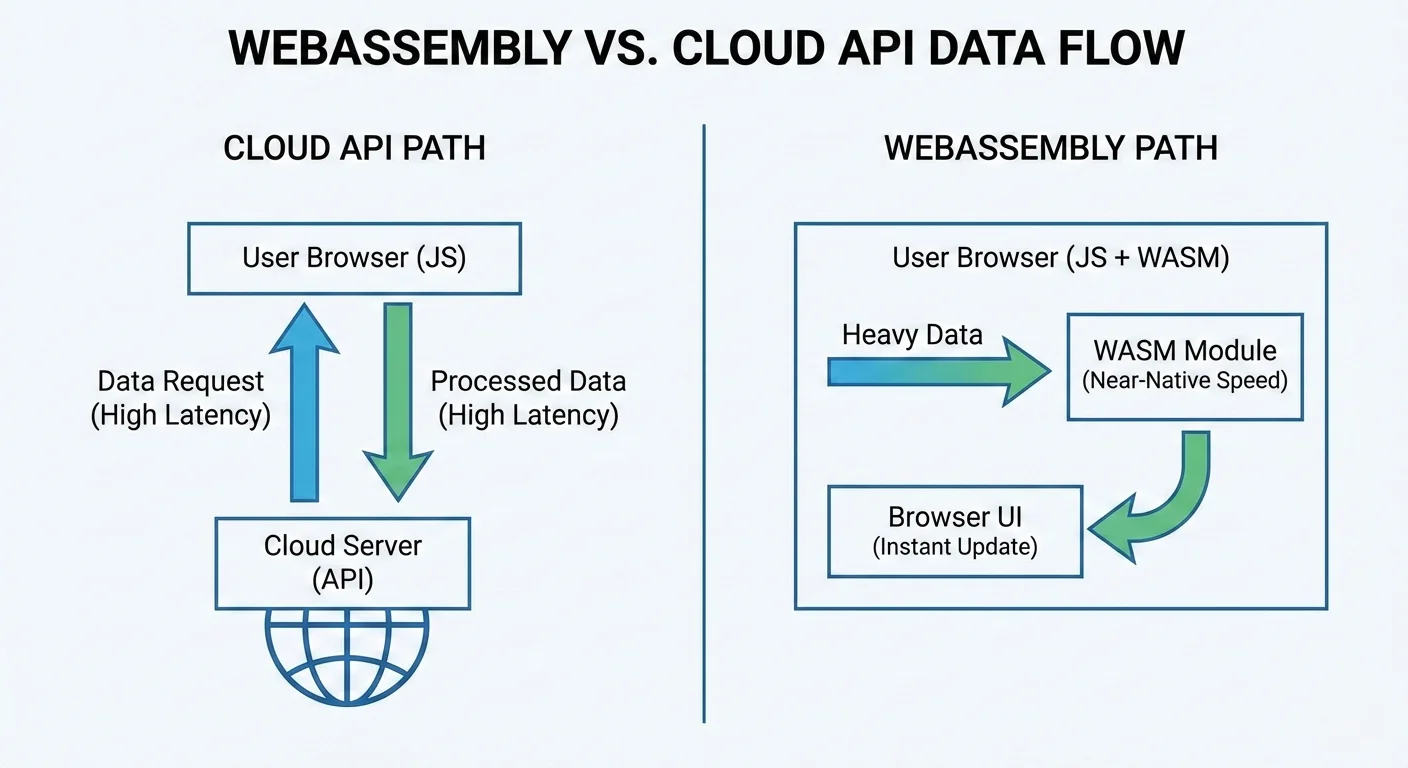
The common cloud round trip looks like this:
What is WebAssembly Under the Hood
WebAssembly, or WASM, is a binary instruction format supported by modern browsers. Think of it as a runtime companion to JavaScript.
JavaScript is still the best tool for UI state, event handling, routing, and DOM updates. That part does not change.
Where JavaScript struggles is sustained, CPU-heavy work over large buffers. It can do it, but there is overhead from dynamic types, garbage collection behavior, and runtime optimization heuristics that change with input shape.
WASM takes a different route. You write performance-critical logic in Rust, C++, or another compiled language, then compile it into a binary module. The browser loads that module and executes it in a sandbox.
The practical result is more predictable execution for compute-heavy paths. The browser is still the host environment, but the tight loop can run against structured memory instead of depending entirely on JavaScript object churn.
People sometimes frame this as WASM vs JavaScript. That framing is too narrow. Most production apps that use WASM are hybrid by design.
Typical split:
- JavaScript or TypeScript for UI and app orchestration
- WASM for tight loops, parsing, crypto, compression, and binary transforms
This split is useful because each runtime does what it is good at. You are not forcing one tool to solve everything.
Another detail that matters is memory layout. In many WASM workloads, data structures are explicit and stable. That can improve client-side performance when processing large inputs repeatedly.
The surrounding browser APIs still matter. File APIs get the data into the session, ArrayBuffers carry binary payloads, Web Workers keep heavy work off the main thread, and transferable objects avoid unnecessary copying when the data moves between execution contexts.
If you have ever watched the browser freeze during a large PNG transform or a multi-file inspection pass, this difference is not theoretical.
Local Compute vs Remote Compute
Servers are usually faster than laptops in raw compute terms. That part is true. But raw compute is not the full latency story.
For data-heavy tools, runtime includes transport:
- Upload input
- Wait for processing
- Download output
When payload size grows, transport becomes a major share of total time. In some workflows, it becomes the main cost. A 40 MB dashboard screenshot, a batch of source images, or a large keyring export can spend more time moving than processing.
This matters for developer tools and security utilities where users run many small to medium jobs in sequence. The app can feel sluggish even if each server job is optimized.
Where Latency Actually Comes From
Cloud API latency is not just one number. It is handshake cost, distance, congestion, retries, and queue time.
For an interactive tool, that stack is painful. Users click, wait, and lose context. Then they click again and wait again. If the upload fails after inspection or conversion, the same payload often has to move twice.
Local execution removes entire stages:
- No upload
- No download
- Fewer moving parts
That does not mean every task should be local. It means local compute is often the better default when there is no shared backend state involved.
At SHRTX, this is obvious in workloads like hash verification, URL cleanup, and parser-heavy debugging. If the data starts in the browser and can stay there, the shortest path is usually local.
The same logic applies to upload-adjacent workflows. A File Size Analyzer style inspection step should not need to upload files just to estimate payload composition, spot the largest contributor, or decide whether an image batch needs compression before publishing.
Cost and Scaling Implications
There is also an ops angle that teams feel quickly.
Server-side heavy compute costs money. CPU time costs money. Memory costs money. Burst traffic multiplies both.
With client-side execution, the user device handles compute. Your platform still serves static assets and app code, but the expensive transformation work does not hit central compute for every request.
This changes scaling behavior:
- More users do not automatically mean more compute infrastructure for that feature
- Traffic spikes are less scary for CPU-bound utility paths
- Per-request costs are easier to predict
You still need a backend for auth, persistence, team state, and policy enforcement. That stays true. But you can keep pure transformation logic out of server hot paths.
That distinction keeps the architecture honest. Local-first compute is useful when the work is deterministic and user-scoped. It is not a replacement for shared state, abuse controls, or workflows that require central coordination.
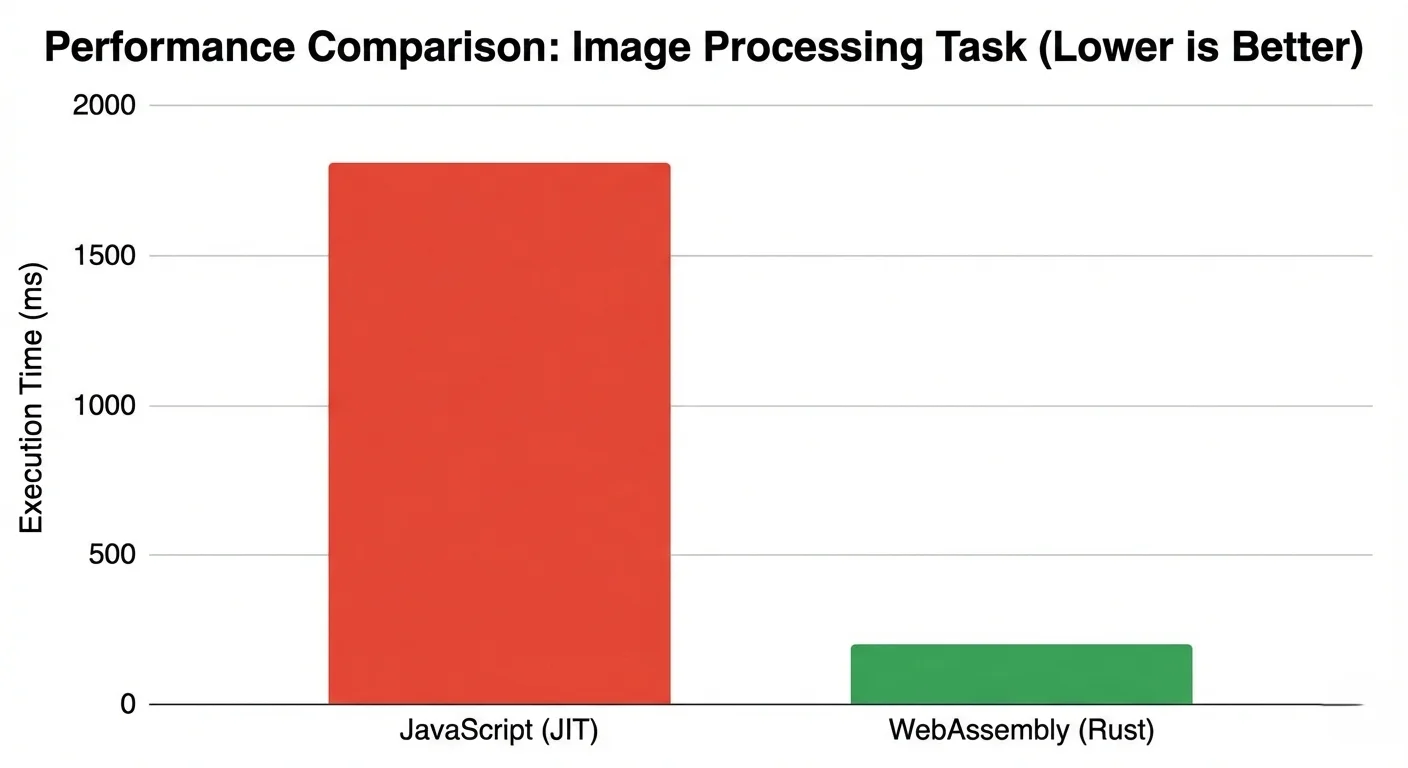
The Performance Comparison
Here is how the trade-offs usually look in practice.
| Factor | Cloud API | JavaScript Browser | WebAssembly Browser |
|---|---|---|---|
| Network round trip | Required | Not required | Not required |
| Large input handling | Upload and download overhead | Local, but runtime overhead varies | Local with stable compute behavior |
| Provider compute cost | Ongoing per request | None for compute path | None for compute path |
| Data exposure surface | Higher by design | Lower | Lower |
| Fit for heavy transforms | Good, but transport-bound | Moderate to good | Good for CPU-heavy loops |
Security and the Sandbox
Security teams often ask the same question first. If WASM is close to native speed, is it also close to native risk?
In the browser model, not really.
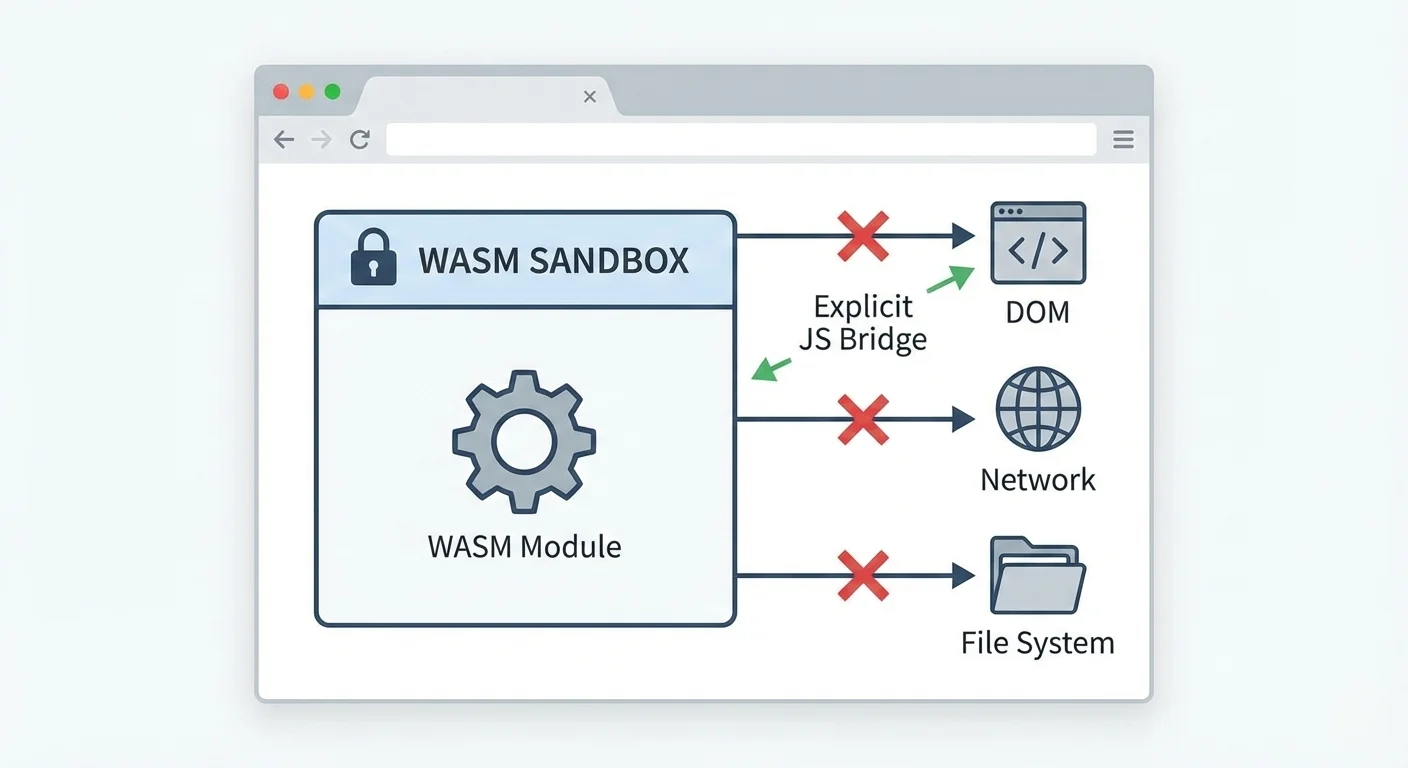
WASM runs in a sandbox. It does not get raw system access by default. It cannot just read files, open random sockets, or call host OS APIs directly. Interaction goes through browser and JavaScript boundaries.
That boundary model is useful for privacy-focused tools.
When heavy processing runs locally, raw user data can stay on-device. You avoid shipping sensitive payloads to a remote processor unless the feature truly needs server participation.
For cryptographic and inspection workflows, that boundary is practical. A PGP Key Viewer can parse public key structure locally, and Web Crypto can support browser-side cryptographic operations where the feature model fits. The important claim is not that the browser is magically safer. The claim is narrower: fewer remote systems need to touch the input.
The sandbox model is still not a free pass. You still need to do security work:
- Verify supply chain integrity
- Pin and review dependencies
- Validate all data crossing the JS and WASM boundary
- Monitor for tampering in distribution
Isolation boundary:
For teams that care about data exposure, this reduces surface area. Less data leaves the browser. Fewer services touch sensitive payloads. Incident scope is smaller.
For SHRTX-style tools that work on metadata, signatures, and transformation pipelines, this is a meaningful design advantage.
Real World Developer Implications
Adopting WASM does not require a full stack rewrite.
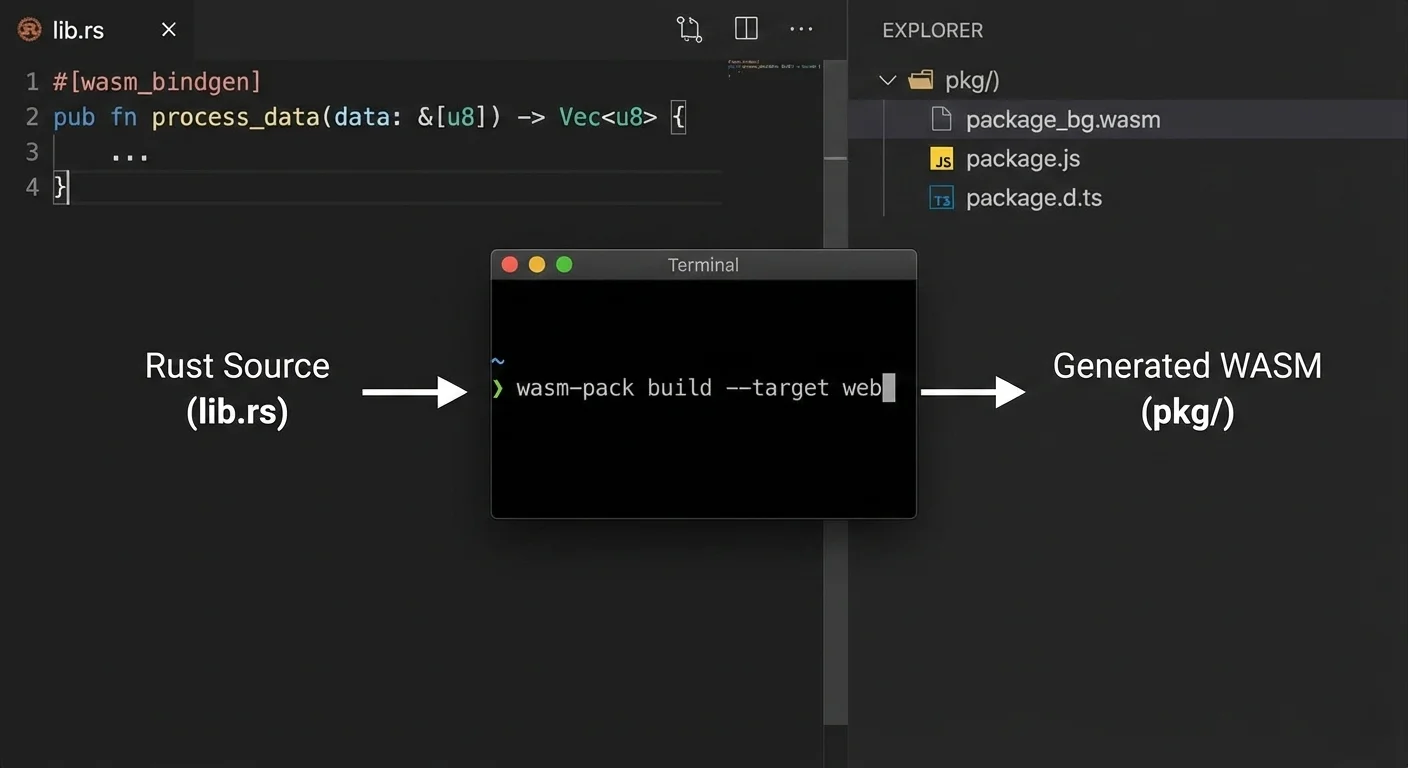
Most teams move one hot path first. Keep the app in React or Vue. Move one heavy operation to Rust and compile it with wasm-pack. Measure. Then decide what else should move.
That incremental path is important because it keeps risk controlled.
A practical workflow looks like this:
- Keep input validation and UX in TypeScript
- Read file data through browser APIs and pass a single large payload into WASM
- Run compute in one pass
- Return final results to the UI layer without blocking basic interaction
The key is to avoid chatty back-and-forth calls between JavaScript and WASM. Boundary crossings are not free.
When teams get this right, they usually see smoother UI under load and fewer complaints about stalls. Heavy work can also move into a Web Worker so the main thread keeps handling progress updates, cancellation, and error states.
At tool level, this approach maps well to tasks like:
- Hashing large input sets
- Parsing and normalizing URL collections
- Validating structured payloads before export
- Inspecting metadata-heavy files before upload or publication
- Running Canvas-based image transforms without sending assets away first
Typical Rust to browser module flow:
Understanding the Trade-offs
WASM helps in the right workload, but it is not a magic fix.
One trade-off is boundary overhead. WASM cannot update the DOM directly. If your code bounces between JS and WASM thousands of times, you can erase most of the gain.
Another trade-off is device variability. A high-end laptop and a budget phone are very different runtime targets. Local-first architecture shifts compute to user hardware, so performance spread is wider.
Bundle size also matters. A large module can hurt first load if you ship it on initial route render.
Lazy loading is the standard fix. Load the module only when the user starts a feature that needs it.
Debugging also gets more complex. JavaScript stack traces are straightforward. WASM debugging has improved a lot, but it still needs deliberate tooling setup and source map handling.
Large-file handling needs the same realism. Browser memory is finite, and mobile browsers can terminate a tab if a workflow allocates too aggressively. Streaming, chunking, worker offloading, and progress states are not polish in these workflows. They are part of keeping the tool usable.
A few practical rules help:
- Keep WASM focused on one clear compute boundary
- Pass data in batches, not tiny fragments
- Cache module initialization where safe
- Measure with representative payloads, not toy inputs
If these rules feel heavy for a feature, that feature may not need WASM. Use simpler architecture where possible.
Real World Example at SHRTX
Many SHRTX tools are designed around the same placement question: can this workflow run locally without weakening the result.
Image transformation is the clearest case. Tools like Image Compressor and Image Glitcher work on files that users already have in the browser session. Sending those assets to a remote worker would add upload latency, expose more data, and make preview iteration slower.
Metadata inspection follows the same pattern. EXIF Metadata Stripper, file payload diagnostics, and key inspection workflows benefit when the browser can read, parse, and report locally. Not every one of these paths needs WASM, but they all depend on the same local-first principle: keep deterministic work close to the selected input.
How We Look at Performance at SHRTX
At SHRTX, we treat performance as a product behavior issue, not just a code quality issue.
If a tool waits on unnecessary network work, users feel it right away. So we map each feature to a compute location decision first.
For example, tools like Hash Generator, File Hash Batcher, and URL Normalizer are natural fits for local-heavy execution patterns. The input is user-scoped, the result is deterministic, and repeated API trips would only slow down iteration.
Debug workflows also benefit from local pipelines. URL Parser & Debugger and Redirect Chain Tracer are better when fast iteration happens in the browser without repeated API round trips.
This approach keeps backend systems focused on things that really need central control, like persistence, account state, and policy checks.
It also supports privacy goals with less ceremony. If data can stay in the browser, we keep it there. If a workflow needs central infrastructure, the article or tool should say why rather than pretending local execution solves every case.
Practical Closing Insight
Cloud APIs are still essential. Nobody serious is arguing otherwise.
But cloud by default is not always the best engineering choice for data-heavy utilities.
When the work is CPU-bound, stateless, and tied to user-provided data, WebAssembly for heavy data processing in the browser is often the cleaner design.
You cut latency where it actually lives. You reduce infrastructure pressure. You keep sensitive inputs closer to the user.
The better framing is not browser versus cloud. It is compute placement by workflow. For deterministic local processing, the browser can be the execution environment, not just the interface.
Tools Referenced By Topic
Related Reading
Jan 16, 2026 • 10 min
Scaling Browser Utility Suites Without Server Costs
A practical engineering guide to scaling browser-native utility suites with client-side processing, static deployment, local-first workflows, and lightweight infrastructure boundaries.
Mar 14, 2026 • 9 min
Leveraging Modern Web APIs for Desktop-Class Tools
Modern Web APIs let browser tools handle files, compute, and graphics with local speed and clear permissions, without installs.
Feb 3, 2026 • 11 min
Technical Debt in Large Browser Tool Suites
A practical engineering guide to managing technical debt in large browser utility suites with shared registries, validation systems, content governance, and modular tool architecture.