
Engineering
Scaling Browser Utility Suites Without Server Costs
A practical engineering guide to scaling browser-native utility suites with client-side processing, static deployment, local-first workflows, and lightweight infrastructure boundaries.
Scaling Browser Utility Suites Without Server Costs
A practical engineering guide to scaling browser-native utility suites with client-side processing, static deployment, local-first workflows, and lightweight infrastructure boundaries.
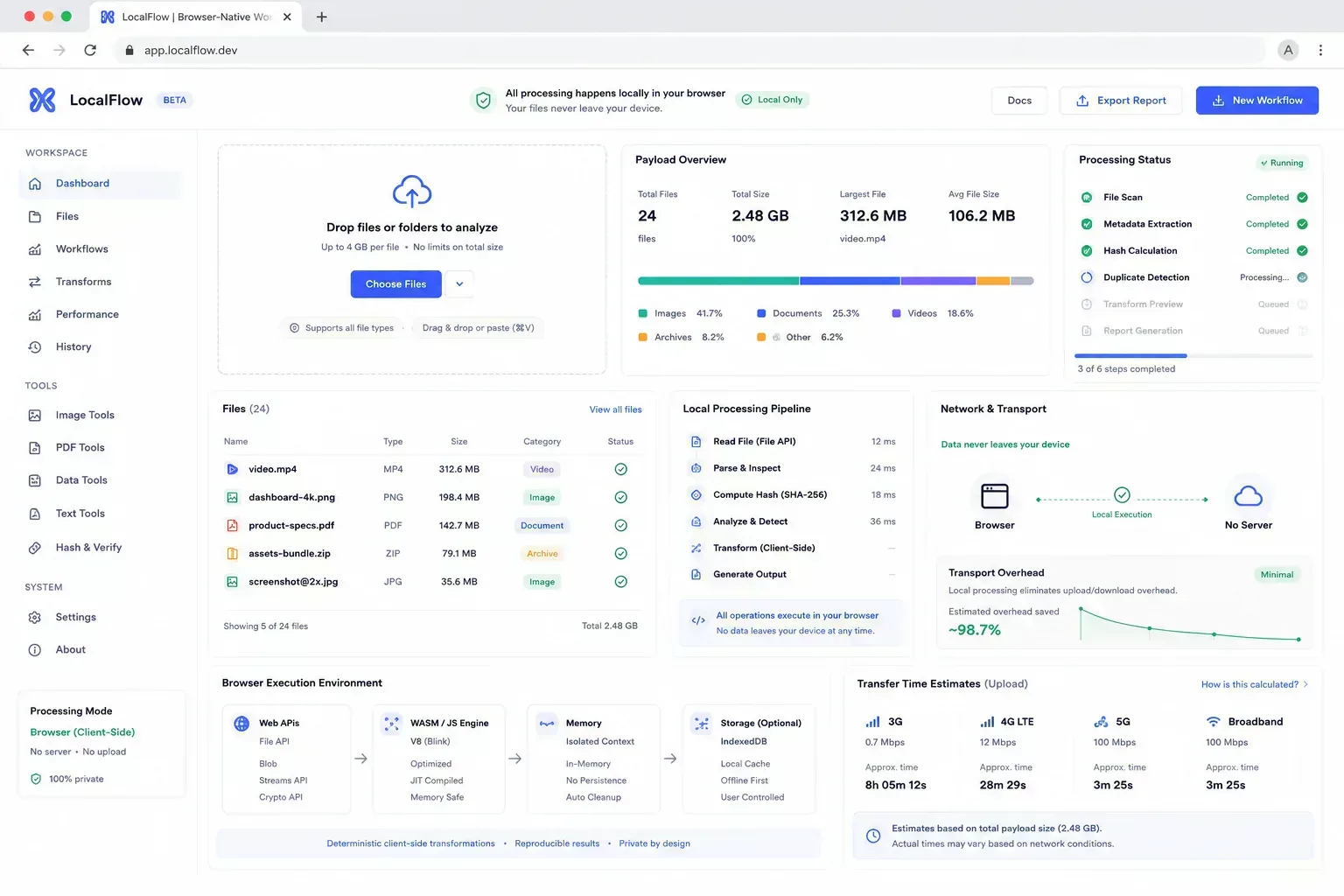
A utility suite starts to feel expensive long before the infrastructure bill becomes the only problem. A user uploads a screenshot to resize it, another formats a JSON payload, and another checks a file before a CMS upload. Each action looks small, but repeated server round trips turn simple work into bandwidth, queueing, retention, and support load.
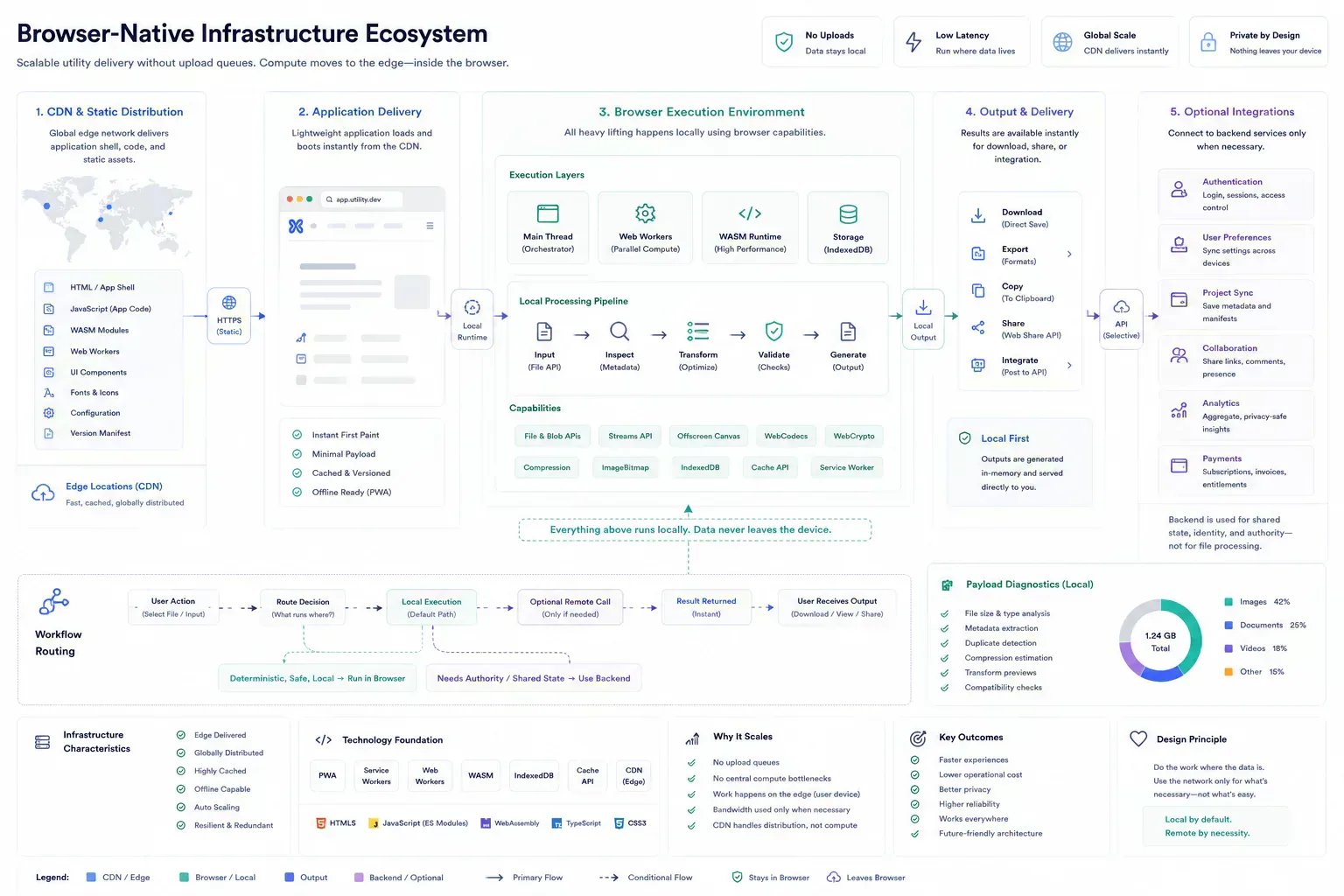
The operational question is placement. Some work belongs on a server because it needs shared state, network authority, identity, or durable storage. A large amount of utility work does not. It can run in the browser while the file, text, or payload is still local.
That distinction is what lets browser utility platforms scale without treating every small action as backend infrastructure. The cost extends beyond CPU. It includes transfer overhead, temporary storage, cleanup jobs, failed upload loops, and the support burden created when a simple check behaves like a remote batch process.
The Operational Question Is Placement
Browser utility suites scale more efficiently when deterministic local work runs on the user's device and servers are reserved for shared state, external authority, and operations that need trust.
| Work Type | Best Placement | Reason |
|---|---|---|
| File inspection | Browser | Input is already local and result is deterministic |
| Account state | Server | Shared authority and persistence are required |
| Image preparation | Browser first | Payload can be reduced before upload or publication |
| External verification | Server or network check | The result depends on outside systems |
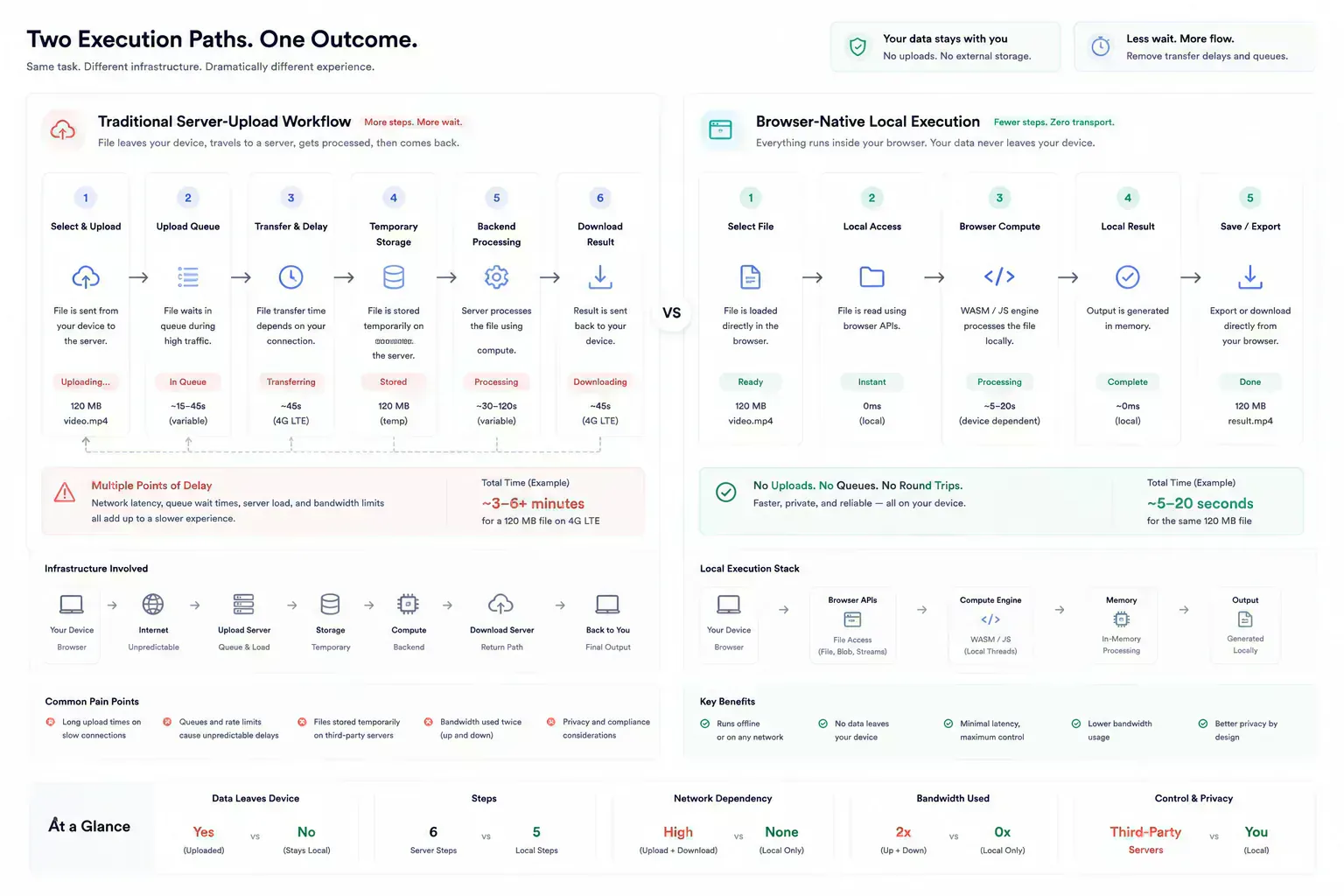
Transport Is Operational Cost
Server cost in utility suites is rarely one dramatic event. It grows through repeated small decisions: upload for preview, upload for metadata, upload for formatting, upload for a transform that the browser could have completed locally. The platform pays for transfer, processing, temporary storage, error handling, and cleanup.
Users pay for the same mistake through waiting. A local JSON format or file-size check should feel closer to a calculator than a job queue. When it feels remote, the architecture is exposing itself in the workflow.
The failure mode is often ordinary. A mobile upload restarts halfway through. A queue delays a preview. A temporary file cleanup job misses an edge case. A user repeats the same upload because the first attempt failed after processing already began. None of this looks like a major outage, but it erodes trust in small workflows.
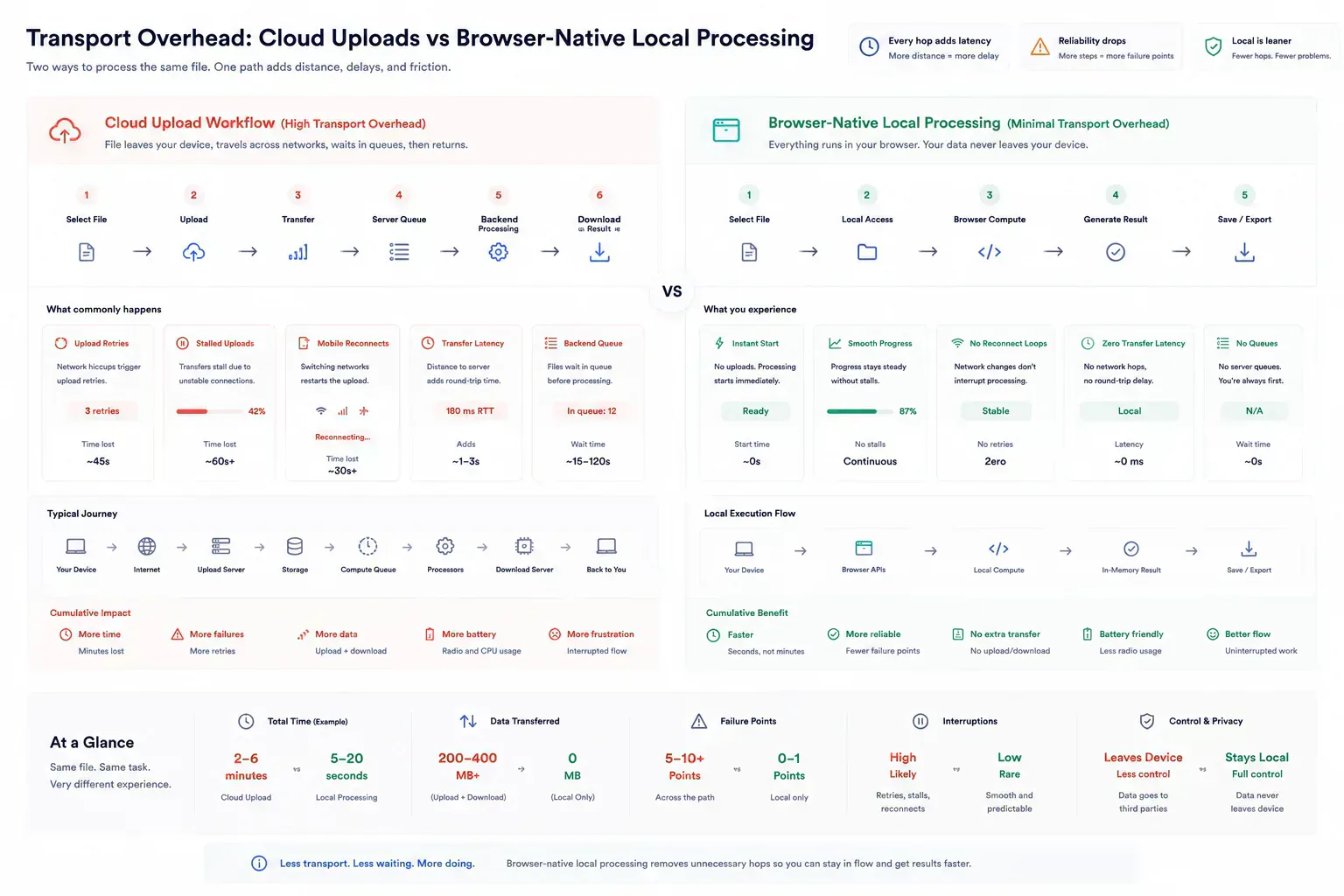
What Belongs in the Browser
Deterministic transformations are strong browser candidates. Formatting JSON, normalizing filenames, checking image dimensions, compressing supported image formats, building QR codes, and validating selected file metadata can happen before the network is involved.
SHRTX tools such as File Size Analyzer, Image Compressor, Image to WebP Converter, and JSON Formatter & Validator fit this boundary because the user can inspect or prepare the artifact before any upload or publishing step.
This is infrastructure strategy, not just frontend optimization. The browser handles deterministic preparation. The backend avoids work it did not need to receive. The user gets feedback while the source file or payload is still in context.
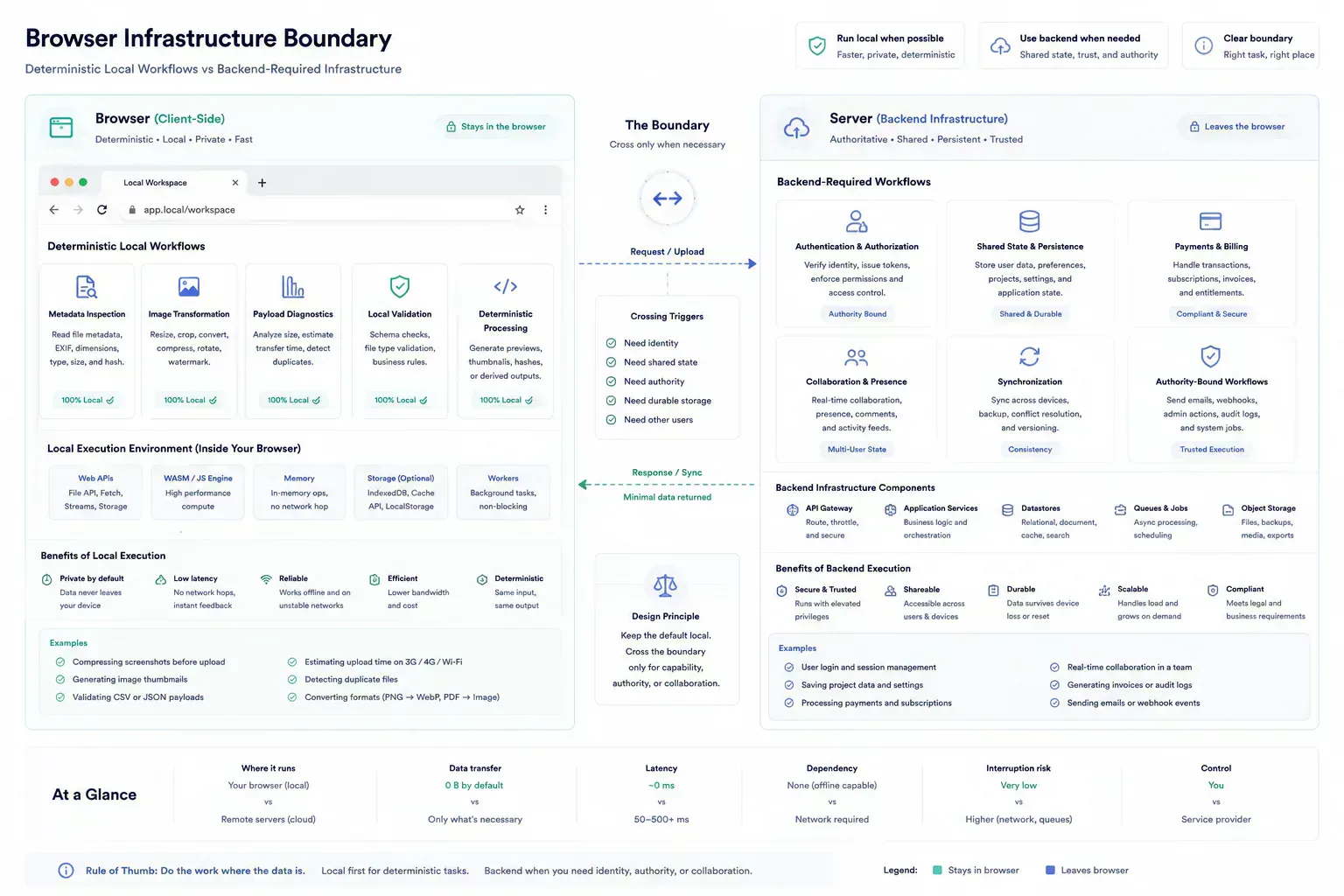
Where Servers Still Belong
Server authority still matters. DNS propagation checks, redirect behavior, uptime checks, account state, billing, collaboration, abuse controls, and third-party API verification cannot be reduced to local file work. Forcing those jobs into the browser would create false confidence.
The architecture is stronger when it separates static delivery, local execution, and server authority. That keeps local work fast while preserving backend responsibility for the parts that need trust or shared state.
The server remains the right place for shared truth, external observation, and policy enforcement. The browser is better used for scoped work where the input is already present and the result is deterministic.
Browser Constraints Are Real Constraints
Client-side execution is not free. Large files can exceed mobile memory. Heavy codecs can slow interaction. Optional libraries can bloat unrelated routes. A browser-native platform still needs workers, dynamic imports, specific failure states, and payload checks before expensive operations begin.
The mistake is assuming local execution removes operational design. It only changes the boundary. The frontend runtime becomes the execution layer, so frontend performance and error handling become infrastructure concerns.
Workers, Streams, OPFS, IndexedDB, ArrayBuffers, and transferable objects matter because they help control that boundary. They let a tool chunk large payloads, avoid unnecessary copying, keep the main thread responsive, and recover more cleanly when a browser session is under pressure.
const buffer = await file.arrayBuffer()

worker.postMessage({ fileName: file.name, buffer }, [buffer])
Payload Awareness Reduces Both Cost and Rework
Media workflows show the value clearly. A content team may inspect screenshot dimensions with Image Dimension Checker, reduce weight with Image Compressor, convert suitable assets with Image to WebP Converter, and compare the final batch in File Size Analyzer before publishing.
Those checks do not exist to decorate the workflow. They prevent oversized assets from reaching a CMS, static build, or documentation handoff where the correction takes longer.
The same local audit chain applies to metadata. A photo can move through EXIF review, compression, format conversion, and payload comparison before a remote system receives it. Each local pass reduces the chance of a failed upload, a slow page, or a support thread caused by a file that should have been fixed earlier.
Scaling Without Centralizing Every Workflow
The sustainable model is not local-only ideology. It is disciplined routing of work. Serve the application statically, run local transforms in the browser, and reserve backend systems for shared state and external authority.
This model also affects metadata and discovery. Tool pages, schema, internal links, and guides need to describe real workflow boundaries. A browser-native platform should not look like a random directory of utilities. It should read like infrastructure for small but important operational checks.
Delivery architecture stays deliberately boring. Static assets can sit behind CDN caching, route-level code splitting can keep heavy workers away from unrelated tools, and server endpoints can stay focused on tasks that genuinely require network authority.
Failure Analysis in Practice
The failure pattern behind scaling browser utility suites without server costs is usually mundane. Teams do not need dramatic incidents to lose time. A stale canonical, oversized PNG, malformed JSON sample, unclear alt text, overbroad regex, or missing schema image can be enough to create avoidable review loops.
Practical authority comes from naming those small breaks clearly. They are the details that show the workflow has been tested against real handoffs rather than described from a distance.
For engineering teams, the useful lens is runtime placement: what runs locally, what requires server authority, and what validation keeps shared contracts from drifting.
Ecosystem Placement Without Catalog Noise
This topic belongs inside a broader browser-native system: local preparation, lightweight diagnostics, media hygiene, metadata alignment, URL review, and content clarity. The ecosystem is useful only when those tools appear at the point where the reader needs them.
A payload issue can route to file-size inspection. A media issue can route to compression or dimensions. A route issue can route to redirect or canonical review. A writing issue can route to text diagnostics. The next step should feel obvious from the workflow context.
That is the difference between ecosystem continuity and catalog noise. Links should reduce the next decision, not inflate the page.
What Strong Implementation Looks Like
Strong implementation is usually small and consistent. Check the artifact before handoff. Preserve the processing boundary. Keep metadata aligned with visible content. Validate repeated failure modes automatically where possible. Use real examples rather than ideal samples.
That approach keeps the article grounded and gives readers a repeatable way to apply the topic in their own workflows. It also keeps infrastructure decisions visible: local transform, static delivery, server authority, or external verification.
Handoff Discipline
The handoff is where many workflow problems become visible. A file reaches a CMS before its size is understood. A route is linked before redirect behavior is clean. A draft reaches distribution before the headline matches the article. A component enters a release before responsive behavior has been tested with real content.
The practical answer is not to add process everywhere. It is to add the right check before the artifact leaves the person who can still fix it quickly. That check should be small enough to run consistently and specific enough to catch a predictable failure.
Local-First Workflow Lens
A local-first lens does not mean every task must stay in the browser. It means the workflow should identify the point where local preparation is cheaper, safer, or clearer than remote processing. That point may be file inspection before upload, schema review before indexing, screenshot compression before publishing, JSON cleanup before API debugging, or headline review before distribution.
When the browser can provide the first useful answer, the workflow becomes easier to operate. The user can correct the artifact while context is still fresh. The team can avoid unnecessary retries. The platform can avoid receiving data it did not need.
The same lens keeps the guidance specific. It forces a boundary: before upload, before deployment, before indexing, before sharing, before publication, or before a remote system receives sensitive context. Once that boundary is clear, the article can stay useful without padding or keyword repetition.
Operating With Real Constraints
Real workflows have device limits, platform limits, team handoffs, old assets, inconsistent samples, and deadlines. Good guidance should survive those constraints. It should not assume perfect data, perfect network conditions, or a team with unlimited time to inspect every artifact manually.
That is why small browser-native checks matter. They give teams a way to reduce uncertainty while the artifact is still close to the source. The result is not a perfect process. It is a more reliable path from local preparation to the next system.
What to Document
The useful documentation is short. Name the artifact, the destination, the check that was run, and the risk that remains. If a file was compressed, record that. If a redirect was verified, record the final destination. If a payload was cleaned, keep the representative sample. If a draft was adjusted for tone or accessibility, preserve the reason.
This creates continuity without turning the workflow into a report. The next person does not need to repeat the same diagnostic step, and the team has enough context to understand why the artifact is ready for the next system.
That context helps future maintenance because the reason for the check stays attached to the workflow rather than hidden in chat history. During quarterly refreshes, tooling migrations, image replacement passes, and SEO cleanup, a short note about what was checked can prevent the next maintainer from treating the page as detached from product behavior.
Content quality and operational maintenance meet in that record. The article preserves the reason for the workflow, and the tool ecosystem provides the check that keeps future updates practical.
Final Takeaway
Scaling without server costs is less about avoiding infrastructure and more about refusing unnecessary infrastructure. When local tasks stay local, the product becomes faster, easier to operate, and easier to explain. Servers remain important, but they stop being the default path for work the browser can already do.
Tools Referenced By Topic
Related Reading
Feb 3, 2026 • 11 min
Technical Debt in Large Browser Tool Suites
A practical engineering guide to managing technical debt in large browser utility suites with shared registries, validation systems, content governance, and modular tool architecture.
Feb 13, 2026 • 11 min
Using WebAssembly for High-Performance Client-Side File Processing
A practical developer look at using WebAssembly in browser tools for heavy data processing without constant cloud API round trips.
Feb 13, 2026 • 12 min
The Local-First Software Movement: Building Web Apps That Run Directly on the User's Device
A practical engineering breakdown of local-first architecture, synchronization trade-offs, and privacy boundaries in modern web apps.