
Guides
Deep Linking Guide: Connecting Web, Mobile, and Desktop Routes
Learn how deep links, Universal Links, Android App Links, fallback URLs, QR flows, and deferred routing connect app paths.
Deep Linking Guide: Connecting Web, Mobile, and Desktop Routes
Learn how deep links, Universal Links, Android App Links, fallback URLs, QR flows, and deferred routing connect app paths.
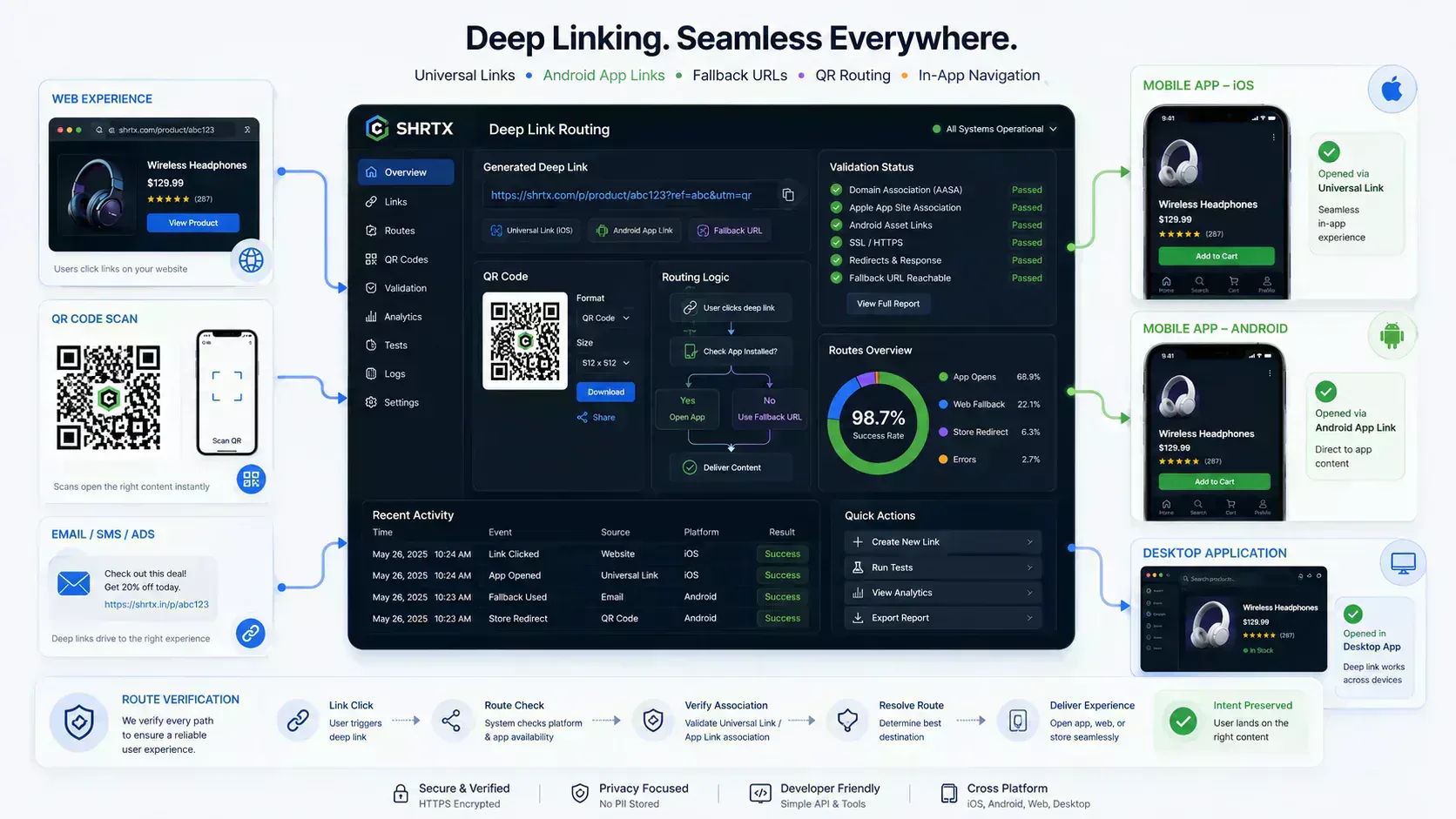
A normal web link points to a page. A deep link points to a specific place inside an app, a browser flow, or a desktop client. That small difference changes how people move between search, email, QR codes, app screens, and product workflows.
Deep linking matters because users rarely stay inside one surface. A person may discover a product in search, scan a QR code on a phone, open a message on desktop, then finish the task inside an app. Good routing keeps that path intact.
This guide explains how deep links work, where Universal Links and Android App Links fit, and why fallback planning is part of the core architecture. It also shows how a browser workflow like Deep Link Builder plus Universal Link Tester can reduce manual link mistakes before a campaign or app handoff goes live.
What a Deep Link Does
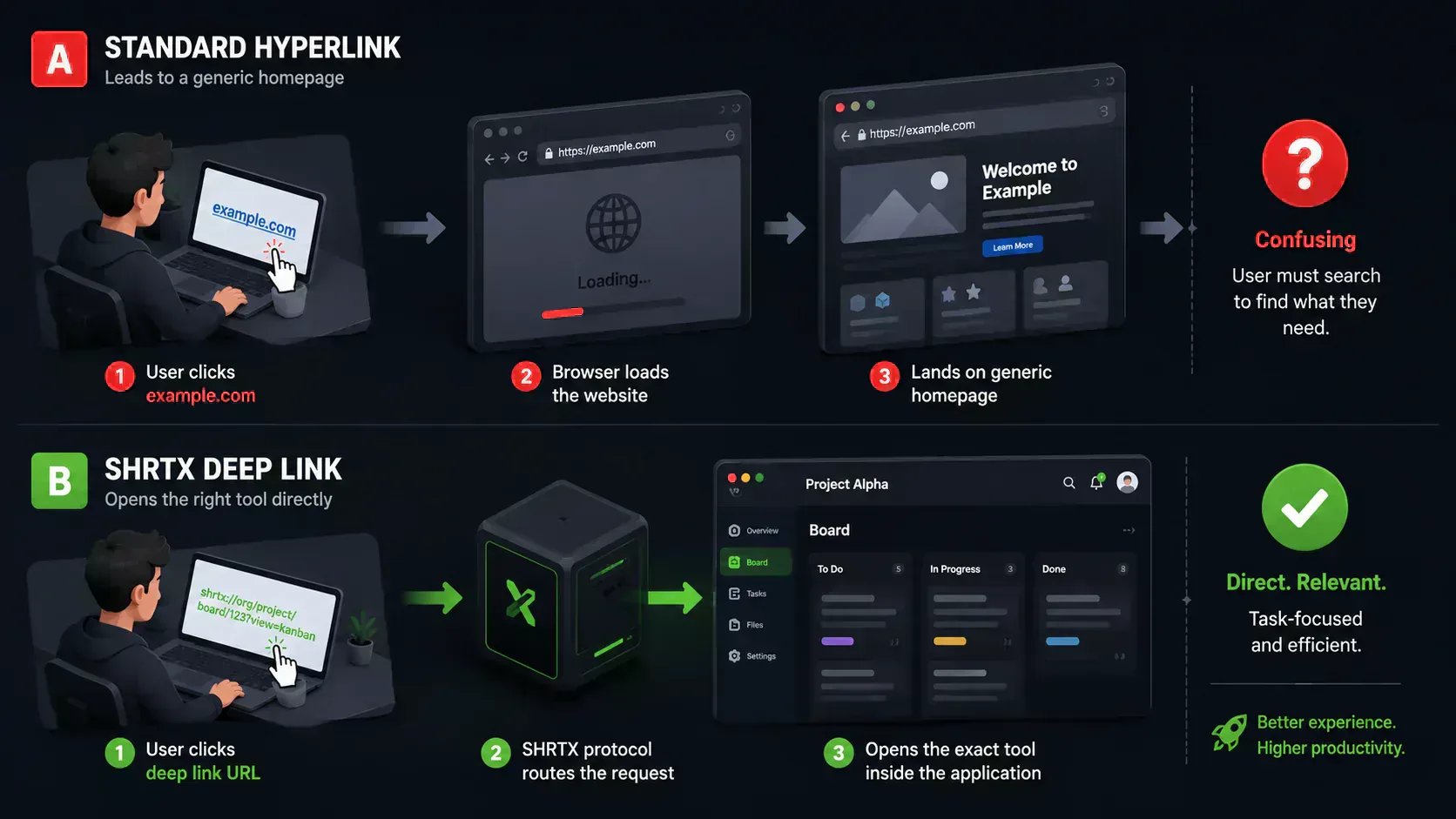
A deep link sends a user to a specific destination instead of a generic entry point. In a web site, that might be a product page. In a mobile app, it might be a cart, support chat, onboarding step, or account screen.
The goal is simple. Keep the original intent attached to the click. If the link promised a product detail screen, the user should not land on a homepage and search again.
A basic web URL might look like this:
https://example.com
A deep route carries more context:
https://example.com/products/running-shoe?utm_source=email
An app scheme can carry similar context:
shopapp://products/running-shoe?utm_source=email
The useful part is not the syntax by itself. The useful part is the routing contract between the link, the operating system, the app, and the fallback page.
Why Deep Linking Became Necessary
The web used to be the main destination for most links. Mobile apps changed that. Desktop clients, messaging apps, embedded browsers, and app stores added more layers.
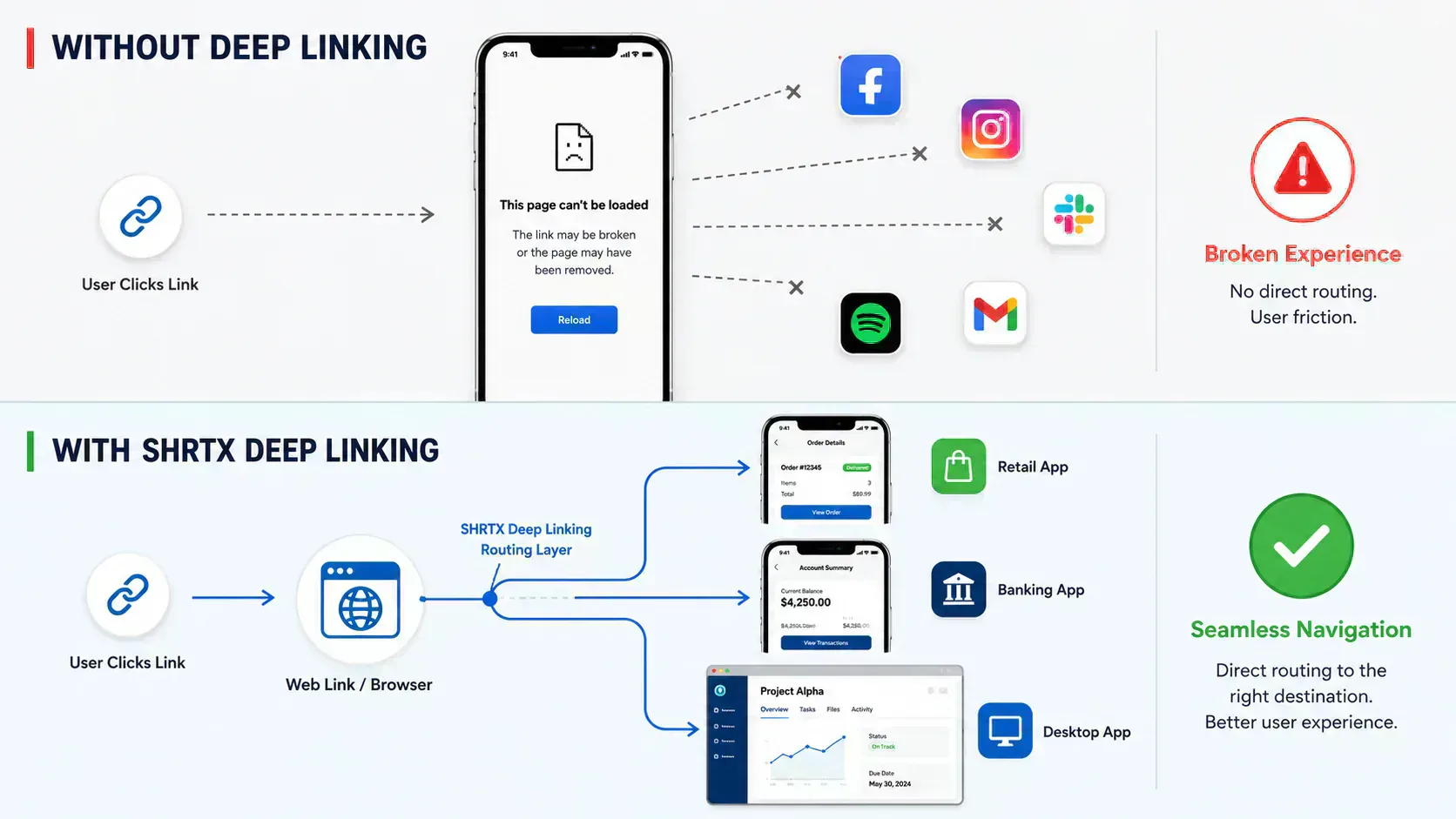
A single click now needs to answer several questions. Is the user on iPhone, Android, desktop, or tablet. Is the app installed. Is the app allowed to claim the domain. If it cannot open the app, where should the user go next.
Without deep linking, users hit rough edges. They open a browser when they expected an app. They see a store page when they expected content. They lose the product ID, referral code, or campaign context that started the route.
Deep linking fixes this by making routing explicit. The link carries destination intent, and each platform decides the best available path.
The Main Types of Deep Links
Most teams deal with three patterns. Custom URL schemes, verified web links, and desktop protocol handlers. Each pattern has a different risk profile.
A custom URL scheme uses an app-owned prefix. Examples include myapp://profile/123, spotify:track:abc, or slack://channel?id=C123. These links are easy to understand because the app name sits at the front.
Custom schemes are also fragile. There is no universal ownership check for a scheme name. Another app can register the same scheme, and users without the app may see a broken browser state.
Verified web links use normal HTTPS URLs. On iOS they are called Universal Links. On Android they are called Android App Links. The device checks whether the domain is associated with an installed app, then opens the app when the verification is valid.
Desktop protocol handlers work in a similar spirit, but the execution path is different. A desktop client may register a protocol such as myclient://. A web gateway may also use HTTPS first, then offer to open the installed app.
Deep Link Type Comparison
Different link types solve different routing problems. Use the table as a quick planning aid before choosing a format.
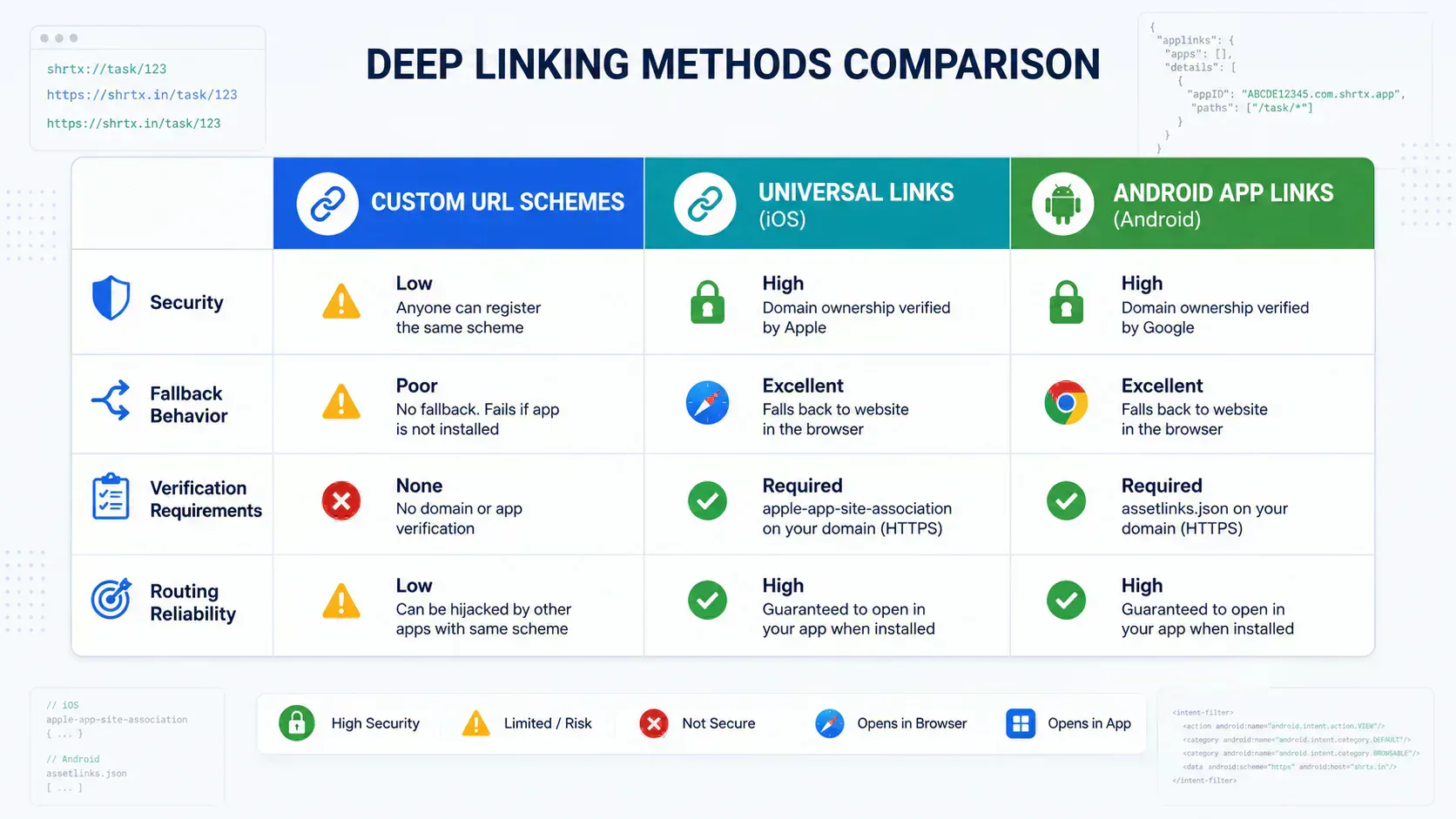
| Link type | Best fit | Risk to test |
|---|---|---|
| Custom URL scheme | Internal app routes, QA builds, controlled app environments | App missing state and duplicate scheme ownership |
| Universal Link | iOS public routes that should also work as web URLs | Associated domain setup, content type, and path rules |
| Android App Link | Android routes tied to a verified HTTPS domain | Package name drift and signing certificate mismatch |
| Android intent URL | Android flows that need package and scheme hints | Browser support, fallback behavior, and syntax mistakes |
| Desktop protocol handler | Installed desktop clients and internal productivity tools | Missing client behavior and locked-down devices |
| HTTPS fallback route | Public campaigns, QR codes, email links, and desktop users | Loss of app context if the fallback is too generic |
Custom URL Schemes
Custom schemes are the older form of app routing. An app declares that it can handle a prefix, then the operating system passes matching links to that app.
A custom app route might look like this:
shrtx://tools/url-parser?source=docs
This structure has three parts. The scheme is shrtx. The route is /tools/url-parser. The query parameter carries context for the app logic.
The appeal is speed. A custom scheme can be created without domain verification files. For internal tools, QA builds, and controlled environments, that may be enough.
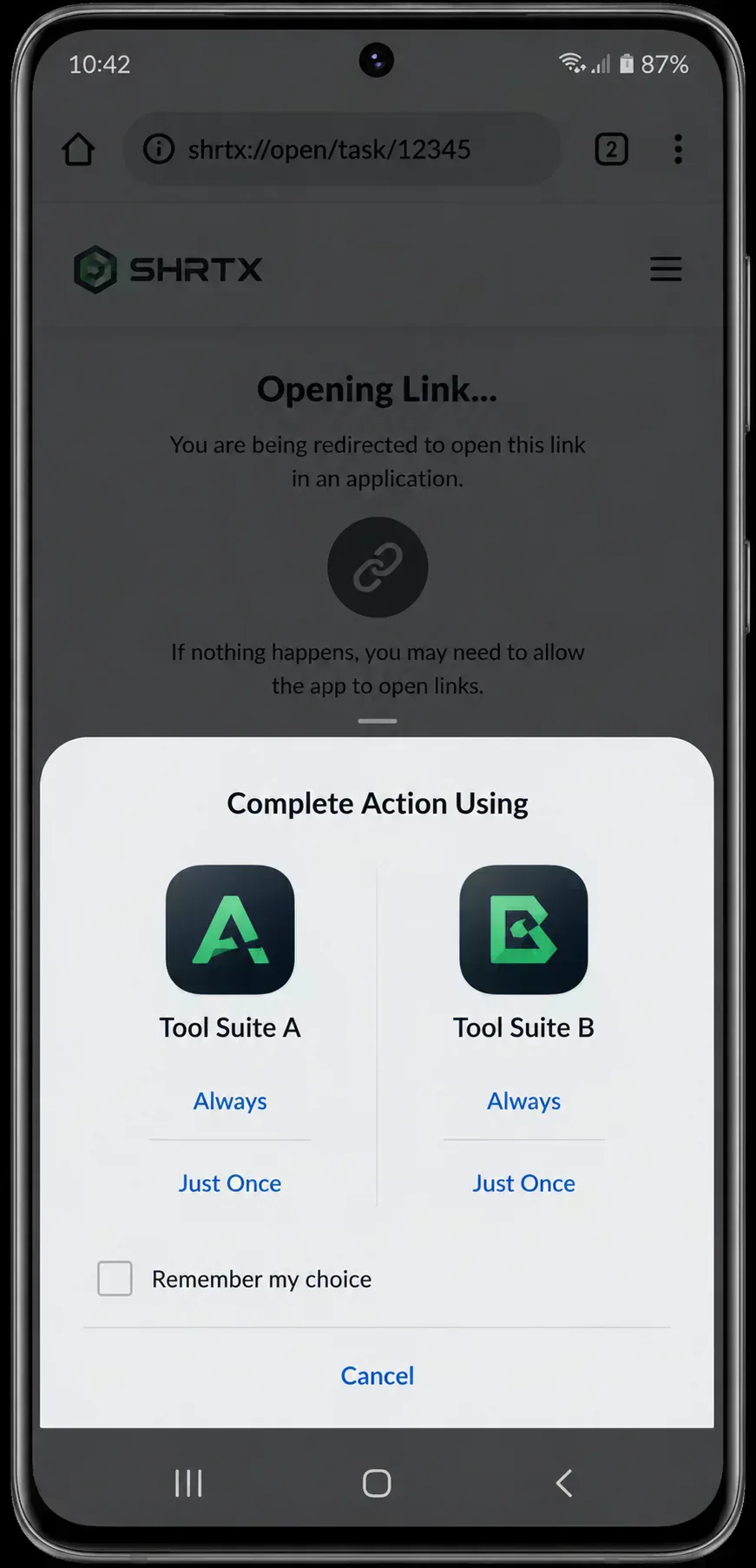
The weakness is reliability. If the app is missing, the link may fail. If two apps claim the same scheme, the operating system may ask the user to choose an app, which breaks trust in the flow.
Use custom schemes when you control the environment or need a direct app trigger. For public campaign links, verified HTTPS routes are usually safer.
Universal Links on iOS
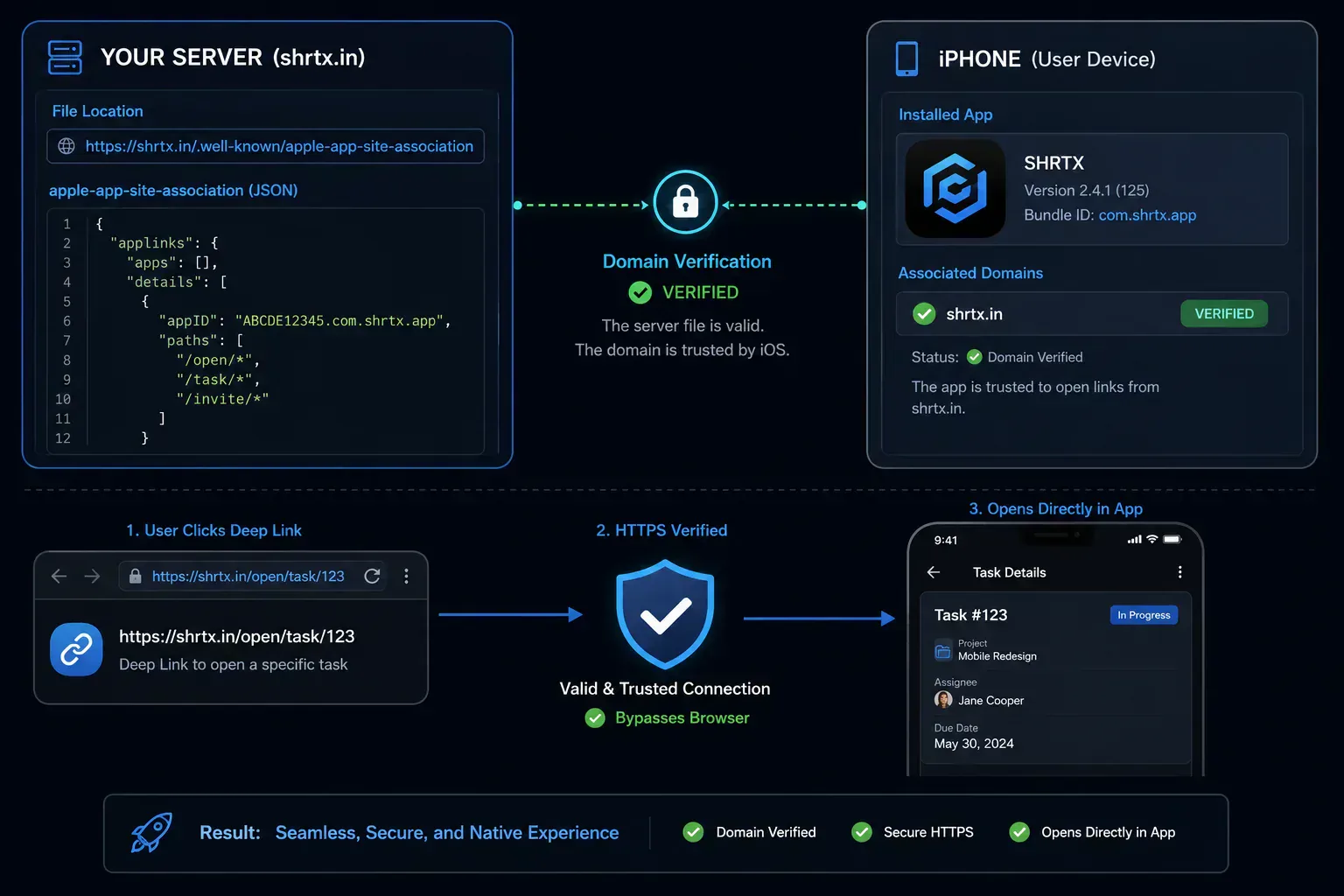
Universal Links are Apple’s verified deep link format. They use HTTPS URLs, but they can open an app when the domain and app are associated.
A Universal Link looks like a normal web route:
https://app.example.com/products/123
The app must declare an associated domain in Xcode. The web domain must host an Apple App Site Association file at a known path. iOS checks that relationship before it trusts the app to open the link.
The association file is commonly served from this location:
https://app.example.com/.well-known/apple-app-site-association
The file has no JSON extension, but it should be served as JSON. That detail trips up many teams during launch checks.
A simplified file can look like this:
{
  "applinks": {
    "apps": [],
    "details": [
      {
        "appID": "TEAMID.com.example.app",
        "paths": ["/products/*", "/account/*"]
      }
    ]
  }
}
Once this is valid, iOS can open supported routes inside the app. If the app is not installed, the same URL opens in Safari or another web context.
That fallback behavior is the main reason Universal Links work well for public routes. They remain useful even when app launch does not happen.
Android App Links
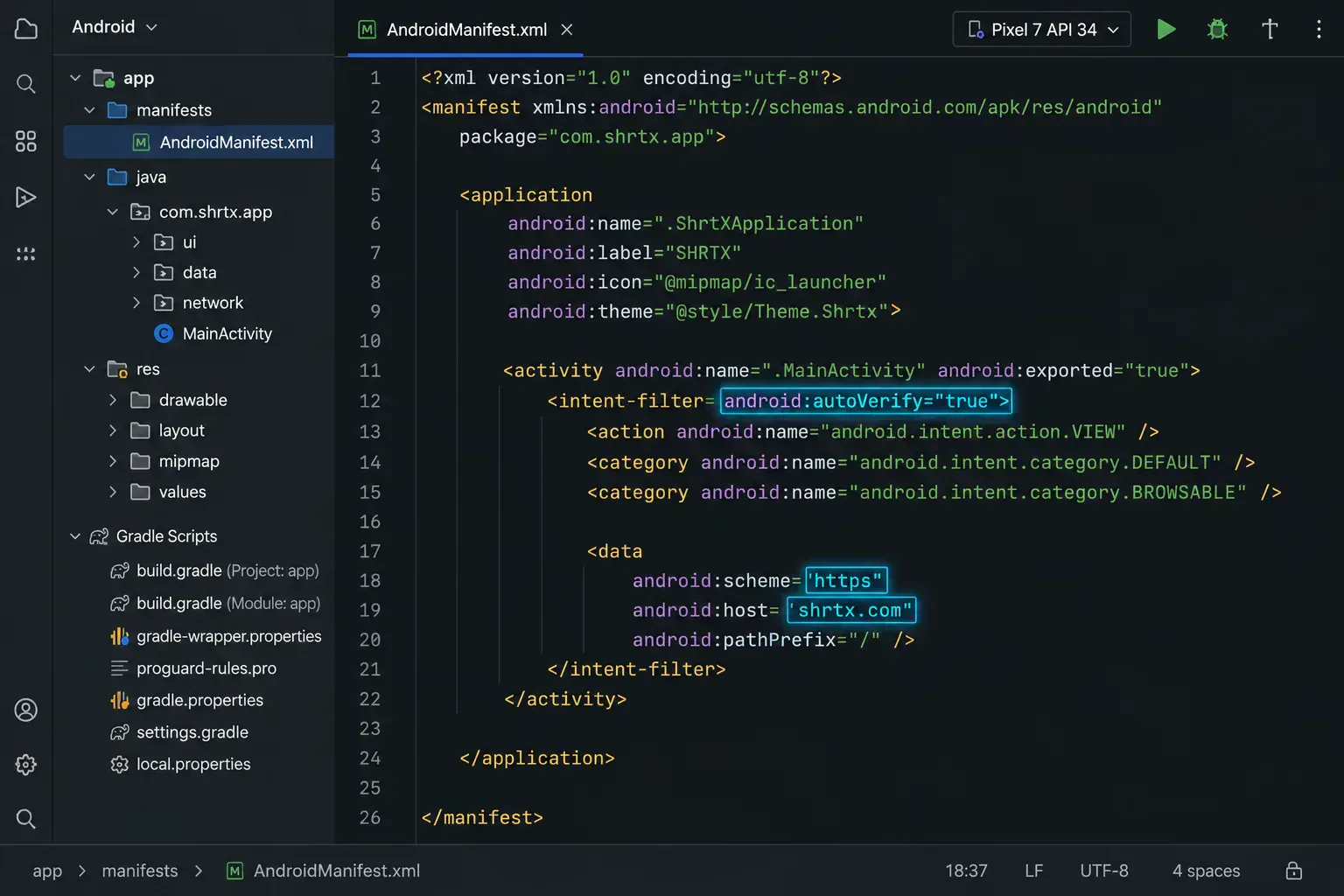
Android App Links follow the same broad idea. The URL is HTTPS, the domain proves app ownership, and the device can route verified links into the app.
An Android App Link might use this form:
https://app.example.com/products/123
The Android app declares intent filters in AndroidManifest XML. The web domain hosts assetlinks.json under the well-known path.
The file normally lives here:
https://app.example.com/.well-known/assetlinks.json
A simplified assetlinks.json file can look like this:
[
  {
    "relation": ["delegate_permission/common.handle_all_urls"],
    "target": {
      "namespace": "android_app",
      "package_name": "com.example.app",
      "sha256_cert_fingerprints": ["AA:BB:CC:DD:EE"]
    }
  }
]
The package name and signing certificate fingerprint must match the installed app. If the values drift across debug, staging, and production builds, verification can fail.
Android also supports intent URLs. They are useful when a route needs package and scheme hints inside the link.
intent://products/123/ with scheme myapp and package com.example.app
Intent URLs are strong, but they need care. Use them when you understand the Android behavior and have tested the fallback path.
Desktop App Links and Protocol Handlers
Deep linking is not limited to phones. Desktop apps often use protocol handlers to open a local client from a browser, email, or internal dashboard.
A desktop route may use a custom protocol:
notesapp://workspace/alpha/page/42
The operating system checks whether an installed app can handle the protocol. If the handler exists, the app receives the route payload. If not, the link can fail unless an HTTPS gateway handles the click first.
A safer desktop pattern starts with a web URL:
https://app.example.com/open/workspace/alpha/page/42
The web page can detect the environment and offer choices. Open the desktop app, continue in the browser, or download the client. This adds one step, but it protects users who do not have the app installed.
Desktop protocol handlers need the same discipline as mobile schemes. Avoid assuming the app exists. Keep a clear browser path for users on locked-down devices or shared machines.
Direct Deep Links and Deferred Deep Links
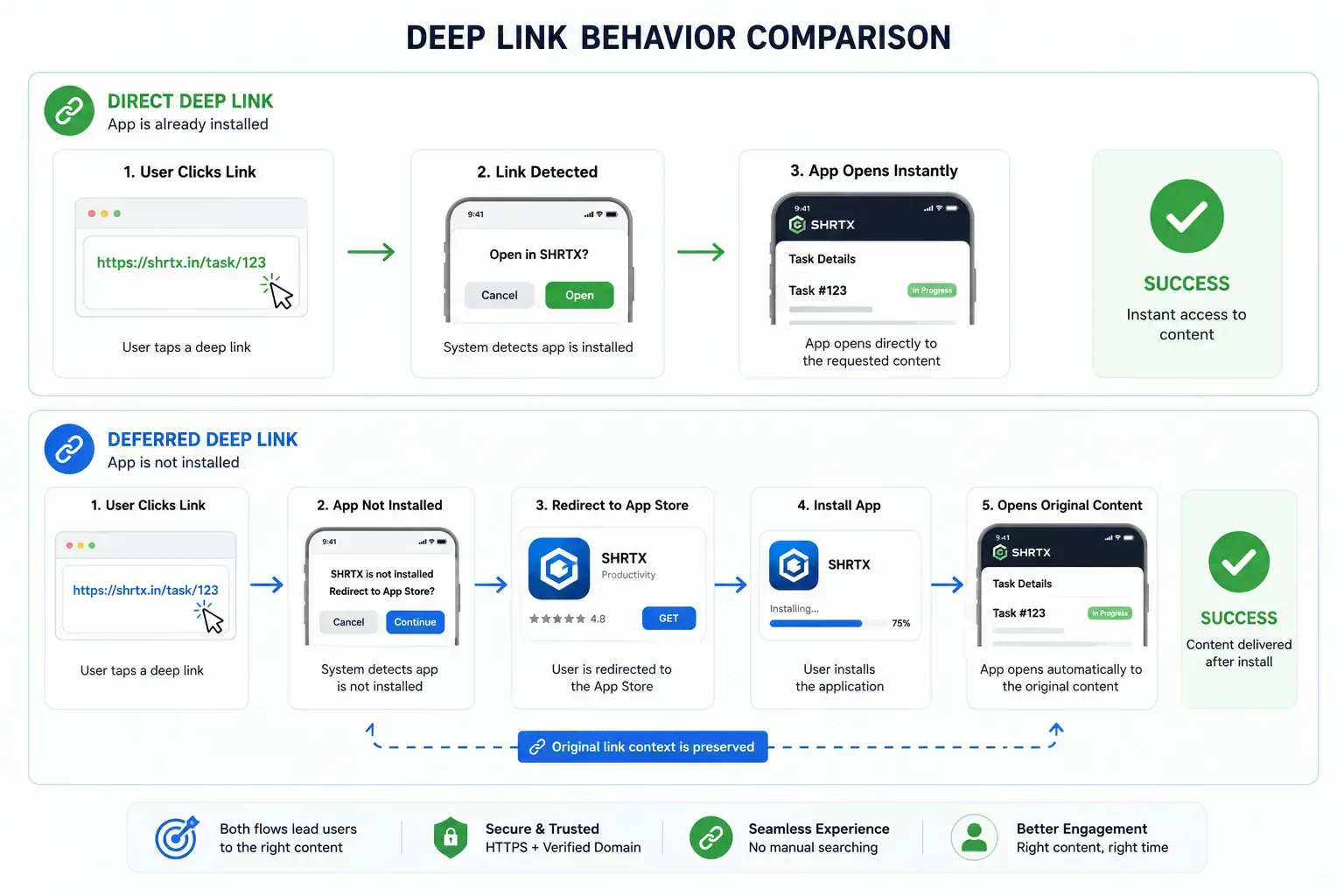
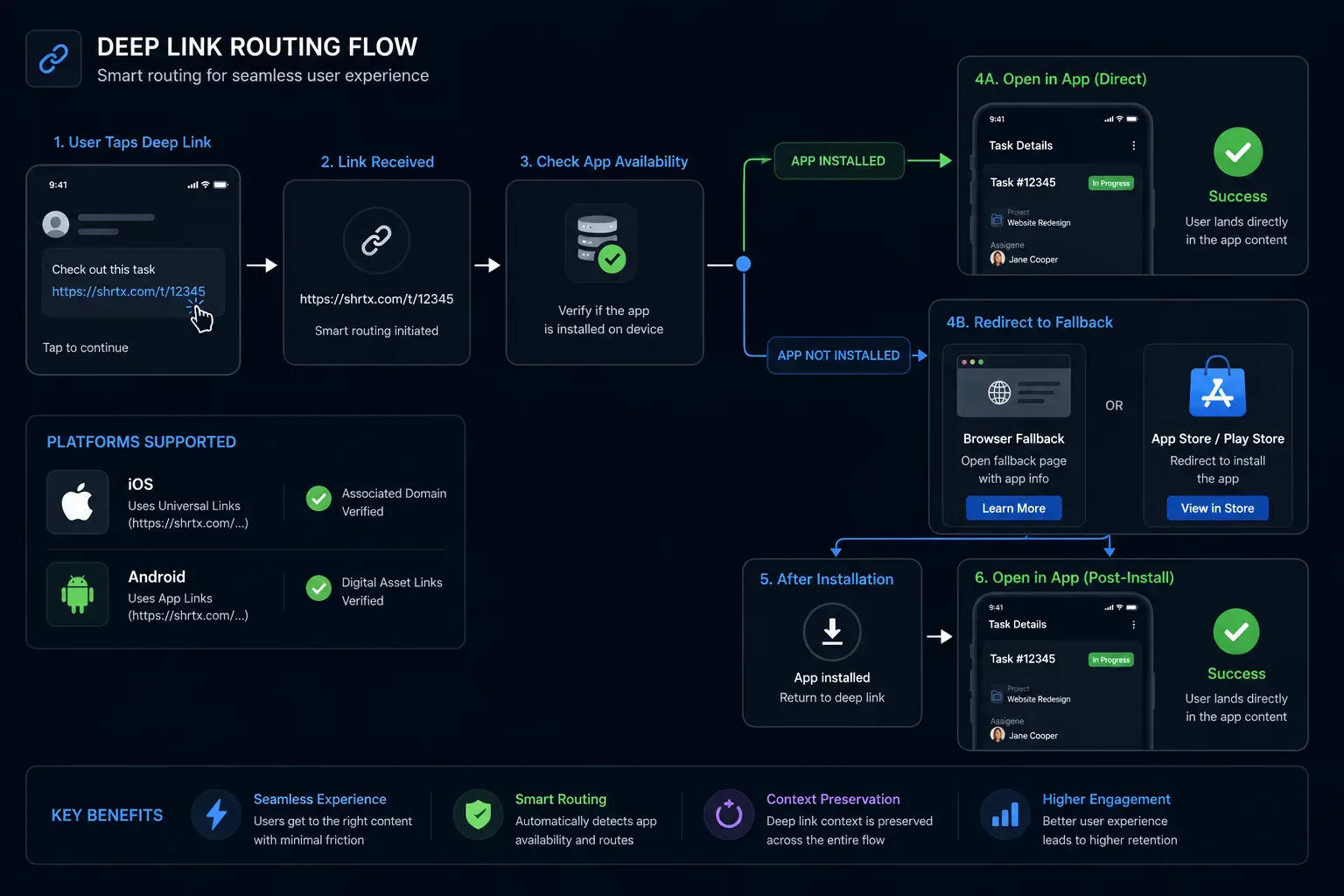
A direct deep link works when the app is already installed. The click reaches the operating system, the operating system finds the app, and the app opens the target route.
That is the simple case. Many acquisition flows start with a user who does not have the app yet. Direct routing cannot finish the job by itself.
Deferred deep linking preserves route intent through install. The user clicks a link, gets sent to an app store, installs the app, then lands on the intended screen after first launch.
A deferred flow usually looks like this:
- The user clicks a campaign link
- The system detects that the app is missing
- The user goes to the store or a web fallback
- The app opens after install
- The original destination is restored inside the app
The hard part is matching the post-install open to the original click. Some teams use attribution providers. Others use first-party tokens, signed links, or account state after login.
The important rule is this. Do not promise deferred behavior unless you have tested the full install path on real devices.
Fallback URLs Are Part of the Product
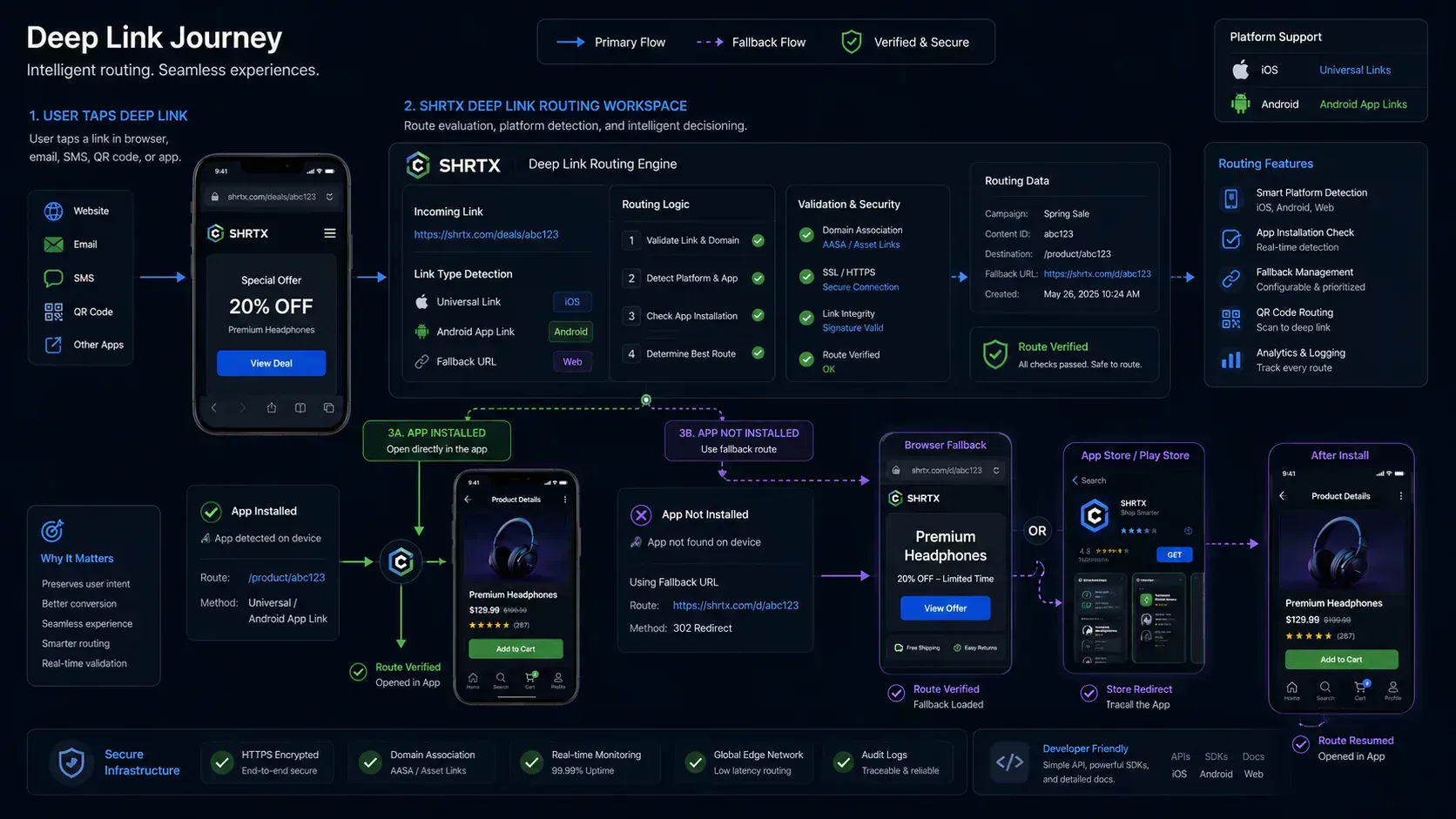
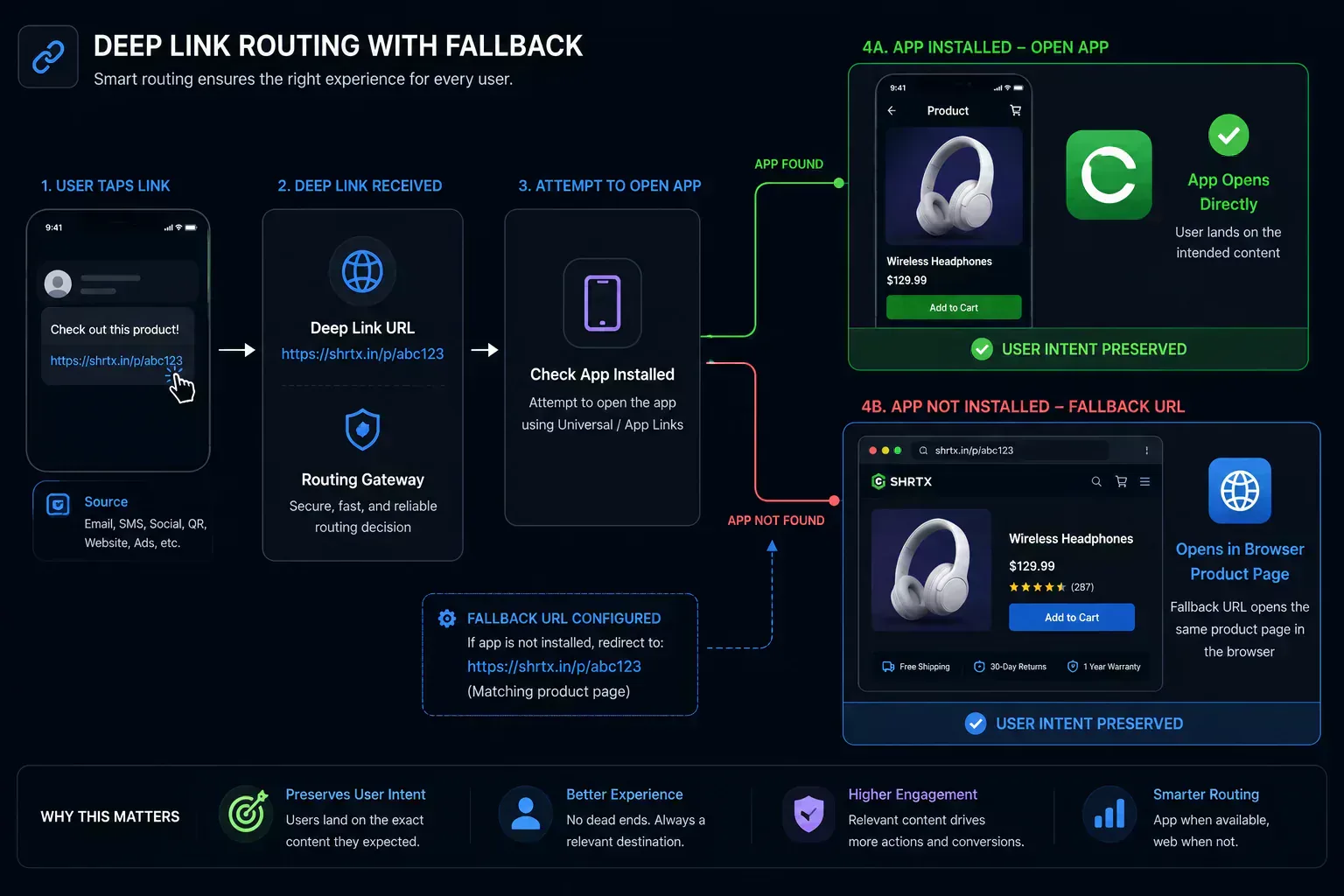
A fallback URL is not a backup detail. It is part of the user path.
If the app cannot open, the fallback should still satisfy the click intent. A product link should fall back to the product web page. A support chat link should fall back to a support page or contact route.
Bad fallback choices are common. Teams send every failed app open to a homepage, store page, or generic download page. That loses context and makes the link feel broken.
A better fallback plan maps each route type to a useful web destination. Product routes go to product pages. Account routes go to login with a return path. Campaign routes keep UTM values intact.
Generate the route inside Deep Link Builder, then inspect it with Universal Link Tester. The builder sets the fallback URL and route simulation. The tester breaks down scheme, host, path, query parameters, Android intent metadata, and fallback readiness before manual device QA.
QR Codes Change the Testing Pattern
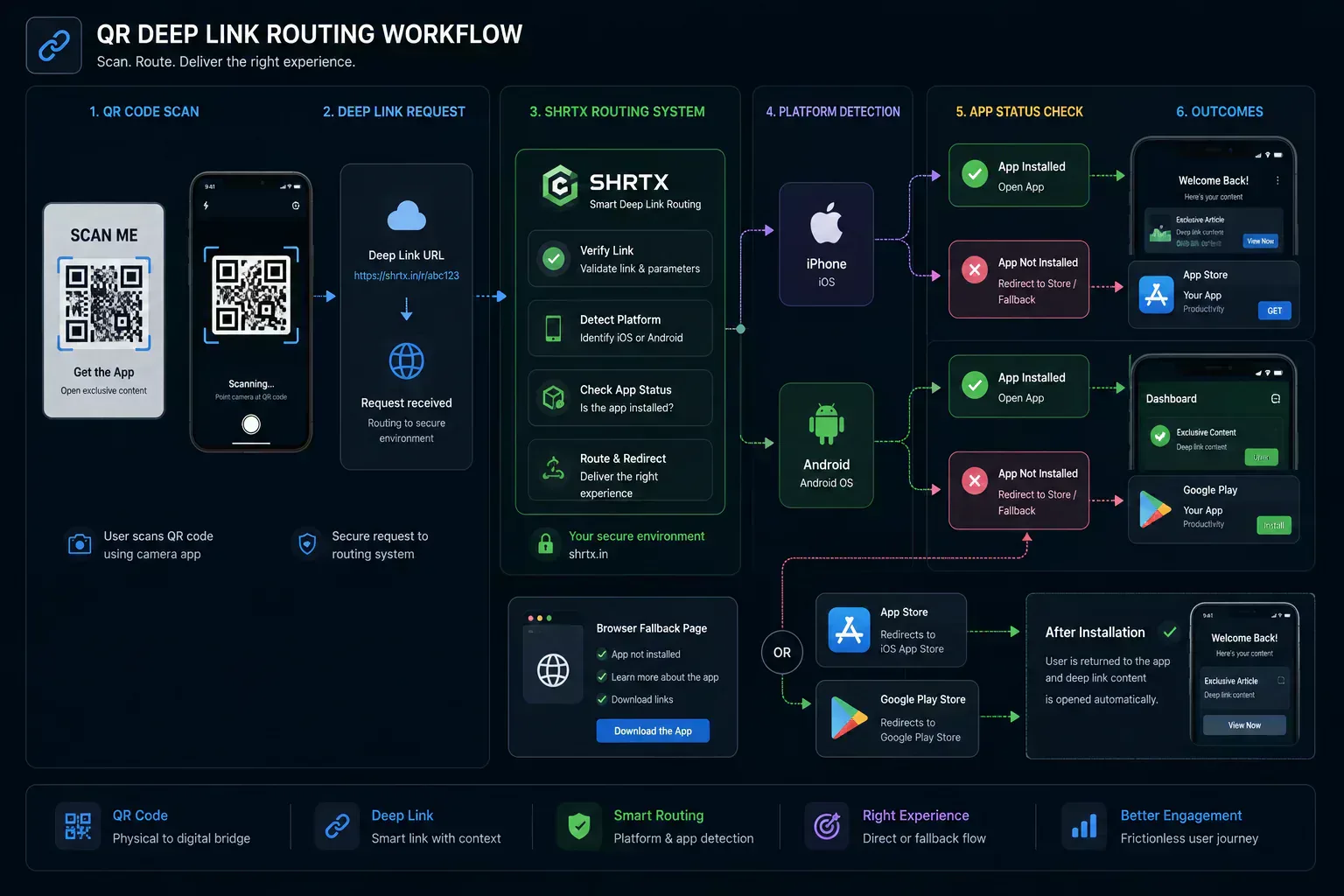
QR codes make deep links easier to test on real phones. They also make broken routing easier to ship if nobody checks the scanned result.
A QR code should point to the same route you plan to distribute. If the QR code wraps a tracking redirect, test the final behavior through the whole chain. Some tracking systems rewrite URLs in ways that interfere with verified app links.
For mobile campaigns, QR testing should include at least four states:
- iPhone with the app installed
- iPhone without the app installed
- Android with the app installed
- Android without the app installed
Also test a desktop scan path if the code may appear in email or on a web page. Many people scan from a laptop screen, but others click the linked image directly.
The QR workflow in Deep Link Builder and Universal Link Tester is useful for this reason. Generate the route, pass it into the tester, then scan the tested link so teams are not testing an outdated copied string.
Copy Ready Deep Link Examples
Examples make route planning easier because each format carries a different kind of intent. Keep these patterns in a route catalog when product, marketing, and QA teams share ownership.
WhatsApp support or sales chat:
https://wa.me/919876543210?text=Hello
Telegram username route:
tg://resolve?domain=shrtx
Slack channel route:
slack://channel?id=C01234567&team=T01234567
Spotify track route:
spotify:track:4cOdK2wGLETKBW3PvgPWqT
YouTube app route:
youtube://www.youtube.com/watch?v=dQw4w9WgXcQ
Verified web route for app links:
https://app.example.com/products/123?utm_source=email
What Good Deep Link Architecture Looks Like
Good routing starts with path parity. The web route and app route should describe the same destination when possible.
For example, this web path is easy to reason about:
/products/123
The app route can use the same concept:
myapp://products/123
This reduces translation code. It also makes support and QA easier because everyone can talk about the same route.
The second rule is parameter discipline. Avoid stuffing links with unused values. Keep product IDs, campaign names, and return paths stable.
The third rule is ownership. Decide who owns the route contract. Product, engineering, marketing, and QA may all touch deep links, but one team needs to keep the route map current.
Common Mistakes to Avoid
The most common mistake is treating deep links as strings. They are not just strings. They are contracts across browsers, apps, operating systems, and fallback pages.
Another mistake is skipping real device tests. Emulators are useful, but platform verification, install state, browser choice, and store routing can behave differently on actual devices.
Teams also forget certificate drift. Android App Links depend on signing fingerprints. If release keys change and assetlinks.json does not, app routing can stop working.
On iOS, teams often misconfigure the Apple App Site Association file. Wrong content type, wrong app ID, invalid paths, or blocked redirects can break Universal Links.
Marketing click tracking can cause another problem. If an email tool rewrites the URL through a tracking domain, iOS and Android may no longer see the verified app domain first.
A Practical Launch Checklist
Use a simple checklist before any public deep link goes live.
- Confirm the route opens the right web page
- Confirm the app route opens the right screen
- Confirm fallback behavior when the app is missing
- Confirm UTM values survive the route
- Confirm QR scans open the expected target
- Confirm iOS Universal Link verification
- Confirm Android App Link verification
- Confirm desktop behavior from email and browser clicks
This checklist catches the problems that hurt campaigns most often. It also keeps teams from relying on a single happy-path test.
If you maintain many links, keep examples in a shared route catalog. Include the purpose, owner, app route, fallback route, and test status.
How SHRTX Fits the Workflow
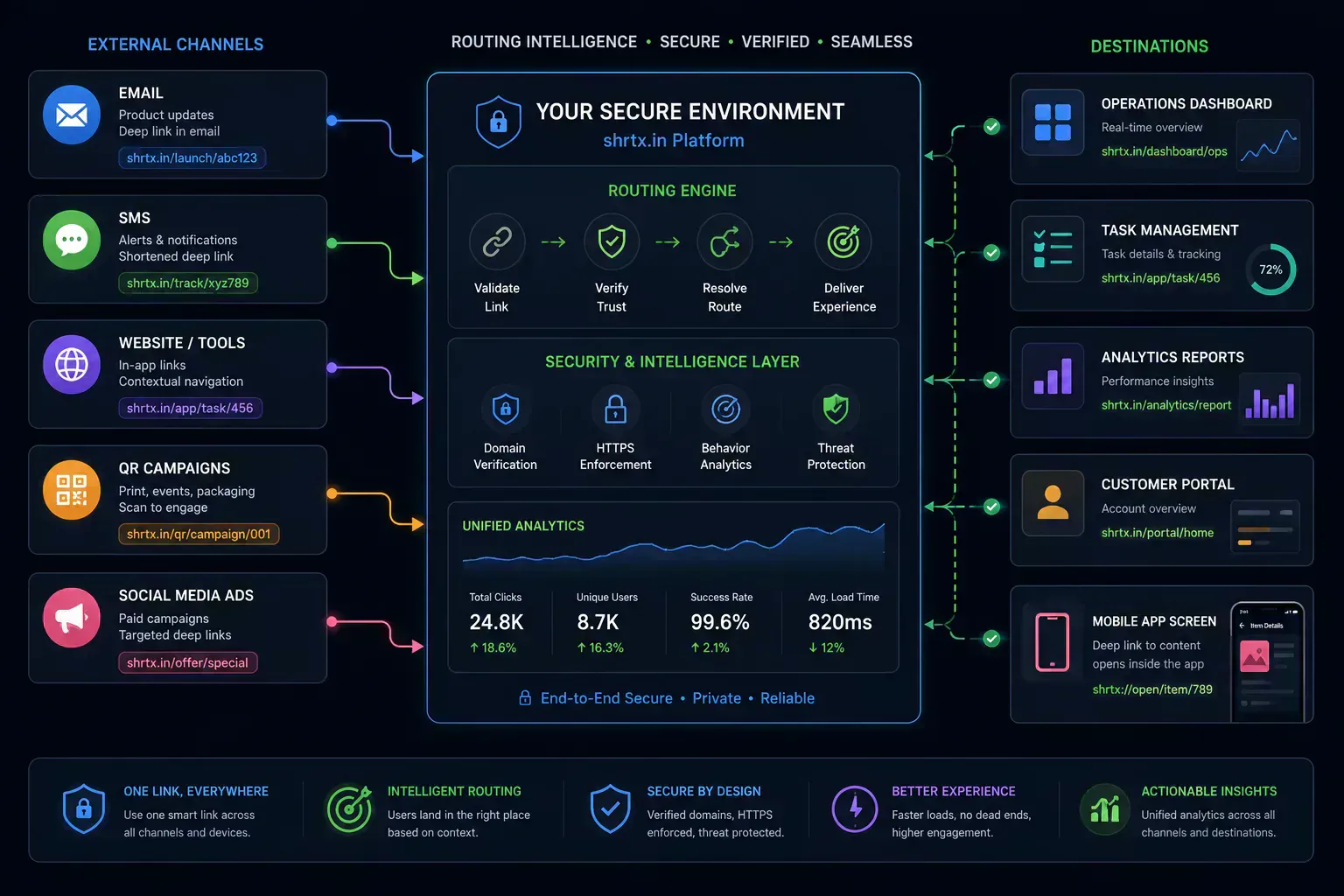
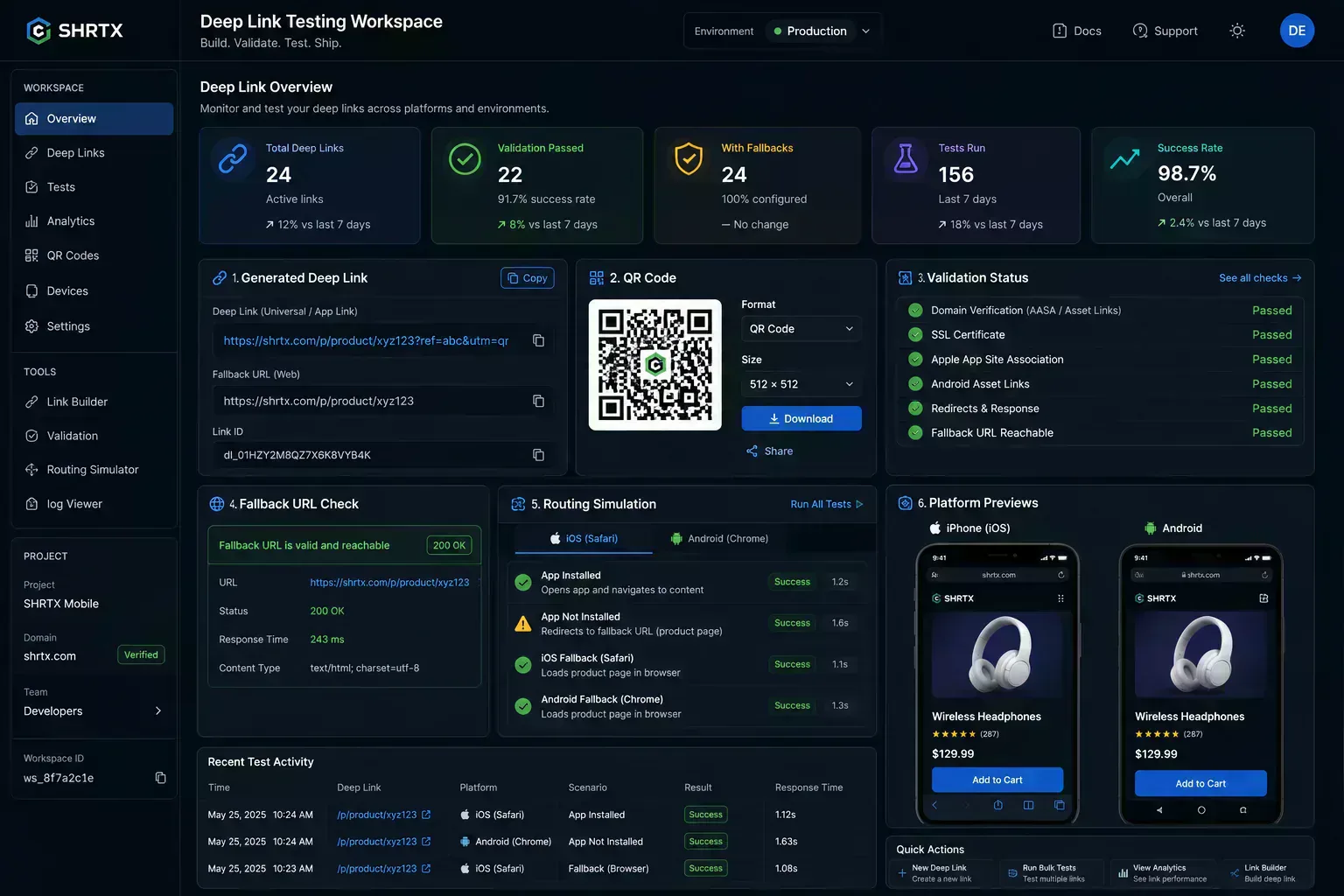
SHRTX treats deep linking as a browser workflow first. A user can generate app routes, add fallback URLs, review parameters, scan a QR code, and inspect route behavior without creating an account.
That is useful for early testing. It is also useful during handoff because the final link is visible, copy-ready, and easy to compare against the planned route.
The related tools matter too. Use Deep Link Builder to generate the route and Universal Link Tester to inspect it, just like generating a PGP key and then auditing it with a viewer. Use URL Encoder when route segments need safe encoding. Use UTM Builder when campaign parameters need clean names. Use Redirect Chain Tracer when a fallback page passes through tracking links.
Deep linking works best when every route is treated as a product path. The link is the entry point, but the full experience includes app state, browser fallback, QR testing, and ownership.
Lightweight Workflow vs Full Attribution Stack
Deep link tooling does not always need to start with an SDK, dashboard, or measurement program. Many teams first need to shape a route, add a fallback, scan a QR code, and confirm the behavior on real devices.
A lightweight browser workflow is useful during planning and QA. It keeps the generated URL visible, makes mistakes easier to spot, and gives non-engineering teammates a safer way to review links before release.
A full attribution stack has a different job. It handles paid measurement, install attribution, cohorts, and long-running campaign reporting. That is valuable when the tracking program is ready, but it can be heavy for early route design.
A practical team can use both layers. Use the browser workflow to create and test the route contract first. Add measurement once the route, fallback, QR scan, and app behavior are already correct.
Final Takeaway
Deep links connect the web to app surfaces, but the real work is route planning. Verified domains, app manifests, fallback URLs, QR scans, and deferred behavior all need to line up.
A good deep link should preserve intent. It should open the app when possible, fall back cleanly when needed, and keep enough context for the user to finish the task.
That is why deep linking belongs in the same workflow as URL cleanup, QR testing, redirect checks, and campaign review. When those pieces are tested together, links stop being fragile handoffs and become dependable paths through the product.
Tools Referenced By Topic
Universal Link Tester
Validate Universal Links, Android App Links, intent URLs, custom URI schemes, fallback URLs, and app routing behavior locally in your browser.
Deep Link Builder
Generate deep links for apps, Universal Links, Android intent URLs, and mobile routing with fallback URLs and custom parameters.
HTTP Status Reference
Quickly find meanings and RFC specifications for any HTTP response status code.
Related Reading
May 25, 2026 • 12 min
How to Check File Size Before Uploading Files Online
Learn how to check file size before uploading files to email platforms, CMS systems, cloud storage, APIs, and messaging apps. Explore browser-native payload analysis, upload compatibility checks, transfer estimates, and file optimization workflows with SHRTX.
May 17, 2026 • 14 min
WebP Optimization and Modern Image Delivery Guide
Learn WebP workflows for faster sites with local processing, visual checks, responsive delivery, and Core Web Vitals guidance.
May 25, 2026 • 19 min
Modern Bento Grid Layouts for SaaS Dashboards and AI Interfaces
Learn how modern SaaS products, AI interfaces, and analytics dashboards use Bento Grid systems to create modular responsive layouts. Explore frontend workflow strategies, Tailwind composition techniques, and browser-native Bento planning with SHRTX.