
Guides
Designing Glitch Art with Browser-Native Image Workflows
Learn databending, JPEG and PNG corruption behavior, pixel-sorting pipelines, and browser-local rendering workflows for glitch art.
Designing Glitch Art with Browser-Native Image Workflows
Learn databending, JPEG and PNG corruption behavior, pixel-sorting pipelines, and browser-local rendering workflows for glitch art.
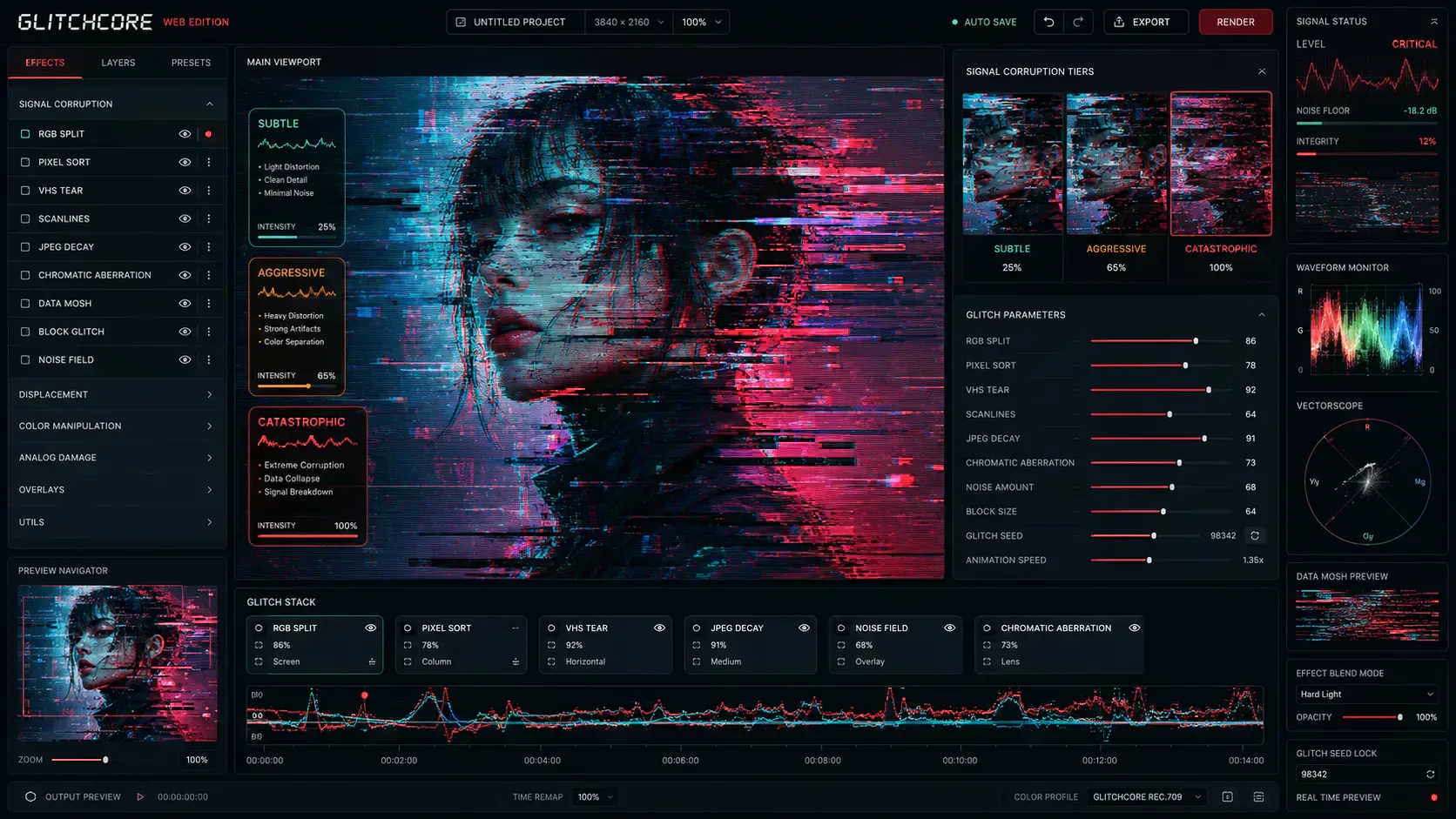
Glitch art usually starts with a normal image that needs controlled visual distortion. The workflow may be an album cover, a stream overlay, an editorial graphic, or a web asset that needs motion-era texture without becoming unreadable.
The engineering problem is practical. Distortion has to be repeatable, previewable, exportable, and light enough for production use. Browser-native tools such as Image Glitcher make that possible by decoding media locally, applying Canvas-based transforms, and exporting standard image files without requiring a remote processing step.
How Glitch Art Uses Controlled Failure
Glitch art uses digital or analog errors as visual material. The source may be file corruption, signal interference, compression artifacts, pixel sorting, channel offsets, or hardware distortion.
The roots of the movement run deep through 20th-century avant-garde and media arts:
- Analog Interference (1960s): In 1965, video artist Nam June Paik created TV Magnet, placing powerful magnets near television screens to distort broadcast signals into shifting abstract patterns, demonstrating that television was a physical medium open to corruption.
- Hardware Bending (1970s): In 1978, Jamie Fenton and Raul Zaritsky created Digital TV Dinner, an early glitch video made by physically striking a Bally video game console to interrupt its system memory during active write loops.
- Net.art and Beyond (1990s): By the mid-1990s, the art collective JODI intentionally induced layout errors on their websites to display raw code blocks, laying the groundwork for modern data corruption methodologies.
Today, those techniques appear in digital illustration, typography, music artwork, streaming graphics, and interface experiments. The production constraint is consistent across those uses: the final asset still needs to load, render, and export predictably.
Databending: The Core Science of Image Corruption
The most common technique inside modern digital glitch workflows is databending, the process of altering information inside a digital file to produce visual distortion. To understand how an Image Glitcher operates, you have to understand a fundamental reality of digital files: every image is just an organized sequence of bytes.
If you open a standard image like a JPEG or a PNG inside a text or hex editor, it appears as structured binary data. Databending targets parts of that structure. Different file formats react differently because their compression models, headers, filters, and pixel payloads are organized in different ways.
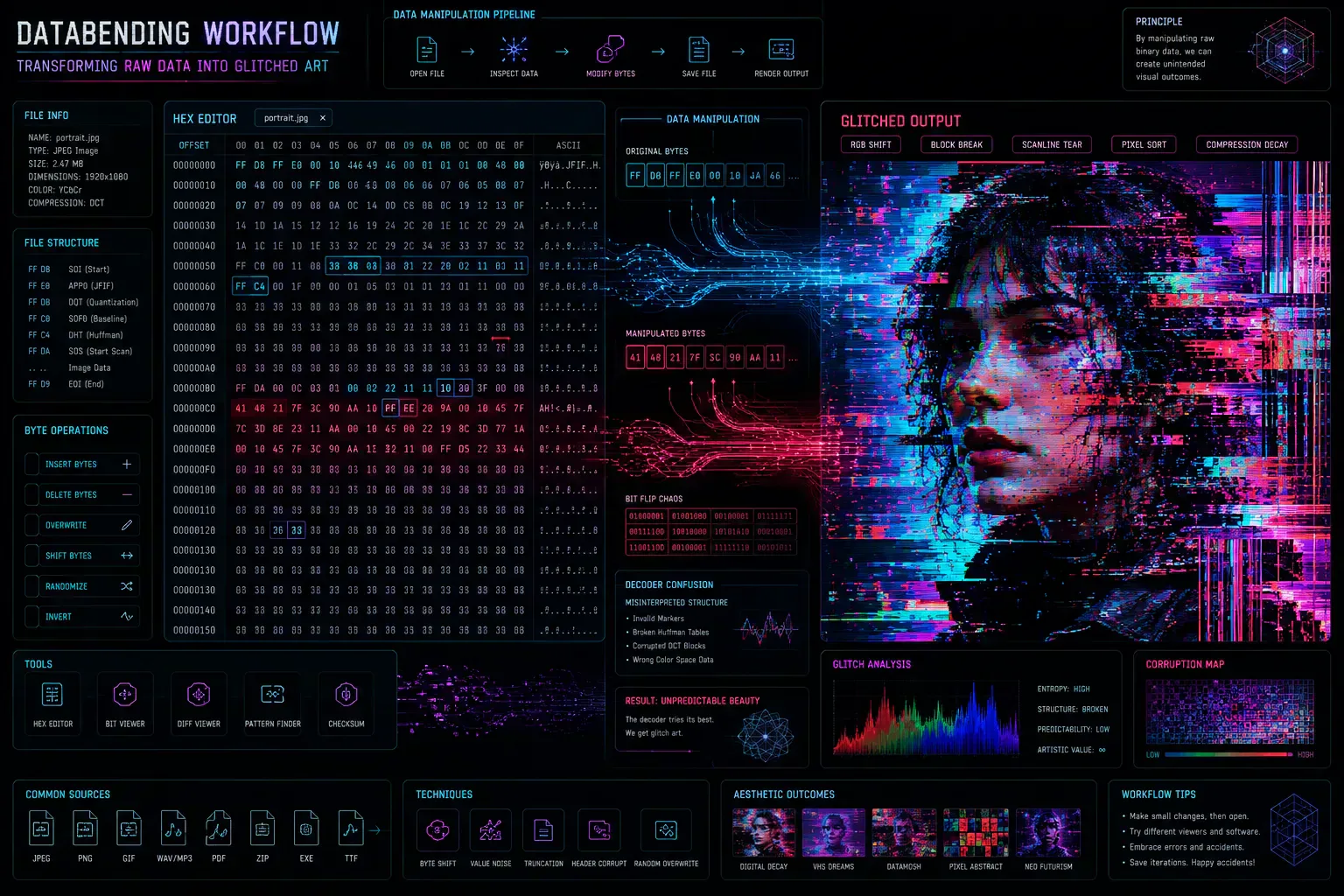
1. JPEG Corruption: The Blocks and Channels of the Frequency Domain
JPEGs compress data in the frequency domain using a Discrete Cosine Transform (DCT). They break an image down into tiny $8 \times 8$ pixel grids and separate luminance (brightness) from chrominance (color channels).
When a glitch utility modifies data inside a JPEG bitstream, the distortion manifests as jagged, misaligned rows, harsh color shifts, or completely scrambled color channels. This occurs because the decoding engine loses its position within the file's data stream, throwing all subsequent pixel blocks off-kilter.
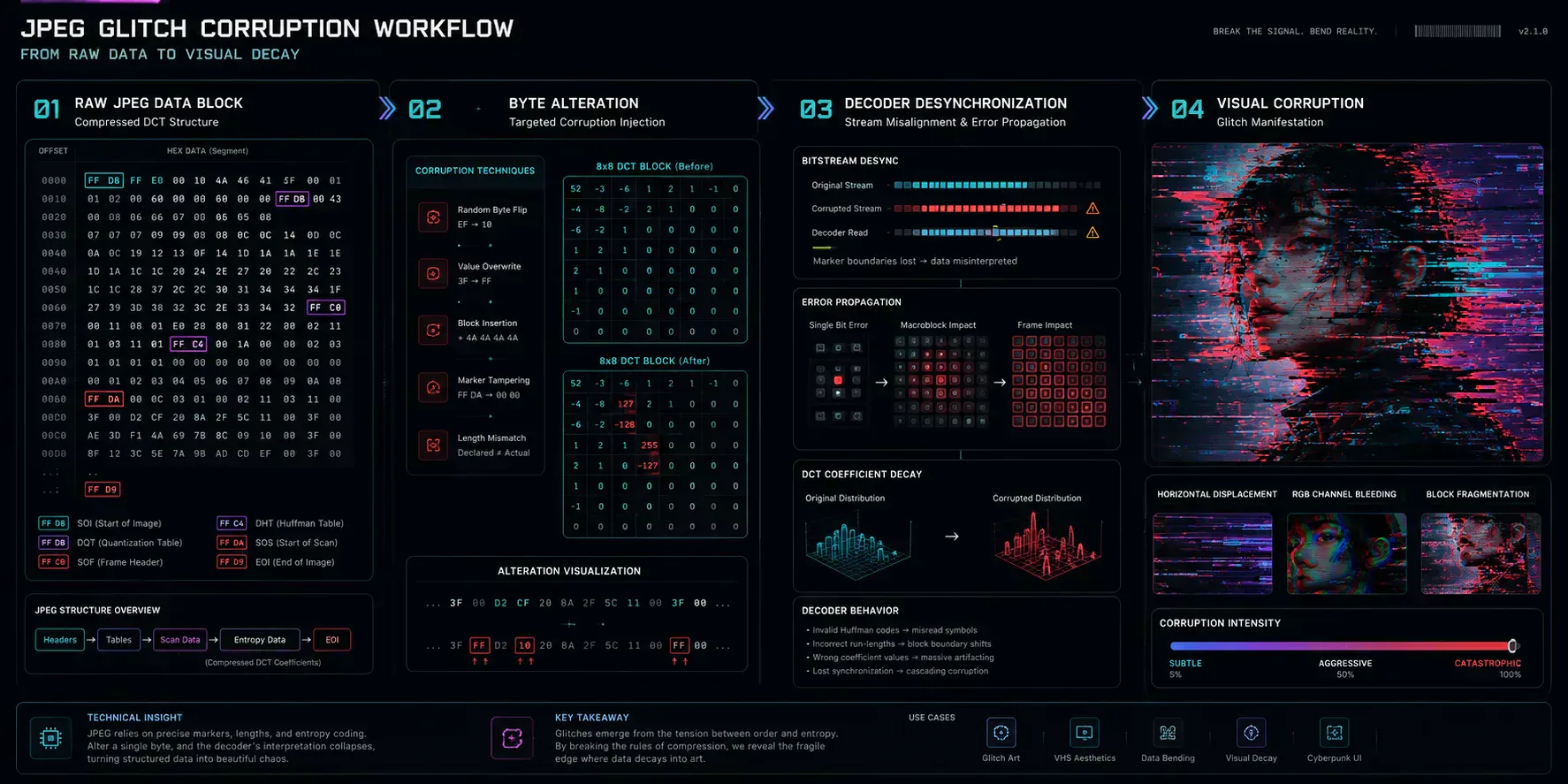
graph TD
    A[Raw JPEG Data Block] --> B{Surgical Byte Alteration}
    B -->|Corrupt Metadata/Headers| C[Decoder Crash / Unreadable File]
    B -->|Corrupt Pixel Payload| D[Decoder Losing Spatial Context]
    D --> E[Discrete Cosine Transform Out of Sync]
    E --> F[Jagged Horizontal Shift & Bleeding Color Channels]
Furthermore, JPEGs rely on specialized segment markers. An advanced tool, like the Image Format Inspector or the Image Metadata Viewer, simplifies analyzing structural headers and extracting EXIF profiles. This ensures safe byte manipulation without completely breaking the file metadata container structure.
2. PNG Corruption: Exposing the Mechanisms of Pre-Filtering
While JPEG glitches often result in blocky shifts, PNG databending experiments create geometric bands, smears, and repeating rectangular cascades. This behavior comes from PNG's layered compression layout.
Before a PNG compresses raw pixel lines, it applies an architectural step called pre-filtering to make the image data more compressible. The encoder translates each pixel into a relative change vector (a delta value) based on the pixels in the rows and columns directly preceding it. PNG defines five primary line filter models:
- Sub Filter: Computes a delta based on the pixel immediately to the left in the same row, which can create horizontal lines when glitched.
- Up Filter: Computes a delta based on the pixel directly above in the previous row, which can generate vertical strips of distortion.
- Average Filter: Takes the average value of the left and above pixels. Glitching this space can create soft color smears that move across the canvas.
- Paeth Filter: Evaluates a three-way matrix with left, above, and top-left pixels to map the delta. Corrupting this routine can produce rectangular disturbances.
- Null Filter: Passes raw data forward with zero alteration.
When a script or automated workstation alters bytes across these distinct filter arrays, it creates an echo chamber effect. This causes color modifications to cascade geometrically across the rest of the file layout.
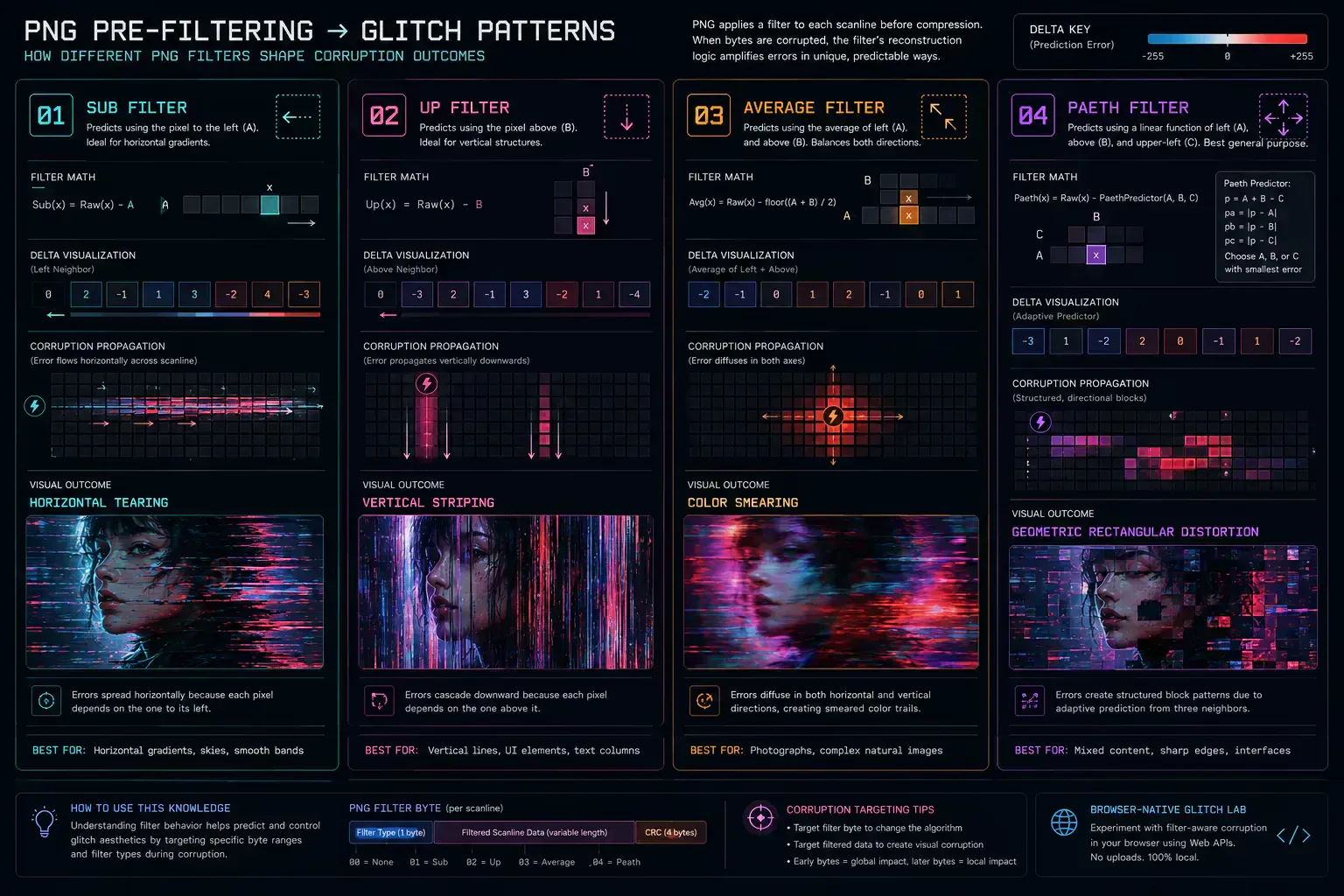
graph LR
    A[Corrupt Byte Input] --> B[Target Filter Selected]
    B -->|Sub Filter| C[Horizontal Shift Cascades Left-to-Right]
    B -->|Up Filter| D[Vertical Strips Cascade Top-to-Bottom]
    B -->|Average Filter| E[Bleeding Smears Diffusing Across Grid]
    B -->|Paeth Filter| F[Complex Rectangular Noise Distortions]
The Visual Corruption Taxonomy
Selecting the right technique requires comparing file behavior, visual output, and export cost. The table below keeps the choice tied to production use rather than style labels alone.
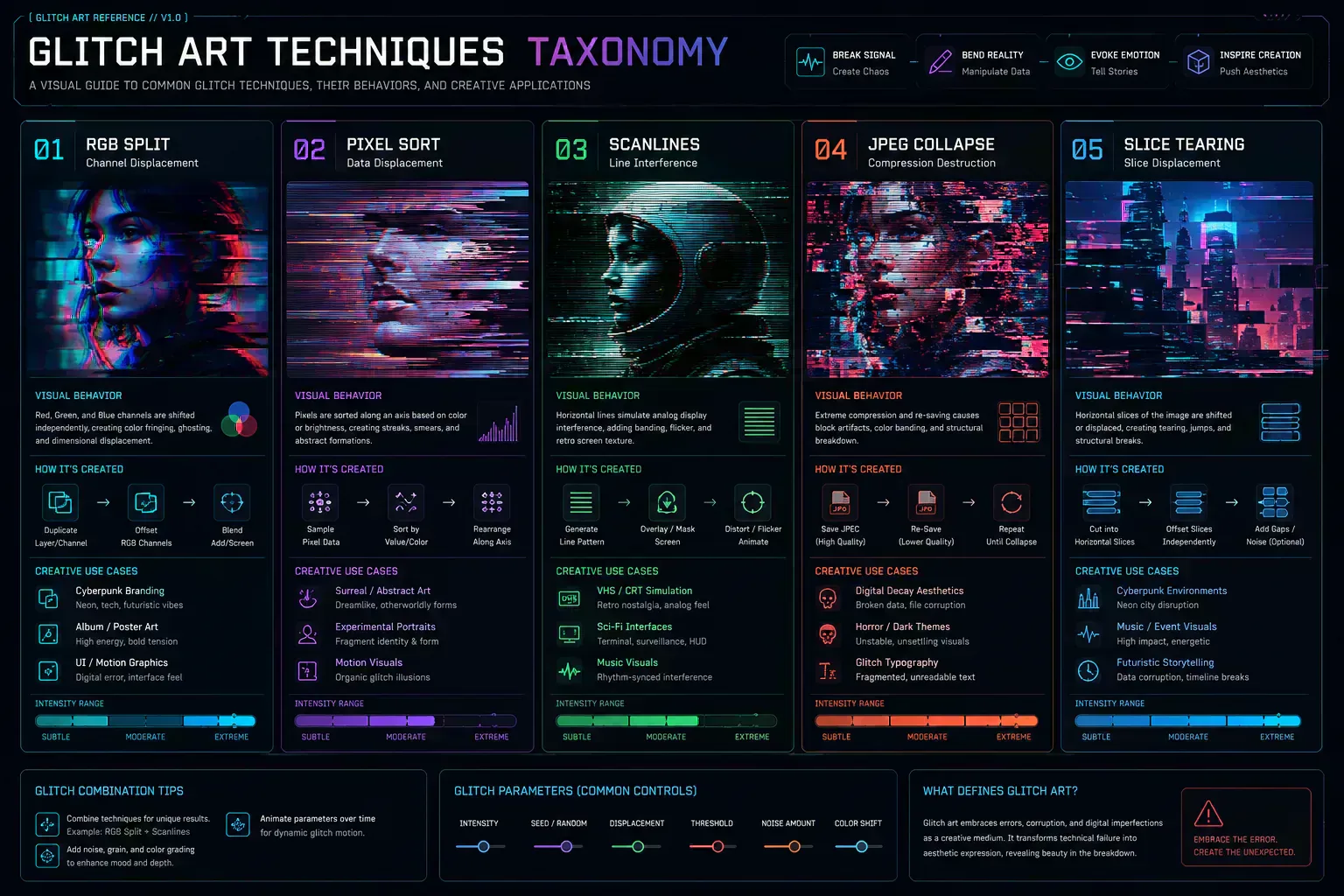
| Technique | Typical Visual Result | Common Creative Use |
|---|---|---|
| RGB Split | Chromatic drift, offset primary color channels, visual depth simulation | High-contrast art, 3D anaglyph emulation, display graphics |
| Pixel Sort | Melting, bleeding vertical/horizontal liquid-like pixel streaks | Surreal dreamscapes, hyper-stylized editorial illustrations |
| Scanlines | Fine horizontal/vertical grid overlays, CRT phosphor simulation | Retrogaming UI, retro VHS playback, interface accents |
| JPEG Collapse | Blocky, low-fidelity grid compression artifacts, color quantization | Low-fidelity storytelling, web-brutalist layouts, compression studies |
| Slice Tearing | Sharp horizontal or vertical spatial displacements, tearing bands | VHS tracking errors, analog cable signal interference, motion distortion |
Modern Creative Workflows Using Glitch Effects
Glitch effects are now common in commercial media, music graphics, streaming packages, and interface experiments. The useful workflow question is where distortion supports the asset and where it starts to reduce readability.
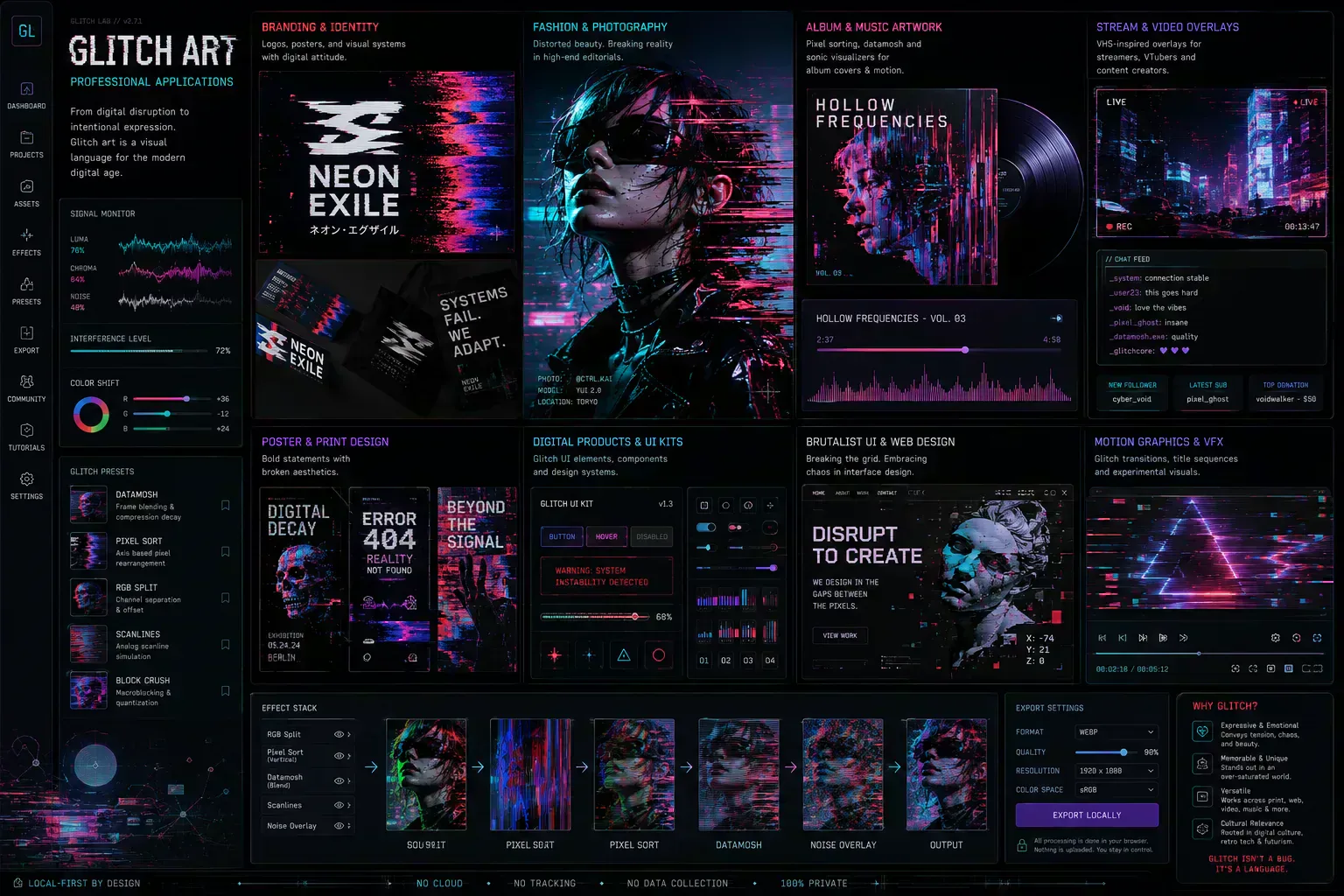
- High-contrast brand graphics: RGB drift, scanlines, and compression artifacts can support dark interface systems when the subject remains readable.
- Album covers and music visuals: Electronic, industrial, synthwave, and lo-fi releases often use pixel sorting and VHS textures to represent audio texture visually.
- Motion graphics and stream overlays: RGB splits, scanlines, and tracking tears can work as short transitions or borders when they do not obscure the main content.
- Editorial photography: Portraits can use controlled decay around the background while preserving the face, pose, and product detail.
- UI experiments: Hover states, loading screens, and error pages can use limited glitch effects when the interaction remains accessible.
Production Workflow: Crafting a High-Contrast Editorial Poster
Transforming a standard studio portrait into a high-contrast editorial asset requires controlled steps. The goal is to keep the subject readable while adding enough distortion to make the final image distinct.
-
Source Image Selection: Choose a high-contrast portrait with clean, dark background spaces. The contrast gives the pixel-sorting algorithm sharp boundaries to anchor onto.
-
Apply Global Multiplier Tiers: Load your image into the Image Glitcher workstation and switch the Signal Corruption Tier from Balanced to Aggressive. This broadens the parameter range for faster visual review.
-
Execute RGB Separation: Push the RGB Split slider to
75pxto separate the primary color layers. This mimics retro analog television chromatic fringes and creates visual depth. -
Trigger Cascading Pixel Sorts: Set the sorting direction to Vertical and increase the intensity until the colors begin to "bleed" downwards into the dark background areas, simulating digital decay while keeping the subject's face clear.
-
Add Analog VHS Scanlines: Enable Scanlines with a grid overlay density of
4pxto simulate classic CRT screen physical grid structures. -
Optimized Export: Export the finished canvas. Convert it with Image to WebP Converter and inspect the payload before using it in a responsive layout.
Common Mistakes when Designing Glitch Art
Even in a medium built from error, there is a practical line between useful distortion and unreadable visual noise. These issues matter before the asset reaches a page, campaign, or CMS upload.
-
Over-Saturating the Entire Canvas: Obliterating 100% of your source image makes it impossible for viewers to identify the underlying subject. Preserve clear focal points (like a subject's eyes in portraiture, or key characters in typography) with low-intensity thresholds to create high-contrast visual tension.
-
Corrupting Structural Headers Blindly: If you are performing manual raw databending, altering byte structures inside the first 100 bytes of a file can break decoder markers such as the SOI marker in JPEG or the IHDR block in PNG. Keep data injections inside safer middle or trailing payload regions.
-
Ignoring CSS Rendering Performance: Deploying actively glitched canvas states or large, unoptimized corrupted files to live websites can trigger massive rendering lag (re-renders, repaint storms, and high CPU usage) for mobile visitors. Always compile your final creative outputs into clean, flattened static assets.
-
Using Low-Contrast Color Palettes: Glitch effects rely on sharp boundaries such as chromatic fringes or pixel sorter trails. Applying these to low-contrast images often creates muddy smears instead of usable visual structure.
Inside the Sandbox: How Modern Viewport Glitchers Work
Historically, databending required a command-line hex editor, manual byte edits, repeated saves, and frequent decoder failures. This manual approach made repeatable edits difficult.
Modern sandboxed platforms move more of that workflow into the browser. The user can preview controlled distortion, adjust parameters, and export a clean file without sending the source image through a remote service.
1. High-Performance Sandboxed Processing Pipelines
Processing complex pixel shifts and coordinate sorting synchronously on the browser's main thread can cause interface lag. Modern browser-based applications reduce that risk with specific browser capabilities:
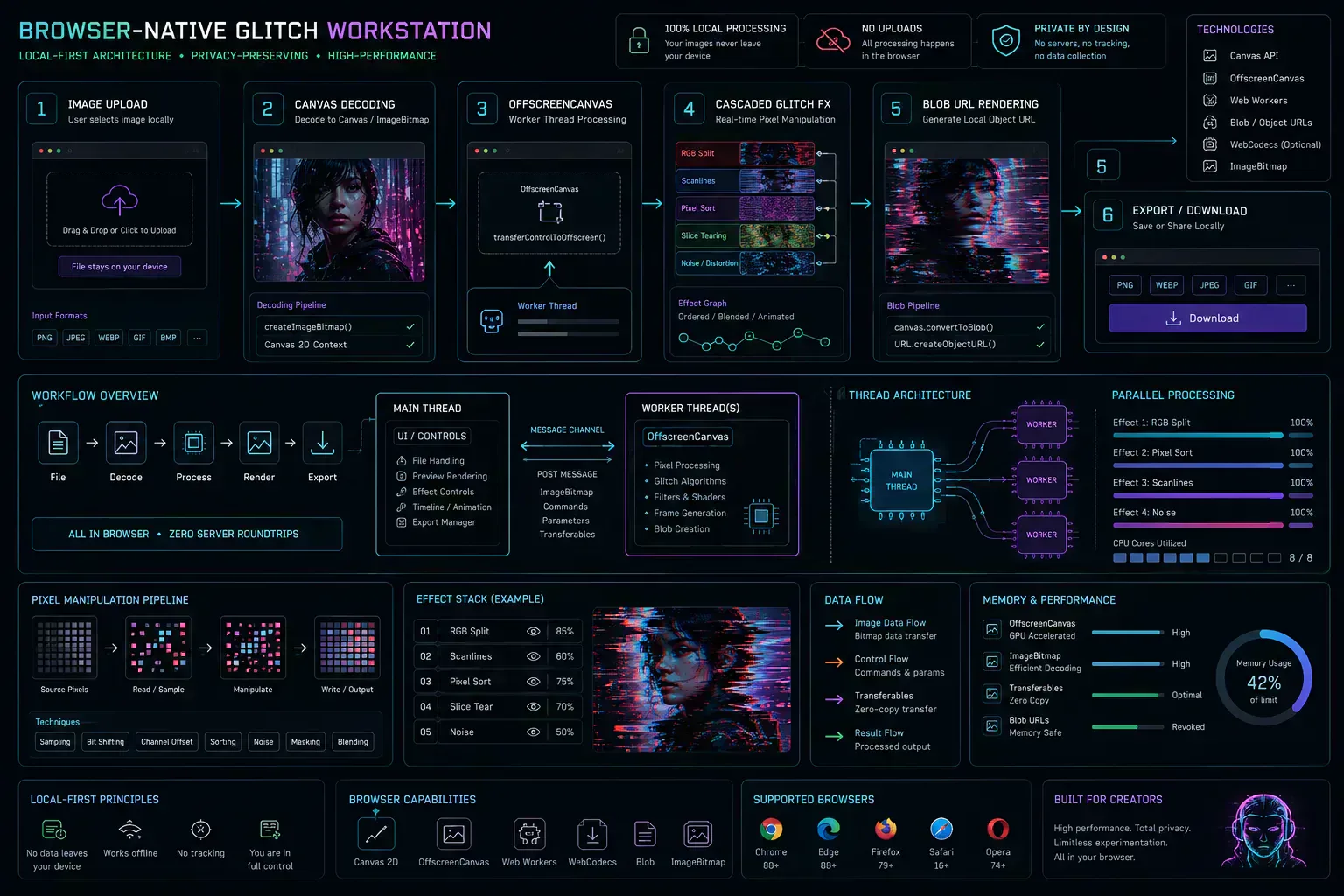
- Canvas & OffscreenCanvas APIs: Isolating image interpolation algorithms inside background web workers using
OffscreenCanvaskeeps the workspace responsive. - Local-First Processing: Media assets are decoded, manipulated, and re-rendered inside the browser sandbox using client-side resources. This avoids a remote upload step for deterministic visual transforms.
2. Multi-Stage Pipeline Cascading
In standard photo filters, effects are applied independently. In a dedicated glitch workstation, like the SHRTX Image Glitcher, effects cross-influence one another dynamically inside a unified rendering queue:
- Activating RGB Split can automatically amplify horizontal slice shifting by
1.5xas color channels drift. - Pushing Pixel Sort to extreme thresholds expands vertical tearing counts by
1.6x. - Activating Noise Burst downscales the image's JPEG compression buffer by
1.35xto force blocky quantization artifacts on sorted pixels.
3. Global Signal Corruption Tiers
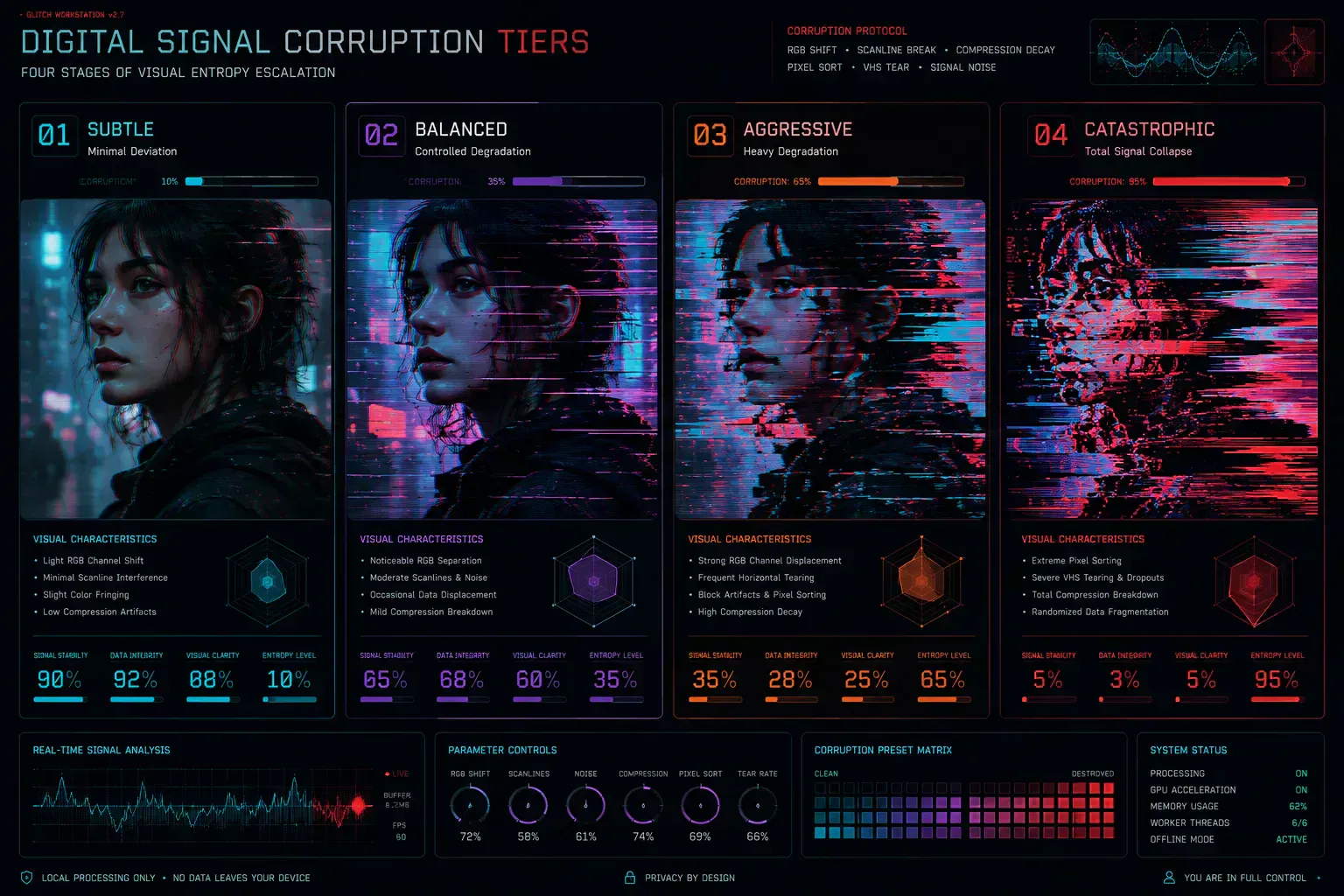
Modern creative workstations often include Signal Corruption Tiers such as Subtle, Balanced, Aggressive, and Catastrophic. These act as global visual scaling multipliers, changing parameters in larger steps for faster review.
4. Deterministic State Restoration
Unlike raw data corruption, modern workstations can use deterministic seed generation. By coupling algorithms with URL search parameter state synchronization (&p=datamosh-burst&s=0.55&tier=catastrophic), artists can recreate and share specific glitch patterns without losing state.
Production Best Practices for Glitch Artists
Deploying glitch assets into a web page requires technical discipline. The final file needs predictable dimensions, stable rendering behavior, and a payload size that fits the destination surface.
-
Flatten and Re-encode Final Deliverables: Direct deployment of broken file streams can trigger browser rendering overhead. Avoid deploying live payload errors to servers. Export the final design as a flattened static asset, then process it with Image to WebP Converter and Image Compressor. For performance workflow details, read the WebP optimization guide.
-
Prevent Layout Shift (CLS): Distorted images often feature irregular borders or horizontal slicing artifacts. Always define explicit
widthandheightproperties on your image containers. This prevents sudden layout shifts as the assets load. -
Maintain Accessibility (ALT Text): Search engine spiders cannot interpret glitched pixels. Ensure your elements feature descriptive alt text strings detailing the visual style. For example, use: "Portrait with heavy horizontal pixel sorting and RGB chromatic splitting."
Frequently Asked Questions (FAQ)
What is databending?↓
Databending manipulates a digital file's underlying binary data using tools designed for other formats, such as editing an image as if it were a text file or audio track. When the byte structure changes, decoders can render visible artifacts.
How do glitch effects work?↓
Glitch effects work by simulating or directly introducing data corruption into an image's rendering stream. Modern browser-native applications accomplish this client-side using JavaScript canvas pixel manipulations, such as shifting RGB channels, numerically sorting pixel columns, adding vertical noise overlays, and compressing blocks, to achieve artistic distortion in real time.
What causes an RGB split?↓
An RGB split (or chromatic aberration) is caused by separating and horizontally offsetting the red, green, and blue color channels of an image. This mimics the classic visual misalignment of retro analog televisions or VHS tapes where the electron guns fail to project the primary color layers in perfect register.
What is pixel sorting?↓
Pixel sorting is an algorithmic glitch art technique that scans an image's pixels row by row or column by column, isolates segments that meet a brightness, hue, or saturation threshold, and sorts those pixels numerically. This creates streaked color movement across the canvas.
Is glitch art destructive?↓
Raw file databending is structurally destructive and can create files that no longer open. Modern sandboxed glitch workstations are non-destructive because they process visual operations in temporary client-side memory and export standard image files such as WebP.
Why do JPEG glitches look different from PNG glitches?↓
JPEGs compress images in the frequency domain using Discrete Cosine Transforms in 8x8 block segments, causing data corruption to express as blocky row misalignments and harsh color channel shifts. PNGs, on the other hand, apply line-based pre-filtering delta calculations, causing glitches to propagate as cascading geometric streaks, vertical bands, or rectangular disturbances.
Can I glitch text or vector SVG files?↓
Vector SVG files and HTML text can be glitched by converting them to clean raster images first, or by applying CSS filters and SVG displacement maps (<feTurbulence> and <feDisplacementMap>) directly within the browser markup. Modern workstations can upload SVGs, rasterize them, apply sandboxed canvas glitching algorithms, and export the resulting visuals.
How do I choose the best Signal Corruption Tier for my image?↓
Choose your Signal Corruption Tier based on the desired level of abstraction:
- Subtle (0.4x): Ideal for micro-animations, button hover states, or keeping editorial photography clean with slight chromatic fringe effects.
- Balanced (1.0x): Useful for album covers and brand graphics where the subject is clear but visibly distorted.
- Aggressive (1.8x): Useful for heavy analog signal simulation and abstract editorial assets.
- Catastrophic (3.5x): Pushes the image into abstract geometric noise. Use it for textures and experiments where readability is not required.
The Verdict
Local-first creative sandboxes make glitch workflows easier to control. They turn image compression behavior, file format filtering, and pixel manipulation into an interactive workspace that still exports standard web assets.
Understanding the mechanics matters because each distortion has rendering and payload consequences. A browser-native workflow keeps the source file close, makes parameter changes repeatable, and exports an asset that can survive production delivery.
Tools Referenced By Topic
Image Glitcher
Create glitch art from images with RGB shift, VHS distortion, pixel sorting, and local export.
Image Background Remover
Automatically remove backgrounds from images locally using WASM technology.
HEIC to Image Converter
Convert HEIC or HEIF photos to PNG, JPG, or WebP with local browser processing.
Related Reading
May 17, 2026 • 14 min
WebP Optimization and Modern Image Delivery Guide
Learn WebP workflows for faster sites with local processing, visual checks, responsive delivery, and Core Web Vitals guidance.
May 25, 2026 • 12 min
How to Check File Size Before Uploading Files Online
Learn how to check file size before uploading files to email platforms, CMS systems, cloud storage, APIs, and messaging apps. Explore browser-native payload analysis, upload compatibility checks, transfer estimates, and file optimization workflows with SHRTX.
May 25, 2026 • 19 min
Modern Bento Grid Layouts for SaaS Dashboards and AI Interfaces
Learn how modern SaaS products, AI interfaces, and analytics dashboards use Bento Grid systems to create modular responsive layouts. Explore frontend workflow strategies, Tailwind composition techniques, and browser-native Bento planning with SHRTX.