
Privacy
Why Browser-Based Data Masking Fits Secure Enterprise Workflows
A practical guide to browser-based data masking, PII cleanup, redaction workflows, and local-first preparation before sharing operational datasets.
Why Browser-Based Data Masking Fits Secure Enterprise Workflows
A practical guide to browser-based data masking, PII cleanup, redaction workflows, and local-first preparation before sharing operational datasets.
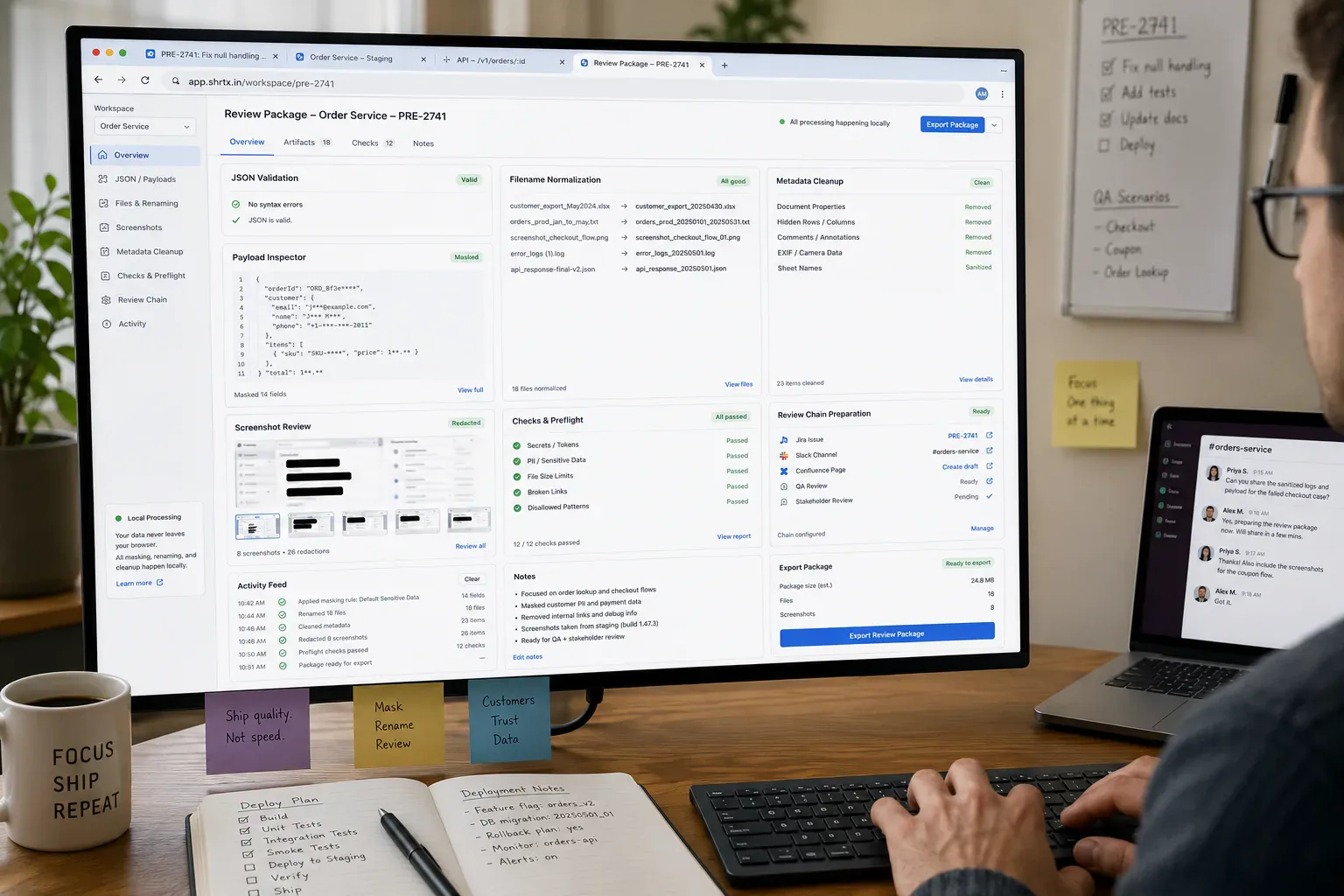
Data masking usually starts because someone needs to share a working artifact, not because they are preparing a polished public release. A support ticket may need a log excerpt, a developer may need a realistic API payload, and a QA reviewer may need screenshots. A writer may need an example without exposing a real person.
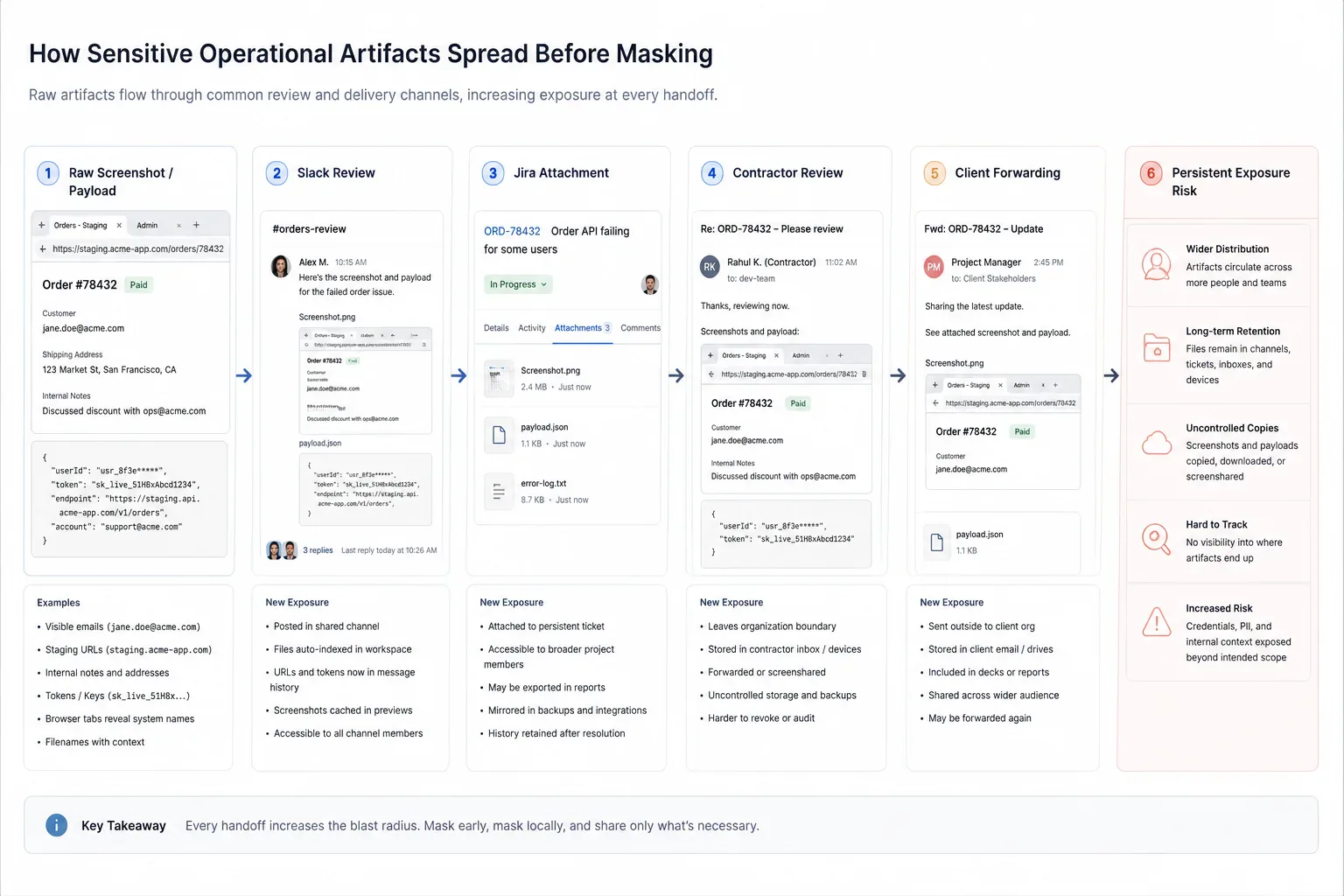
The risky version of this workflow sends raw material through Slack screenshots, Jira attachments, spreadsheet exports, staging captures, and contractor review threads before anyone removes the sensitive parts. By then, the leak has already happened during review and iteration.
Browser-based masking moves cleanup closer to the first handoff. The artifact can be shaped while it is still local, editable, and attached to the person who understands what the reviewer actually needs.
Quick Answer
Browser-based data masking is strongest as an early handoff step. Clean sensitive examples locally before they enter tickets, chats, prompts, documents, spreadsheets, or shared review systems.
Masking Protects Context and Fields
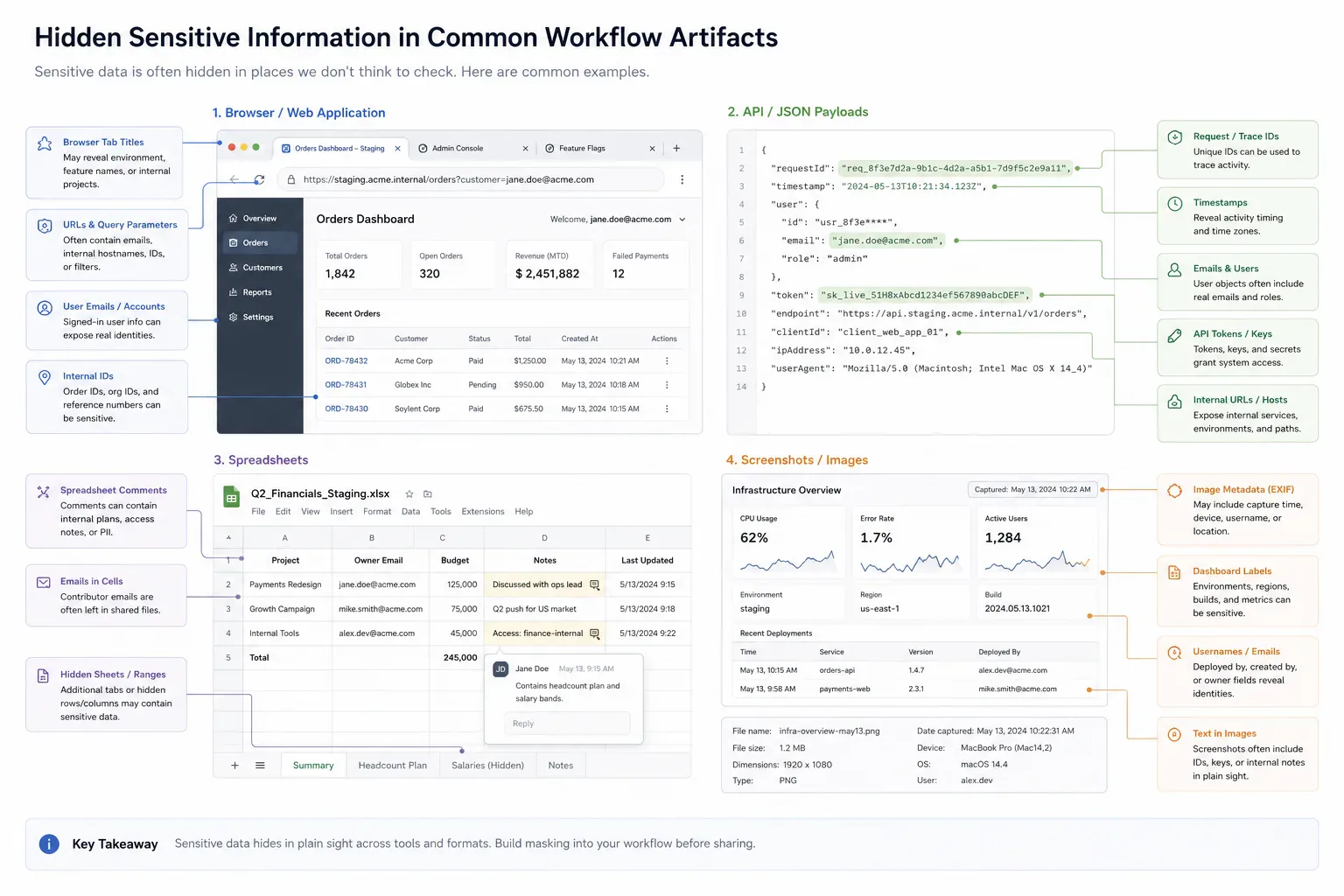
Sensitive data is not limited to obvious names and email addresses. IDs, filenames, timestamps, order numbers, URLs, dashboard labels, browser tabs, and embedded metadata can all identify a person, account, or internal system.
A useful masking workflow looks at the whole artifact. A Slack screenshot may show the correct error state but also reveal the active workspace, a customer email, and another tab title. A Jira attachment may need the request shape while account IDs, staging URLs, and file names should be replaced before upload.
The same pattern appears in API debugging payloads and analytics exports. A JSON fragment copied from a browser tab can carry real tokens, user IDs, campaign parameters, or internal feature flags. A spreadsheet shared for client review may hide sensitive values in unused columns, sheet names, comments, or filenames.
Why Browser Placement Matters
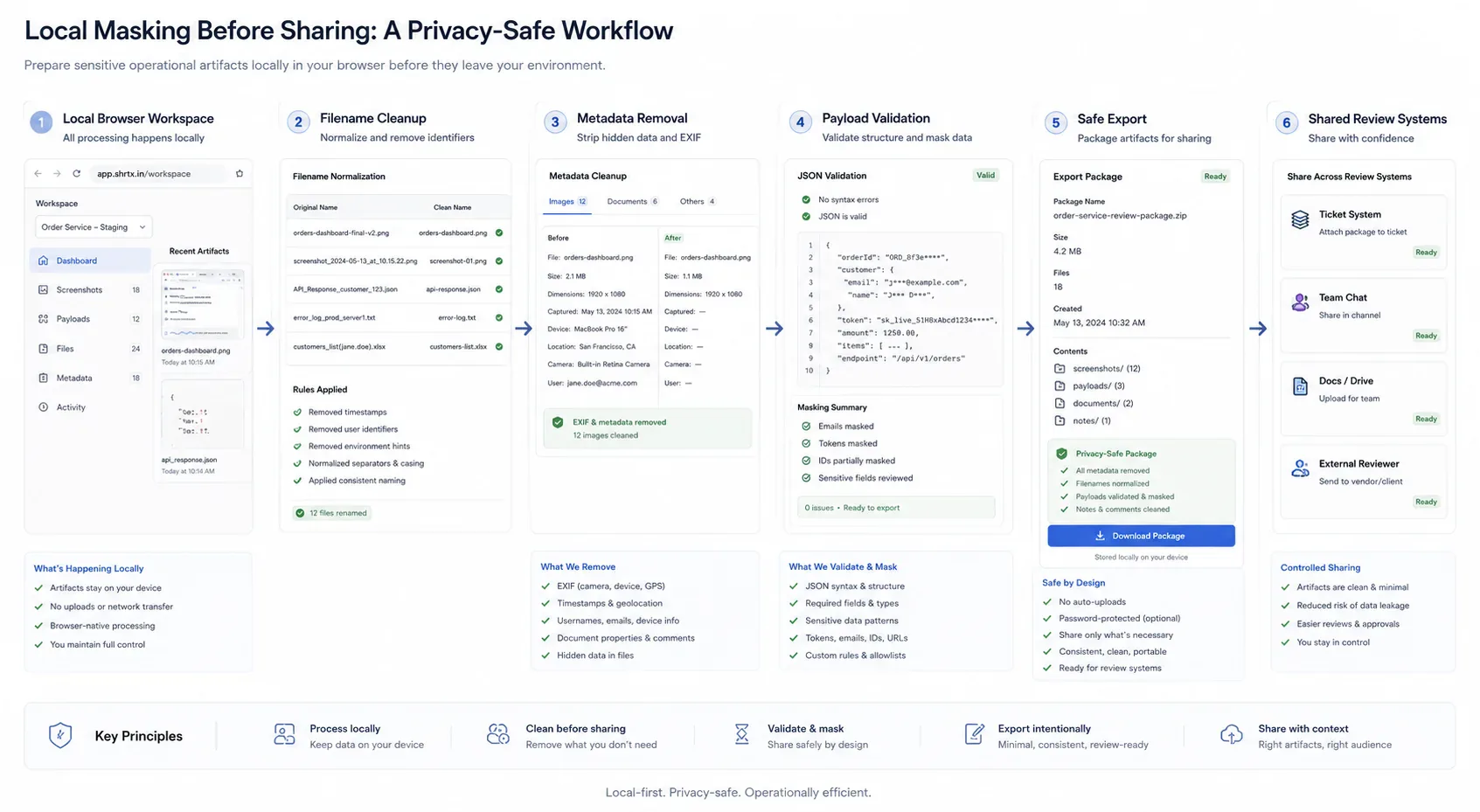
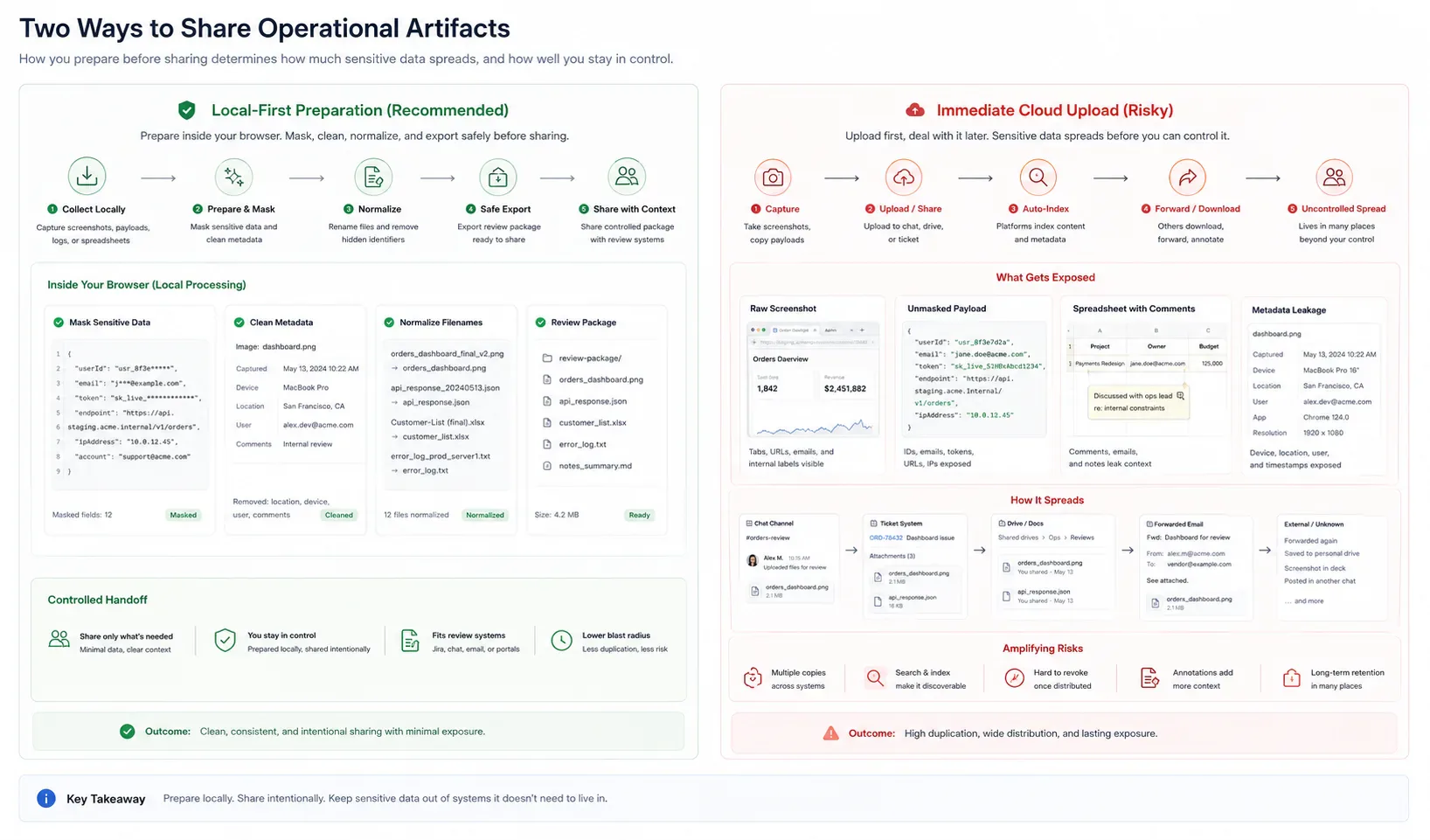
If masking happens in the browser, raw material can be edited before it enters a ticket, prompt, email, spreadsheet, or shared document. That matters because many data leaks are not caused by final publication. They happen during review, sharing, and repeated iteration.
Local-first preparation can include redacting text, normalizing filenames with Filename Normalizer, removing image metadata with EXIF Remover, and checking payload composition with File Size Analyzer. Those checks belong before the first upload or forward, not after a reviewer has copied the raw artifact into another system.
Browser placement also fits short-lived artifacts. A QA engineer can mask a staging screenshot before attaching it to Jira. A support lead can clean a support escalation payload before pasting it into a vendor form. A content operator can prepare CMS media locally before it enters a shared asset folder.
Secure Workflows Still Need Verification
Masking is not a one-click guarantee. A redacted screenshot may still contain identifying data in the browser chrome, tab strip, URL bar, or sidebar. A JSON sample may remove names while leaving unique IDs. A PDF may hide text visually while preserving it in selectable layers.
The review needs a second pass. Inspect the output as if it will be copied outside the team. If the artifact still tells the wrong story, mask again before sharing.
For payloads, run the cleaned sample through JSON Formatter & Validator before it goes into an API debugging thread. For screenshots, check visible text, browser tabs, and image metadata before upload. For key material, PGP Key Viewer can support local inspection of public key structure before a reviewer decides what external trust process applies.
Failure Modes in Enterprise Sharing
The most common failure is rushing a useful example into the wrong channel. An engineer posts a production payload in chat. A support agent uploads a customer screenshot to a generic converter. A manager forwards a PDF with internal metadata.
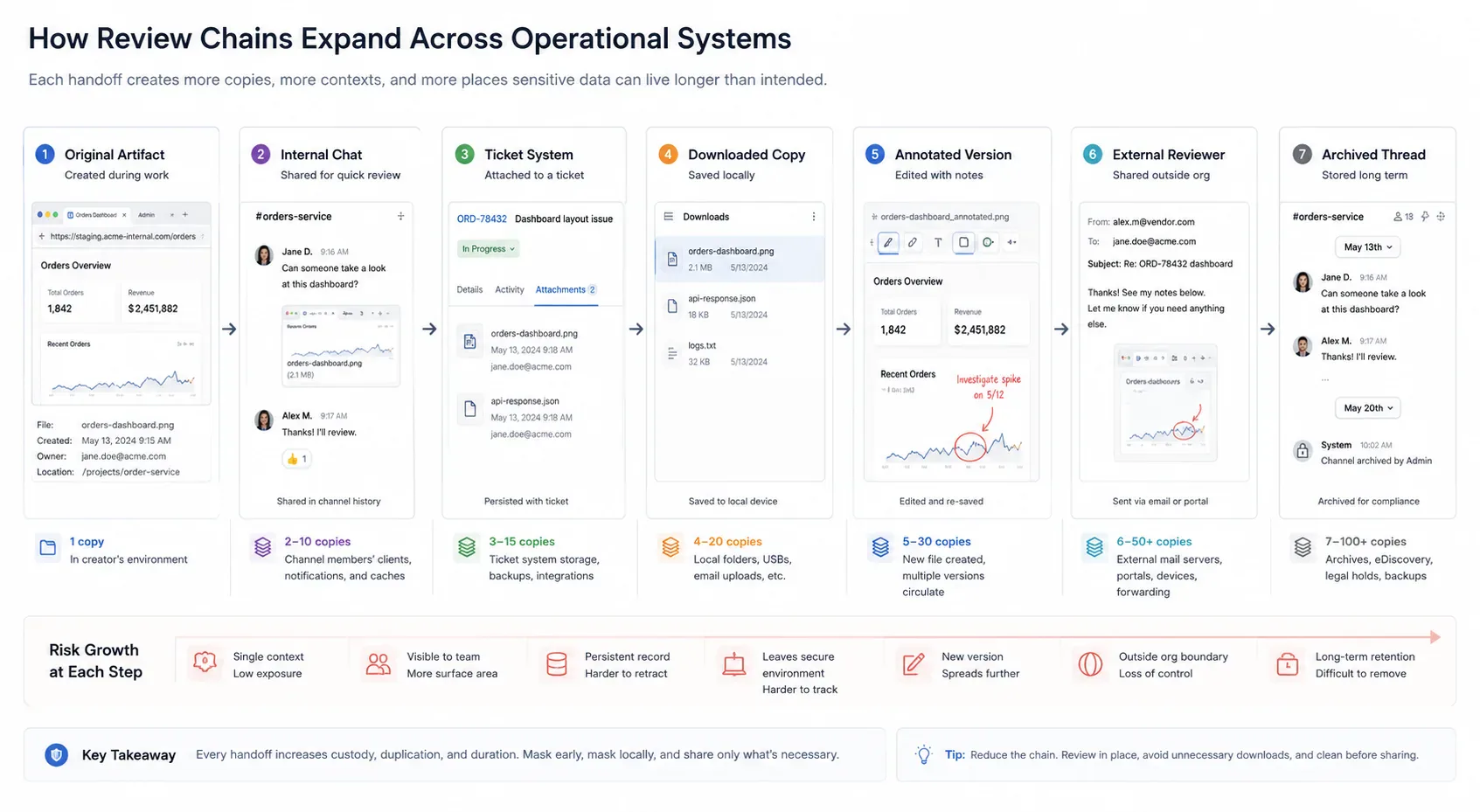
The higher-pressure version is a review chain. A Slack screenshot becomes a Jira attachment. The attachment is downloaded, annotated, re-uploaded, then forwarded to a contractor or client. Each step feels temporary, but every copy increases custody and makes cleanup harder.
These mistakes are easier to prevent when browser-local tools sit in the handoff path. The user can clean the artifact before the organization has to rely on deletion after distribution.
Where Masking Is Not Enough
Some workflows require stronger controls: formal redaction, legal review, access-managed repositories, retention policy, and audit trails. Browser-based masking should not be used to bypass those requirements.
It is best understood as an early containment layer for routine operational sharing. It reduces avoidable exposure before high-governance systems are needed.
The useful comparison is timing, not tool preference. The same artifact can be low-risk or high-friction depending on whether cleanup happens before the first handoff or after the review chain expands.
| Artifact | Late Cleanup Pattern | Early Masking Pattern |
|---|---|---|
| Slack screenshot | Shared first, then cropped after someone notices browser chrome | Mask tab names, URL fragments, and visible customer labels before posting |
| API payload | Pasted into a ticket with real IDs still attached | Replace identifiers, keep the failing shape, then validate the sample locally |
| Spreadsheet export | Uploaded to review with hidden columns and raw filename context | Remove unneeded sheets, rename the file, and share only the review fields |
| CMS media batch | Images enter a shared folder before metadata and size are checked | Strip EXIF data, normalize names, and inspect payload before upload |
Designing a Team Masking Habit
A practical habit is simple: identify the recipient, remove unnecessary identifiers, replace real values with realistic placeholders, normalize filenames, inspect metadata, and keep the original file out of general-purpose channels. That keeps the check close to the handoff instead of turning it into late cleanup.
Teams that do this consistently spend less time cleaning up after accidental shares. They also produce better examples because the artifact is shaped for review rather than copied raw from production.
The habit works best when it is tied to artifact types. Mask copied payload fragments before debugging. Remove EXIF data from QA staging screenshots before ticket upload. Rename exported spreadsheets before client review, and check CMS media weight before files enter a publishing folder.
A small handoff gate can make that habit concrete without turning privacy review into a process document. The point is to name what the reviewer needs and what must be removed before the artifact leaves the browser.
type MaskingHandoff = {
  artifact: "screenshot" | "payload" | "spreadsheet" | "media"
  destination: "slack" | "jira" | "vendor" | "cms" | "client"
  keep: string[]
  remove: string[]
}

const supportPayloadHandoff: MaskingHandoff = {
  artifact: "payload",
  destination: "jira",
  keep: ["error_code", "request_shape", "timestamp_window"],
  remove: ["customer_id", "email", "token", "internal_host"]
}

function isReadyForReview(handoff: MaskingHandoff) {
  return handoff.keep.length > 0 && handoff.remove.length > 0
}
Failure Analysis in Practice
The failure pattern behind privacy review is usually mundane. Teams do not need dramatic incidents to lose time. A staging screenshot may contain a real customer name, and a copied payload fragment may include an internal token. An analytics export can leave a campaign ID in the filename while a browser tab title reveals another account during capture.
Practical authority comes from naming those small breaks clearly. They are the details that show the workflow has been tested against real handoffs rather than described from a distance.
For privacy workflows, the useful lens is custody: what data enters the workflow, what remains local, what leaves the browser, and what claim the product can honestly support. The earlier that lens appears, the fewer temporary artifacts become permanent records in another system.
Ecosystem Placement Without Catalog Noise
This topic belongs inside a broader browser-native system: local preparation, lightweight diagnostics, media hygiene, metadata alignment, URL review, and content clarity. The ecosystem is useful only when those tools appear at the point where the reader needs them.
A payload issue can route to JSON Formatter & Validator for structure review or File Size Analyzer for transfer impact. A media issue can route to EXIF Remover, Image Compressor, or Image Dimension Checker. A route handoff can route to Deep Link Builder when a masked example still needs a realistic destination path.
The next step should feel obvious from the workflow context. If a spreadsheet is leaving the team, clean the file name before sharing. If a CMS image came from a phone, strip metadata before upload. If an API example is headed into a support escalation, validate the cleaned payload before it becomes the thread's reference sample.
What Strong Implementation Looks Like
Strong implementation is usually small and consistent. Check the artifact before handoff, preserve the processing boundary, and keep metadata aligned with visible content. Validate repeated failure modes automatically where possible. Use real examples rather than ideal samples.
That approach keeps the practice grounded and gives teams a repeatable way to apply it in their own workflows. The goal is not to make every artifact anonymous forever. The goal is to remove details that the next reviewer does not need.
Handoff Discipline
The handoff is where many workflow problems become visible. A screenshot reaches Jira before browser chrome has been checked. A file reaches a CMS before metadata and size are understood. A route is linked before destination intent is clean, or a payload reaches a support escalation before real account values have been replaced.
The practical answer is not to add process everywhere. It is to add the right check before the artifact leaves the person who can still fix it quickly. That check should be small enough to run consistently and specific enough to catch a predictable failure.
Local-First Workflow Lens
A local-first lens does not mean every task must stay in the browser. It means the workflow should identify the point where local preparation is cheaper, safer, or clearer than remote processing. That point may be file inspection before upload, screenshot cleanup before ticket attachment, JSON cleanup before API debugging, or filename normalization before client review.
When the browser can provide the first useful answer, the workflow becomes easier to operate. The user can correct the artifact while context is still fresh. The team can avoid unnecessary retries. The platform can avoid receiving data it did not need.
The same lens keeps the guidance specific. It forces a boundary: before upload, before deployment, before indexing, before sharing, before publication, or before a remote system receives sensitive context. Once that boundary is clear, the workflow can stay useful without padding or keyword repetition.
Operating With Real Constraints
Real workflows have device limits, platform limits, team handoffs, old assets, inconsistent samples, and deadlines. Good guidance should survive those constraints. It should not assume perfect data, perfect network conditions, or a team with unlimited time to inspect every artifact manually.
That is why small browser-native checks matter. They give teams a way to reduce uncertainty while the artifact is still close to the source. The result is not a perfect process. It is a more reliable path from local preparation to the next system.
This matters during repeated upload and re-share cycles. A staging screenshot may be resized twice, pasted into a ticket, downloaded for annotation, then added to a status deck. If masking waits until the deck is ready, the operational chain has already carried the raw detail through several systems.
What to Document
Useful documentation is short: name the artifact, the destination, the check that was run, and the risk that remains. If a screenshot was masked, record whether browser chrome and metadata were checked. If a payload was cleaned, keep the representative sample. If a spreadsheet was shared, note whether hidden sheets or file names were reviewed.
This creates continuity without turning the workflow into a report. The next person does not need to repeat the same diagnostic step, and the team has enough context to understand why the artifact is ready for the next system. The note also prevents a cleaned example from being treated as raw production evidence later.
That small record matters during content refreshes, support escalations, release reviews, and CMS updates. It shows whether the artifact was masked for a public guide, an internal ticket, a client review chain, or a debugging thread. The boundary stays attached to the workflow instead of disappearing into chat history.
Final Takeaway
Browser-based data masking is valuable because it changes timing. Sensitive material is cleaned while it is still local, editable, and close to the person who understands the artifact. That does not replace formal controls, but it reduces the number of raw files, screenshots, payloads, and exports that enter everyday collaboration workflows.
Treat masking as a pre-sharing discipline. It is a local-first operational boundary, not a magic privacy layer. Used early, it contains routine leakage before review chains turn temporary artifacts into permanent copies.
Tools Referenced By Topic
Related Reading
Jan 23, 2026 • 10 min
The Hidden Costs of Free Cloud File Converters
A practical privacy guide to the operational risks behind free cloud file converters, upload-based processing, metadata exposure, and browser-native alternatives.
Mar 19, 2026 • 12 min
Auditing Your Browser Privacy Workflow in 2026
A workflow-native guide to browser privacy audits covering fingerprinting, tracking parameters, cookies, local processing, and privacy-aware utility workflows.
Feb 12, 2026 • 10 min
Zero-Log Architecture for Browser-Native Tools
An engineering-focused privacy guide to building browser tools that minimize server visibility, avoid unnecessary file custody, and keep processing boundaries auditable.