
Developer
Building a Custom Developer Toolbox with Browser Utilities
A practical guide to assembling browser-native developer workflows for formatting, validation, URL checks, payload preparation, security review, and deployment preflight.
Building a Custom Developer Toolbox with Browser Utilities
A practical guide to assembling browser-native developer workflows for formatting, validation, URL checks, payload preparation, security review, and deployment preflight.

A developer toolbox usually forms from interruptions. A payload needs formatting, a header needs decoding, an environment value needs checking, a filename batch needs cleanup, or a deployment asset needs inspection. None of these tasks deserves a full SaaS workflow.
The problem is that teams often solve small tasks with scattered bookmarks, local scripts, random converters, and one-off browser extensions. The tools work until the workflow becomes inconsistent.
A custom browser utility toolbox should be organized around recurring decisions, not around a long list of favorite links. The useful question is where the first answer should happen. If the artifact is already in the browser, a local check can often prevent a ticket, upload, or deployment loop before the slower system gets involved.
Quick Answer
A developer toolbox works best when organized around recurring handoff friction: payload cleanup, URL checks, asset review, filename hygiene, deployment preflight, and the local validation steps that prevent unnecessary transport.
The Same Bad Payload Keeps Coming Back
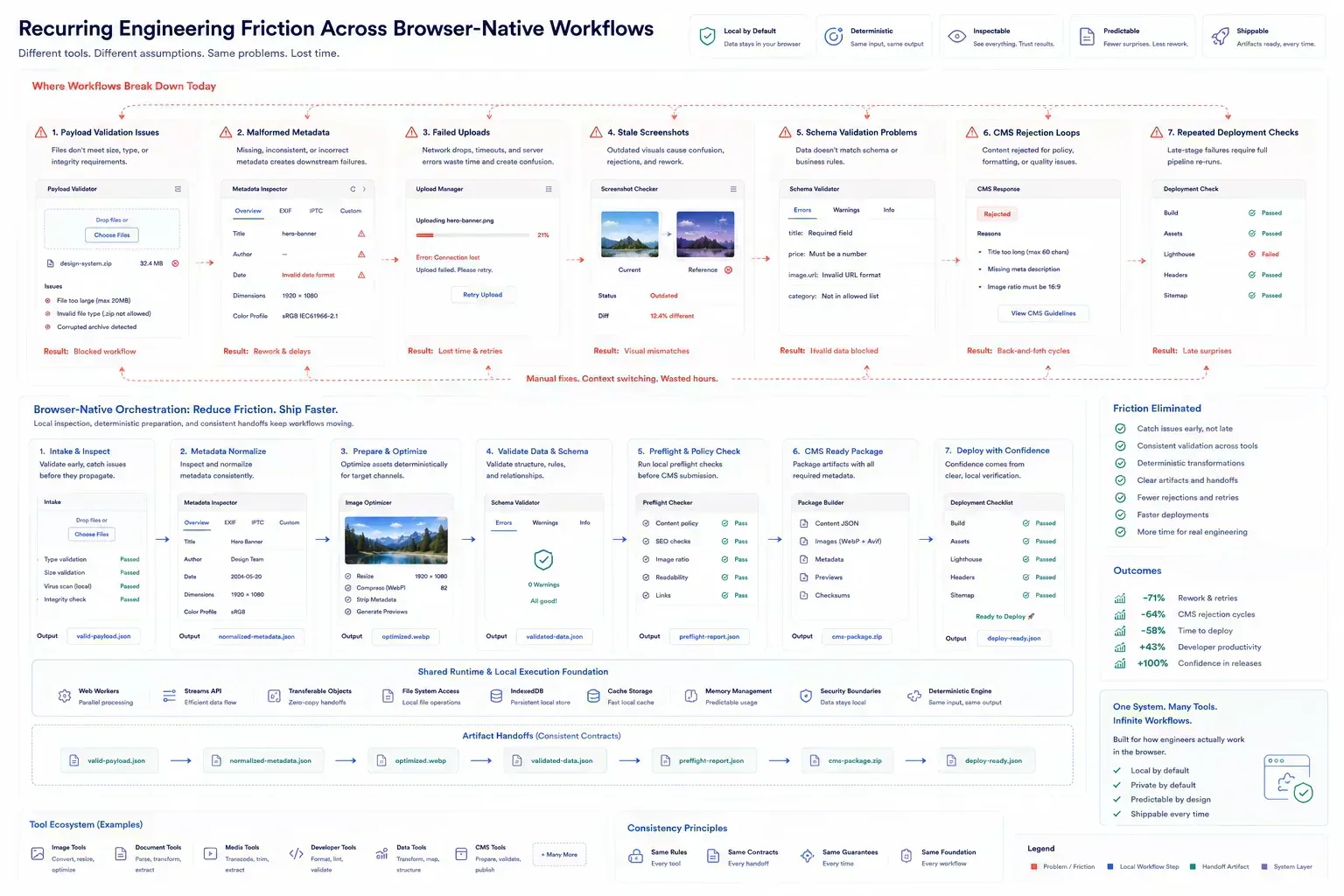
The useful starting point is not which tools exist. It is which interruptions happen every week. API payload cleanup, URL inspection, regex testing, metadata review, image optimization, and pre-deployment checks are common examples.
Grouping tools by friction keeps the toolbox practical. A release owner needs different shortcuts than a content editor or backend developer. The pattern is usually visible in reviews: the same malformed payload, stale screenshot, oversized image, or unsafe filename keeps returning because the check happens too late.
Keep Sensitive Artifacts Out of Extra Systems
Some tasks involve harmless sample text. Others involve customer payloads, screenshots, access tokens, or internal filenames. The toolbox should make local-first options easy for sensitive artifacts.
For local checks, JSON Formatter & Validator, File Size Analyzer, EXIF Remover, and Filename Normalizer can reduce unnecessary uploads or external processing. This matters because transport is not neutral. Uploading an artifact for a check adds latency, storage exposure, retry risk, and often another cleanup step when the result is wrong.
The Check Belongs Before Ticket, CMS, or Deploy
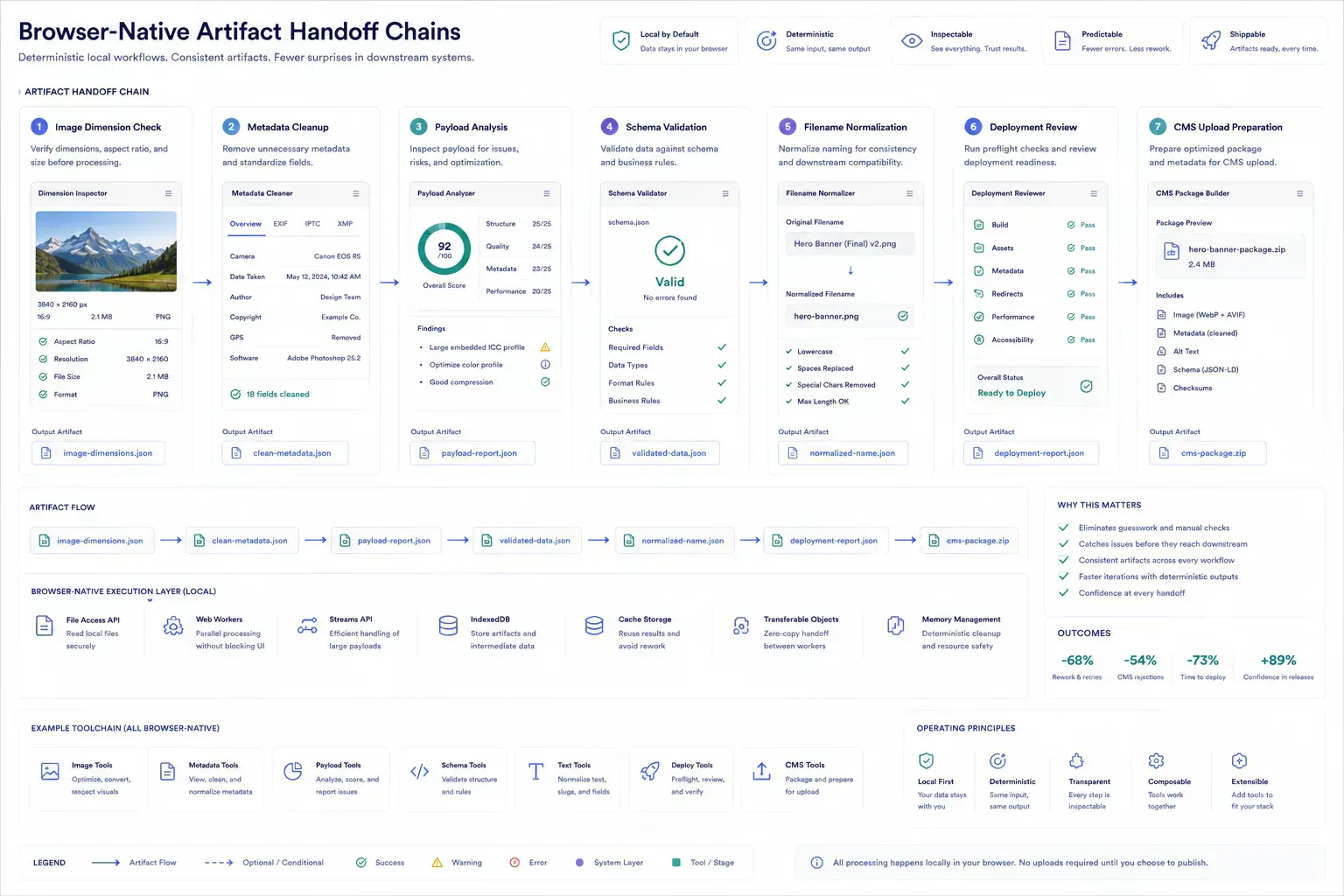
The most useful tools sit before handoff. Before opening a ticket, format the JSON. Before uploading media, inspect dimensions and payload. Before shipping a route, check redirects and metadata. Before sharing a file batch, normalize filenames.
This keeps cleanup near the person who can still fix the artifact quickly. It also prevents reviewers from repeating basic diagnostics. In practice, the chain often looks like payload, validation, export, upload. Or image, dimensions, payload, CMS upload. The toolbox should make that sequence obvious.
type WorkflowGate = {
  artifact: "payload" | "image" | "url" | "file"
  boundary: "ticket" | "cms" | "deployment" | "handoff"
  checks: string[]
}

const gates: WorkflowGate[] = [
  { artifact: "payload", boundary: "ticket", checks: ["format", "schema", "size"] },
  { artifact: "image", boundary: "cms", checks: ["dimensions", "compression", "filename"] },
  { artifact: "url", boundary: "deployment", checks: ["canonical", "redirect", "preview"] }
]
Group Tools Around the Failure You Keep Debugging
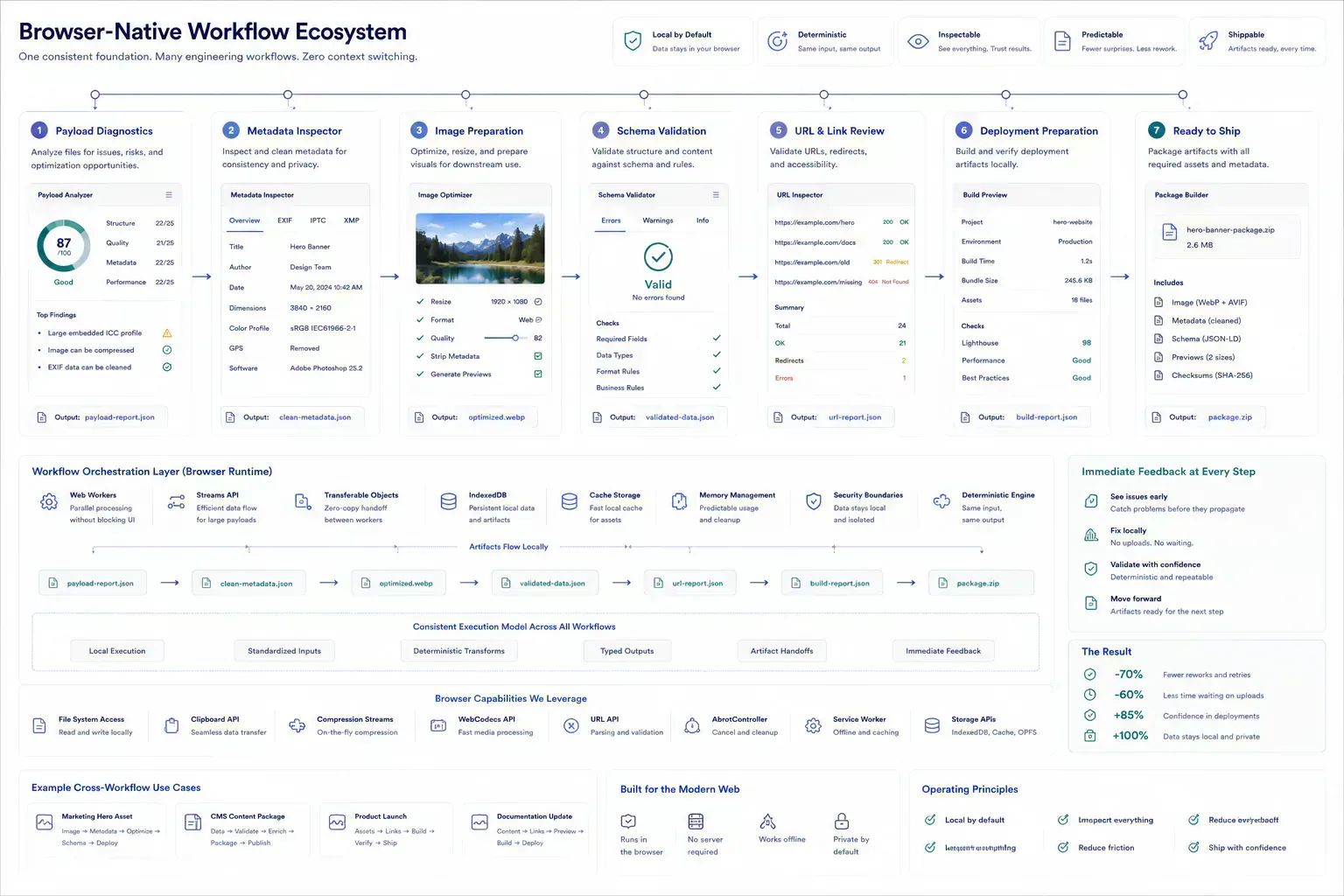
A practical toolbox might include payload tools, URL tools, text cleanup, file hygiene, image optimization, and release review. The exact mix should reflect the work, not a generic idea of productivity.
For API work, pair HTTP Header Parser with JSON tools so malformed payloads and confusing headers are cleaned before they enter a ticket. For routing work, pair Redirect Chain Checker with URL normalization before deployment or indexing. For frontend assets, pair image tools with file-size checks before the asset reaches a CMS or static build.
Link Piles Create Their Own Interruptions
A toolbox can become its own clutter. Too many overlapping tools slow the user down because the first decision becomes which tool to open.
Keep the set small enough that each utility has a clear reason. If two tools serve the same step, keep the one that fits the workflow boundary better. The wrong toolbox creates a different interruption: the developer stops to choose a utility instead of resolving the artifact.
Short Notes Beat Another Review Loop
A shared toolbox is stronger when the team documents when to use each tool. That documentation can be short: use this before API tickets, this before CMS upload, this before deployment, and this before support handoff.
The documentation turns individual habits into team workflow. It also makes onboarding easier because new contributors inherit a path rather than a pile of links. It also reduces handoff confusion when a review asks whether the screenshot was current, whether filenames were normalized, or whether the upload payload was already checked.
The Missed Boundary Shows Up in Someone Else's Queue
Building a Custom Developer Toolbox with Browser Utilities becomes useful when the guidance survives a normal handoff. The artifact may be a file, route, payload, screenshot, draft, schema block, or component state. The important point is that someone else will receive it and make a decision from it.
That is where vague advice fails. The next person needs to know what was checked, what risk remains, and which constraint can still break late. In practical teams, the best workflow guidance reduces repeated diagnosis rather than adding a decorative process layer.
For developer workflows, the useful lens is artifact ownership: payload, header, filename, asset, route, component, or deployment setting. The owner should be able to run the local check while the artifact is still open, not after it has already bounced through a remote system.
First Answer Before Upload
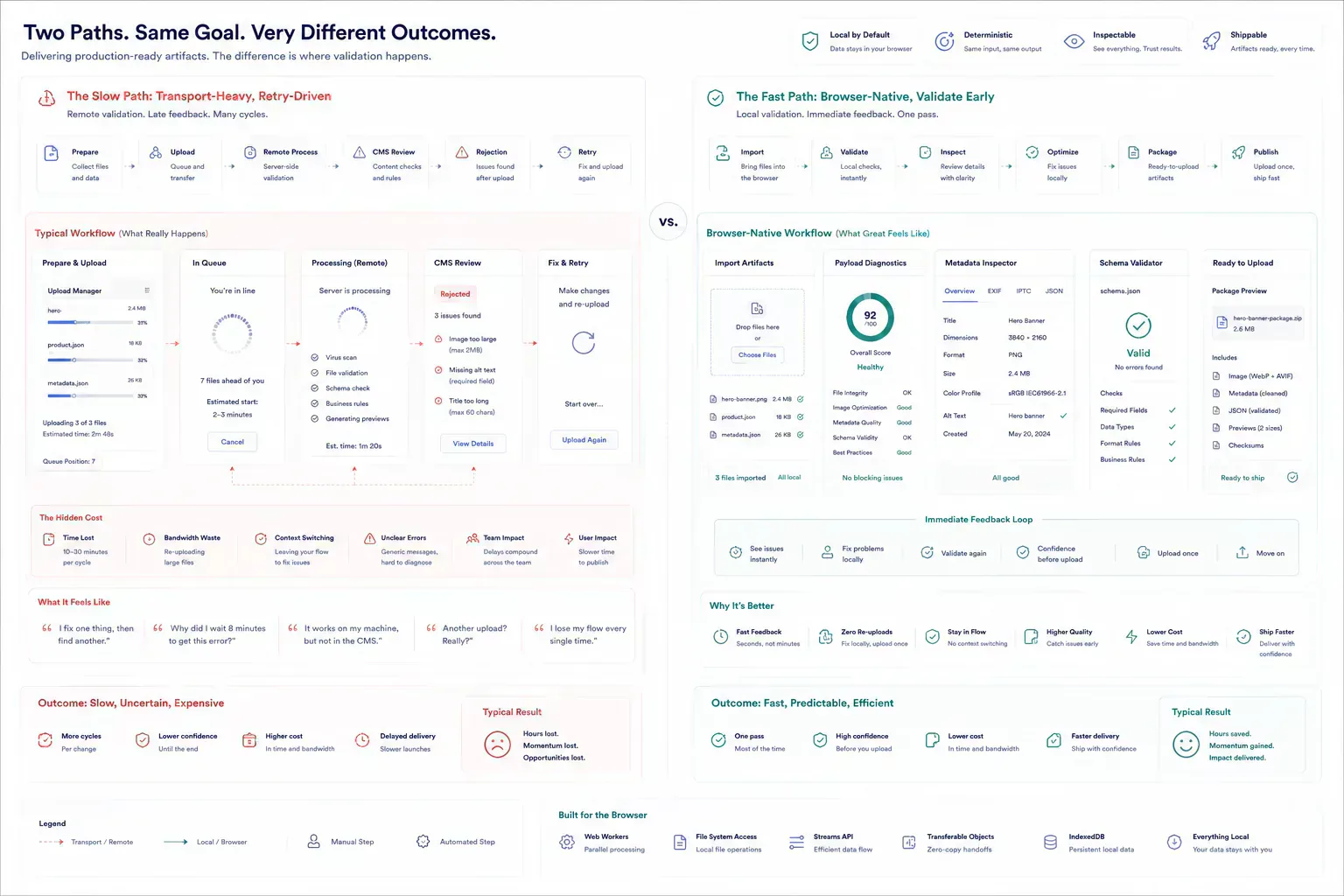
Many failures are cheaper to catch while the artifact is still local. A file can be resized before upload. A URL can be normalized before indexing. A JSON sample can be validated before it enters a ticket. A screenshot can be compressed before the CMS rejects the media batch.
Browser-native utilities fit this point in the workflow because they provide the first useful answer without making every small check a server-side event. They also avoid the practical drag of upload retries, mobile upload restarts, and review threads where someone has to ask for the original file again.
| Workflow Point | Local Check | Delayed Check |
|---|---|---|
| API ticket | Payload is formatted and sized before review | Reviewer spends time reconstructing the sample |
| CMS upload | Images are inspected before transfer | Upload fails after copy and layout are approved |
| Deployment handoff | Routes, metadata, and assets are checked together | Runtime issues appear after distribution starts |
Is This a Tool Choice or a Boundary Problem
The article should give readers a way to classify the work in front of them. If the task is local, inspect it locally. If the task needs external authority, use the correct remote system. If the task affects publication, check metadata, payload, links, and visible output together.
That distinction keeps the guidance practical. It also keeps tool mentions honest because each link should continue the work rather than interrupt it. Redirect to canonical to deployment is a workflow. Image dimensions to payload to CMS upload is a workflow. Schema to validation to indexing is a workflow. A toolbox is useful when it preserves those chains.
Guardrail While the Artifact Is Still Open
The handoff is where many workflow problems become visible. A file reaches a CMS before its size is understood. A route is linked before redirect behavior is clean. A draft reaches distribution before the headline matches the article. A component enters a release before responsive behavior has been tested with real content.
The practical answer is not to add process everywhere. It is to add the right check before the artifact leaves the person who can still fix it quickly. That check should be small enough to run consistently and specific enough to catch a predictable failure.
That check often needs to be boring. Confirm the file size. Normalize the filename. Format the JSON. Recheck the redirect. These small steps prevent expensive review loops because they happen before the artifact becomes someone else's problem.
Local First Means Fixing Before Transport
A local-first lens does not mean every task must stay in the browser. It means the workflow should identify the point where local preparation is cheaper, safer, or clearer than remote processing. That point may be file inspection before upload, schema review before indexing, screenshot compression before publishing, JSON cleanup before API debugging, or headline review before distribution.
When the browser can provide the first useful answer, the workflow becomes easier to operate. The user can correct the artifact while context is still fresh. The team can avoid unnecessary retries. The platform can avoid receiving data it did not need.
The same lens keeps the guidance specific. It forces a boundary: before upload, before deployment, before indexing, before sharing, before publication, or before a remote system receives sensitive context. Once that boundary is clear, the article can stay useful without padding or keyword repetition.
Mobile Uploads, Old Assets, and Deadline Pressure
Real workflows have device limits, platform limits, team handoffs, old assets, inconsistent samples, and deadlines. Good guidance should survive those constraints. It should not assume perfect data, perfect network conditions, or a team with unlimited time to inspect every artifact manually.
That is why small browser-native checks matter. They give teams a way to reduce uncertainty while the artifact is still close to the source. The result is not a perfect process. It is a more reliable path from local preparation to the next system.
The constraints are concrete. A mobile upload can restart. A CMS can reject a large PNG. A stale screenshot can survive into documentation. A malformed payload can waste an API review. Local checks do not remove those risks, but they make the failures easier to catch while someone can still fix them quickly.
Leave the Result Beside the Artifact
The useful documentation is short. Name the artifact, the destination, the check that was run, and the risk that remains. If a file was compressed, record that. If a redirect was verified, record the final destination. If a payload was cleaned, keep the representative sample. If a draft was adjusted for tone or accessibility, preserve the reason.
This creates continuity without turning the workflow into a report. The next person does not need to repeat the same diagnostic step, and the team has enough context to understand why the artifact is ready for the next system.
That context helps future maintenance because the reason for the check stays attached to the workflow rather than hidden in chat history. During audits, release reviews, CMS migrations, and asset replacement passes, a short note can prevent the next maintainer from treating the artifact as unverified.
This is where toolbox design and operational memory meet. The local check gives the team a result, and the note preserves why that result mattered.
A Toolbox Is Useful Only If Handoffs Get Quieter
A custom developer toolbox works when it is organized around operational friction. The goal is not more utilities. The goal is fewer avoidable handoff failures, faster local checks, and a browser-native workflow that keeps small tasks small.
The first useful answer should happen as close to the artifact as possible. That is what turns a toolbox from a link collection into workflow infrastructure.
Tools Referenced By Topic
API Payload Builder
Visually construct complex JSON payloads for API requests with dynamic keys.
JSON Schema Compliance
Validate your JSON objects against standard schemas using the high-performance AJV engine locally.
String Escaper/Unescaper
Safely escape or unescape strings for JSON, HTML, and CSV formats.
Related Reading
Feb 9, 2026 • 12 min
Cleaning Messy JSON for API Performance and Reliability
A developer workflow guide to JSON cleanup, validation, schema alignment, payload size, and debugging API data before production handoff.
Jan 28, 2026 • 10 min
A Pre-Deployment Checklist for Web Developers
A practical pre-deployment workflow for web developers covering routes, metadata, redirects, assets, payloads, environment variables, security headers, and validation checks.
Feb 27, 2026 • 12 min
Regex Workflows for Bulk File Renaming
A practical developer guide to regex-based filename cleanup, batch renaming safety, pattern testing, media handoffs, and repository asset hygiene.