
Developer
Cleaning Messy JSON for API Performance and Reliability
A developer workflow guide to JSON cleanup, validation, schema alignment, payload size, and debugging API data before production handoff.
Cleaning Messy JSON for API Performance and Reliability
A developer workflow guide to JSON cleanup, validation, schema alignment, payload size, and debugging API data before production handoff.

Messy JSON tends to arrive in the middle of a debugging session. A webhook sample is copied from logs, a frontend state dump includes extra nesting, an API example has trailing commas, or a production payload contains fields the consuming UI never uses.
The first instinct is often to blame the API. Sometimes the real problem is that the team cannot clearly see the structure it is testing.
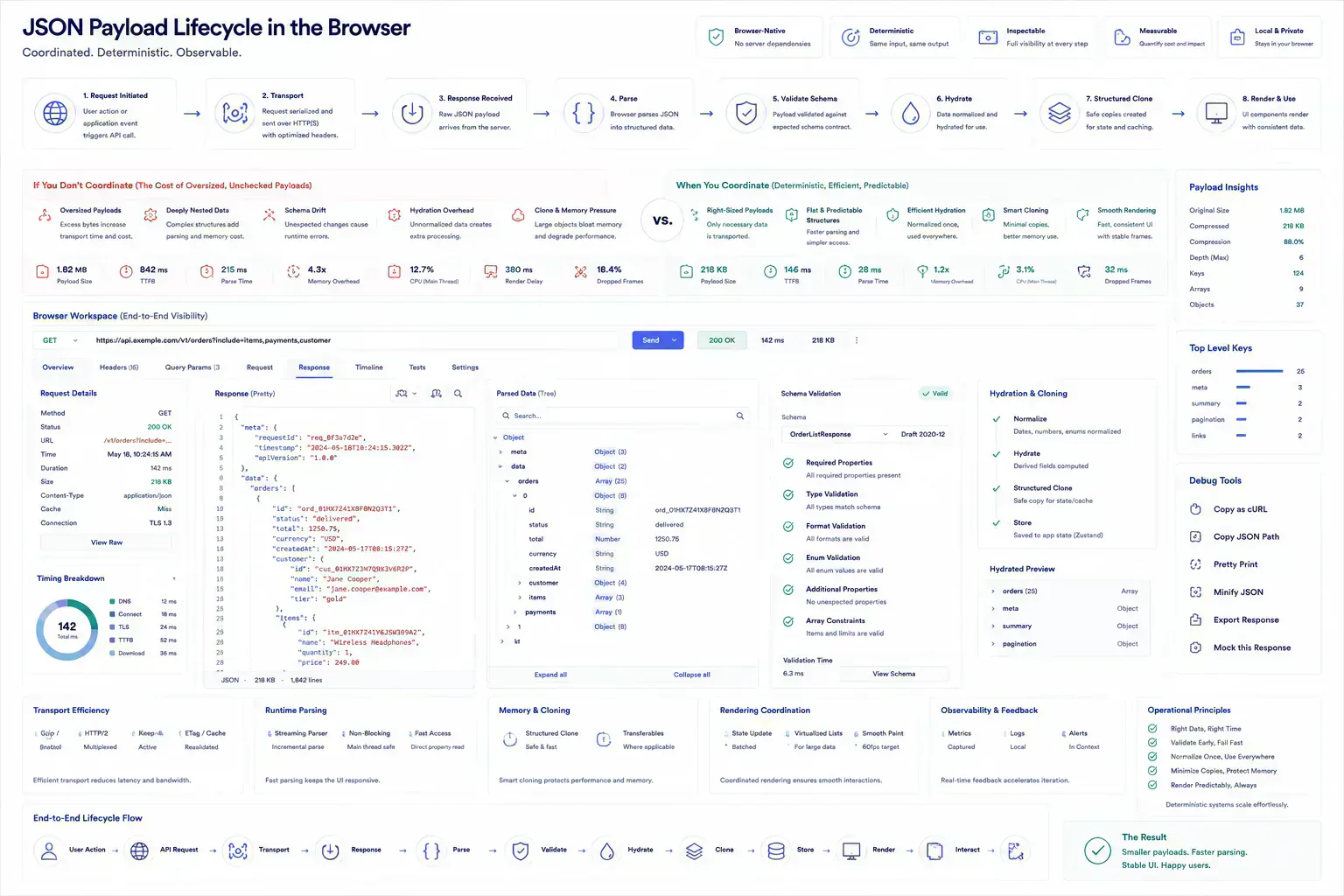
JSON cleanup is an operational step: make the payload valid, readable, minimal, and aligned with the contract before debugging application behavior. It is also payload lifecycle work. A messy response can affect transport, parsing, UI hydration, logging, retry behavior, and the quality of every review that follows.
In browser-native workflows, that lifecycle starts as soon as the payload enters the tab. The browser may decode text, allocate strings, parse JSON, render an inspection tree, clone data into a Worker, or hold the original sample for export. Each step is small until the payload is large, deeply nested, or repeated across reviews. That is where cleanup stops being cosmetic and starts affecting interaction quality.
Quick Answer
JSON cleanup improves API reliability by making payloads valid, readable, schema-aligned, appropriately sized, and predictable across transport, parsing, and browser inspection.
The Sample Is Still Explainable Here
Formatting makes structure visible. It exposes missing commas, invalid strings, unexpected arrays, and nested objects that are hard to inspect in a single line.
JSON Formatter & Validator fits the first review step because it separates syntax problems from application problems. A malformed sample should not consume backend debugging time. It should be corrected locally before the payload enters a ticket, API console, or shared review thread.
This local pass also keeps the first failure cheap. If the formatter cannot parse the sample, the team knows the problem is syntax before anyone starts reasoning about authorization, caching, or downstream rendering.
Pretty JSON Can Still Break the Contract
A pretty JSON sample can still be wrong. Required fields may be missing, string numbers may appear where numeric values are expected, and optional fields may hide contract drift.
Use JSON Schema Validator when a schema exists and JSON Schema Generator when the team needs a starting point for review. Generated schemas still need human approval before they become production contracts.
Schema mismatch is a common review delay. Frontend sees one shape, backend expects another, and QA has a third sample copied from logs. Local schema validation gives the group a shared artifact before the conversation turns into guesswork.
Oversized Responses Turn Into Runtime Cost
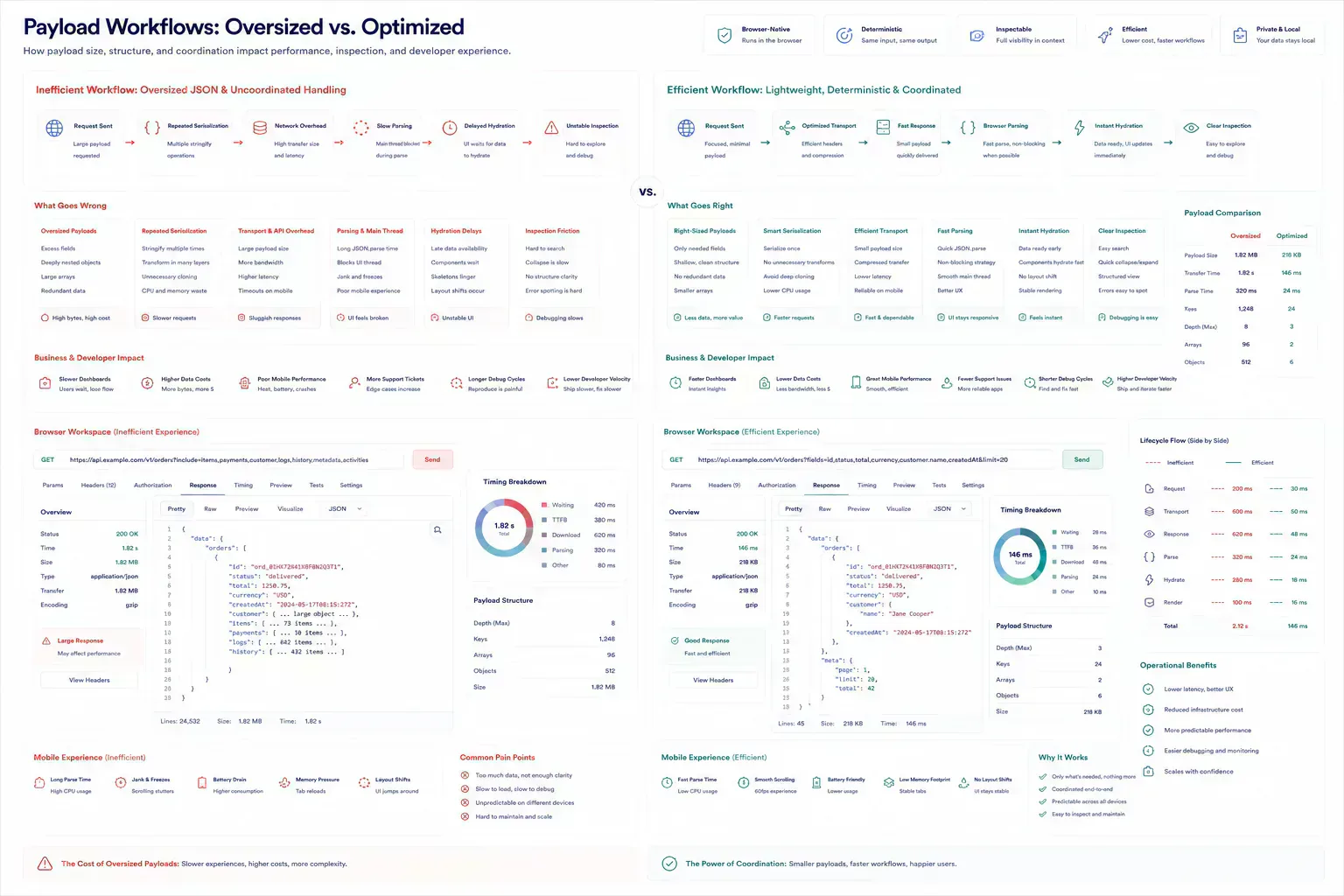
Large payloads affect transfer time, parsing cost, logging, retries, and frontend rendering. The bloat often comes from full records passed where summaries would work, repeated metadata, unbounded arrays, or base64 strings embedded inside JSON.
When JSON is part of a larger upload or API test bundle, File Size Analyzer helps expose whether payload size is part of the failure.
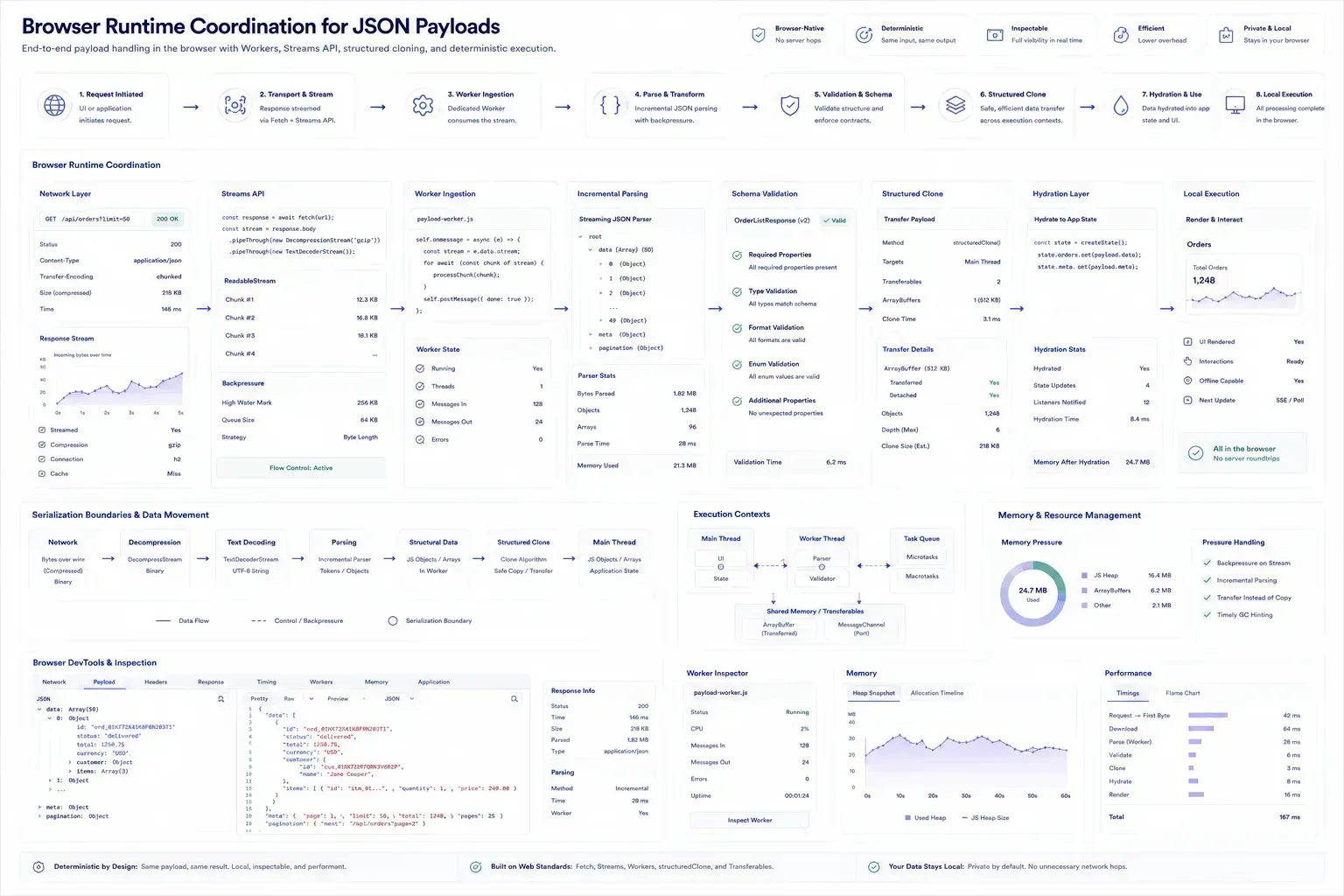
The browser pays for payload bloat too. A large response can delay inspection, stall a debugging panel, increase memory pressure, or make hydration feel sluggish in an admin view. Repeated serialization and structured cloning can add more friction when the same oversized object moves between the UI, a worker, and a log viewer.
Large JSON also changes how the inspection pipeline should be built. Streaming reads, chunked upload checks, ArrayBuffers for raw payload handling, and Worker-based parsing can keep the interface responsive, but only if the workflow is designed around those boundaries. Loading everything into one visible tree is often the slowest way to understand a large response.
Incremental parsing is not always available in the clean shape developers want, but the workflow can still avoid doing everything at once. Read the payload in stages, summarize before expanding, and move expensive inspection away from the main interaction path when the sample is large enough to make the UI hesitate.
async function inspectJsonPayload(file: File) {
  const text = await file.text()
  const bytes = new TextEncoder().encode(text).byteLength
  const parsed = JSON.parse(text)

  return {
    bytes,
    topLevelKeys: Object.keys(parsed).length,
    isArray: Array.isArray(parsed)
  }
}
Keep the Failure Shape, Remove the Noise
Tiny examples hide performance issues. Full production dumps hide intent. The useful middle ground is a representative sample with sensitive values removed, unnecessary fields reduced, and edge cases preserved.
That sample should show the behavior under test: missing values, empty arrays, large lists, escaped JSON, or schema version differences. Clean does not mean sanitized into uselessness.
Representative data should also preserve lifecycle behavior. If the issue appears only with nested arrays, pagination metadata, large text fields, or escaped JSON strings, keep that shape. Removing the part that creates parsing overhead makes the sample easier to read but less useful.
This is where over-cleaning creates its own bug. A small tidy sample can pass review while the real response still causes delayed hydration, slow table rendering, or repeated response retries in the dashboard that actually uses it.
Parsing Passed, Inspection Still Stalls
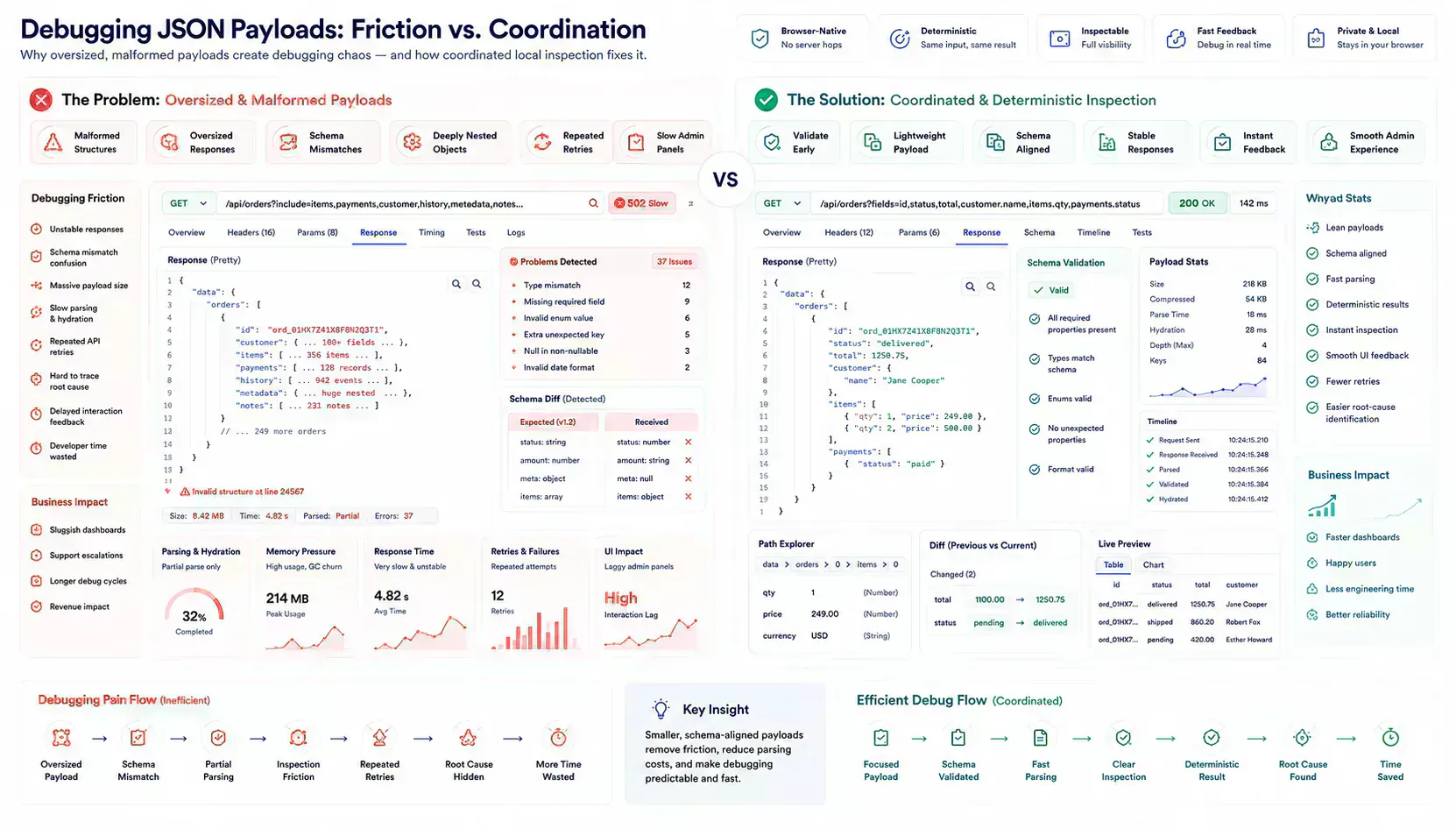
Teams often format without validating, delete fields without checking consumers, treat null and missing as equivalent, or paste production secrets into shared tickets. Another common failure is debugging frontend state when the API payload itself is inconsistent.
A cleanup workflow should preserve meaning while reducing ambiguity. The goal is not polished indentation. The goal is a payload that can be trusted during review.
Another failure is ignoring serialization boundaries. A payload may parse correctly but still create slow browser behavior when it is repeatedly stringified, cloned into a Worker, expanded in a JSON tree, or hydrated into a dense UI. That is not a micro-optimization concern. It changes how debugging feels.
The rough edge is usually visible during review. Someone expands a nested node, the inspector pauses, the page feels stuck, and the discussion shifts from the API issue to the debugging tool itself.
| Payload Behavior | Browser Cost | Workflow Consequence |
|---|---|---|
| Large nested response | Parsing and inspection tree expansion | Debugging session slows before the API issue is clear |
| Repeated stringify and clone | Serialization churn across UI and Worker boundaries | Interaction feels slower than the network trace suggests |
| Malformed shared sample | Syntax failure before contract review | Backend and frontend review starts from different artifacts |
Handoff Evidence for Frontend, Backend, and QA
A good handoff includes the endpoint, method, expected schema, cleaned sample, known edge case, payload size, and the observed failure. That gives frontend, backend, and QA reviewers the same artifact.
Browser-native utilities are useful here because the data can be inspected locally before it enters chat, tickets, or external debugging systems. The first useful answer happens close to the payload, before transport and review overhead accumulate.
That does not mean every payload should be processed entirely in one main-thread pass. Heavy samples should be treated like other browser-side artifacts: parse what is needed, preserve the original when useful, and avoid repeated serialization unless the workflow needs it.
The Debugger Freezes Before the Bug Is Clear
The failure pattern behind cleaning messy JSON for API performance and reliability is usually mundane. Teams do not need dramatic incidents to lose time. A malformed payload reaches an API review. A response inspector freezes on a deeply nested object. A mobile debug session degrades because the payload is too large to inspect comfortably. A dashboard hydrates slowly because the API returns full records where summaries would work.
Practical authority comes from naming those small breaks clearly. They are the details that show the workflow has been tested against real handoffs rather than described from a distance.
For developer workflows, the useful lens is payload ownership: endpoint, schema, sample, size, edge case, consumer, and lifecycle boundary.
Tool Links Belong Where the Payload Fails
This topic belongs inside a broader browser-native workflow, not a standalone formatting habit. Local preparation, payload review, schema validation, metadata alignment, URL review, and content clarity all become useful when they appear at the point where the reader needs them.
A payload issue can route from formatting to schema validation to size inspection. A media issue can route to compression or dimensions. A route issue can route to redirect or canonical review. The next step should feel obvious from the workflow context, not inserted as a tool list.
For API debugging, the natural chain is format, validate, reduce, measure, then hand off. If the payload is still too heavy to inspect comfortably, size and structure are part of the defect report, not side notes.
One-Off Formatting Does Not Survive Review
Strong implementation is usually small and consistent. Check the payload before handoff. Preserve the processing boundary. Keep schema, sample, and observed behavior aligned. Validate repeated failure modes automatically where possible. Use representative examples rather than ideal samples.
That approach keeps the article grounded and gives readers a repeatable way to apply the topic in their own workflows. It also keeps JSON cleanup tied to API behavior instead of turning it into formatting theater.
It also keeps browser execution honest. A cleanup workflow that freezes on the same oversized sample it is supposed to diagnose has moved the problem rather than reduced it.
Schema Drift Usually Moves With the Ticket
The handoff is where many workflow problems become visible. A file reaches a CMS before its size is understood. A route is linked before redirect behavior is clean. A draft reaches distribution before the headline matches the article. A component enters a release before responsive behavior has been tested with real content.
The practical answer is not to add process everywhere. It is to add the right check before the artifact leaves the person who can still fix it quickly. That check should be small enough to run consistently and specific enough to catch a predictable failure.
For JSON, that check is usually simple. Format the sample, validate the schema, note the payload size, preserve the edge case, and remove sensitive values. If the team skips those steps, the next reviewer has to rediscover the shape from scratch.
Local Inspection Before Another Request Cycle
A local-first lens does not mean every task must stay in the browser. It means the workflow should identify the point where local preparation is cheaper, safer, or clearer than remote processing. That point may be file inspection before upload, schema review before indexing, screenshot compression before publishing, JSON cleanup before API debugging, or headline review before distribution.
When the browser can provide the first useful answer, the workflow becomes easier to operate. The user can correct the artifact while context is still fresh. The team can avoid unnecessary retries. The platform can avoid receiving data it did not need.
The same lens keeps the guidance specific. It forces a boundary: before upload, before deployment, before indexing, before sharing, before publication, or before a remote system receives sensitive context. Once that boundary is clear, the article can stay useful without padding or keyword repetition.
For API workflows, that boundary is often before the payload leaves the browser. A local formatter, validator, or size check can prevent another request cycle, another ticket comment, or another oversized response retry.
The economics are plain. Every avoidable request sends the same uncertainty through transport, parsing, logging, and review again. Local cleanup reduces that loop before it becomes normal operating friction.
Shared Assumptions Fail Under Real Payload Size
Real workflows have device limits, platform limits, team handoffs, old assets, inconsistent samples, and deadlines. Good guidance should survive those constraints. It should not assume perfect data, perfect network conditions, or a team with unlimited time to inspect every artifact manually.
That is why small browser-native checks matter. They give teams a way to reduce uncertainty while the artifact is still close to the source. The result is not a perfect process. It is a more reliable path from local preparation to the next system.
JSON payloads stress those constraints quickly. A response that looks acceptable on a workstation can be painful on a phone. A nested object that expands quickly in one inspector can stall another. A logging path that stringifies the same data repeatedly can make the app feel slower than the network trace suggests.
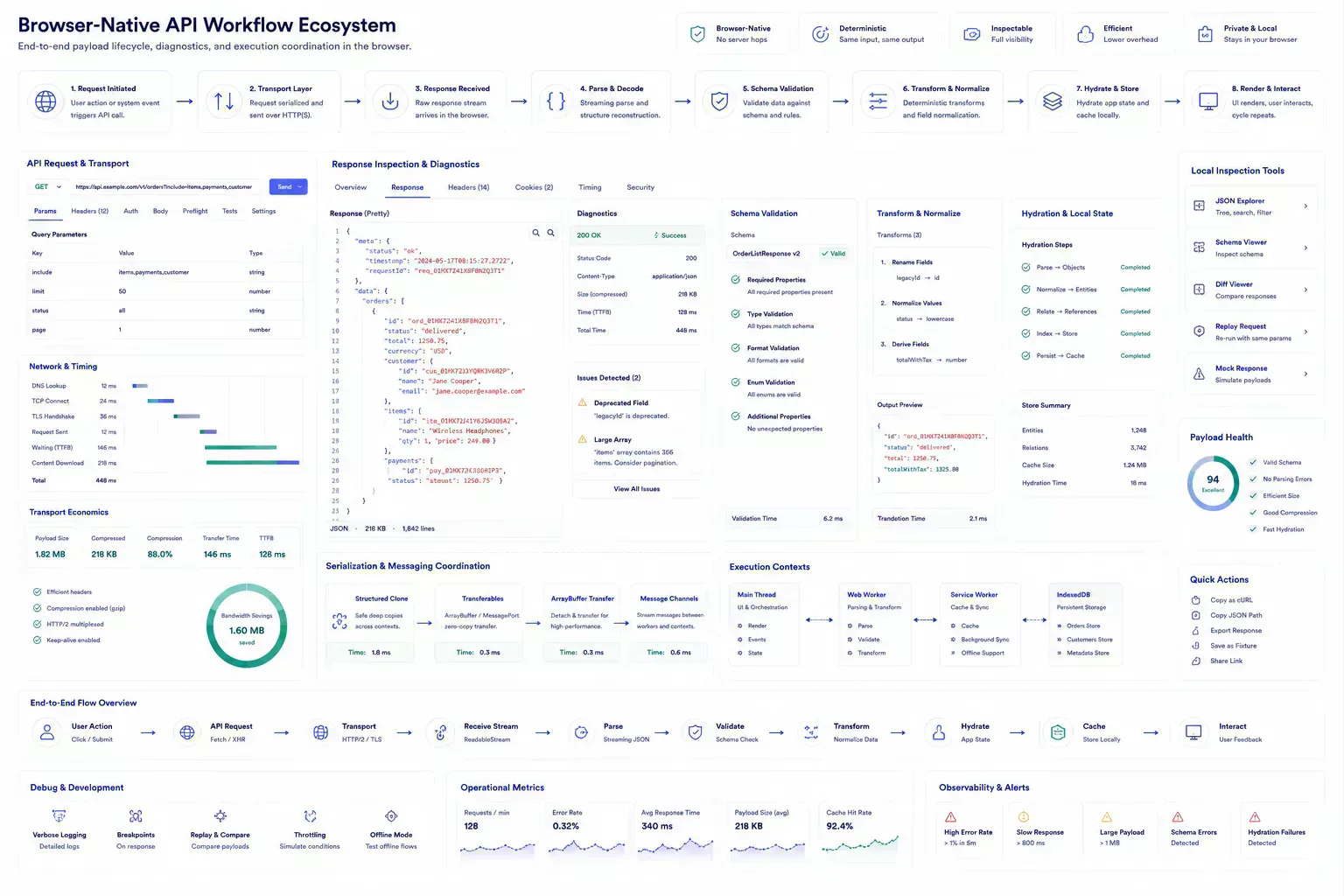
Leave the Sample the Next Reviewer Can Trust
The useful documentation is short. Name the artifact, the destination, the check that was run, and the risk that remains. If a file was compressed, record that. If a redirect was verified, record the final destination. If a payload was cleaned, keep the representative sample. If a draft was adjusted for tone or accessibility, preserve the reason.
This creates continuity without turning the workflow into a report. The next person does not need to repeat the same diagnostic step, and the team has enough context to understand why the payload is ready for the next system.
That context helps future maintenance because the reason for the cleanup stays attached to the workflow rather than hidden in chat history. During API reviews, schema migrations, support investigations, and dashboard debugging, a short note can prevent the next maintainer from treating the sample as arbitrary.
This is where payload quality and operational maintenance meet. The article records the reason for the workflow, and the tool ecosystem provides the checks that keep the workflow practical across future updates.
Stable Payloads Shorten the Debug Loop
JSON cleanup improves API reliability because it removes ambiguity before debugging starts. Format the payload, validate the contract, reduce unnecessary weight, preserve edge cases, and only then decide whether the bug belongs in frontend logic, backend handling, or the data itself.
The operational value is broader than tidy formatting. A stable payload lifecycle reduces transport overhead, browser inspection friction, serialization churn, and review confusion across API workflows.
Tools Referenced By Topic
API Payload Builder
Visually construct complex JSON payloads for API requests with dynamic keys.
JSON Cleaner
Sanitize JSON by removing nulls, empty strings, and sorting keys alphabetically.
JSON Schema Compliance
Validate your JSON objects against standard schemas using the high-performance AJV engine locally.
Related Reading
Apr 18, 2026 • 10 min
Building a Custom Developer Toolbox with Browser Utilities
A practical guide to assembling browser-native developer workflows for formatting, validation, URL checks, payload preparation, security review, and deployment preflight.
Feb 27, 2026 • 12 min
Regex Workflows for Bulk File Renaming
A practical developer guide to regex-based filename cleanup, batch renaming safety, pattern testing, media handoffs, and repository asset hygiene.
Jan 28, 2026 • 10 min
A Pre-Deployment Checklist for Web Developers
A practical pre-deployment workflow for web developers covering routes, metadata, redirects, assets, payloads, environment variables, security headers, and validation checks.