
Developer
A Pre-Deployment Checklist for Web Developers
A practical pre-deployment workflow for web developers covering routes, metadata, redirects, assets, payloads, environment variables, security headers, and validation checks.
A Pre-Deployment Checklist for Web Developers
A practical pre-deployment workflow for web developers covering routes, metadata, redirects, assets, payloads, environment variables, security headers, and validation checks.

Pre-deployment issues usually appear as small misses: an environment variable points at staging, a canonical URL is wrong, a payload is too large, a redirect chain survives migration, or a screenshot added to a page shifts layout on mobile.
None of these feels like architecture during implementation. They become architecture when the release reaches production and the team has to debug across build logs, browser behavior, SEO tooling, and support reports.
A useful pre-deployment checklist is not a long ritual. It is a focused review of the things most likely to break after handoff. The timing matters: the earlier a runtime problem is found in the artifact lifecycle, the cheaper it is to fix.
Quick Answer
A pre-deployment checklist should catch route, metadata, asset, payload, browser-runtime, cache, and environment issues before production turns small misses into cross-team debugging.
The Release Surface Extends Into the Browser
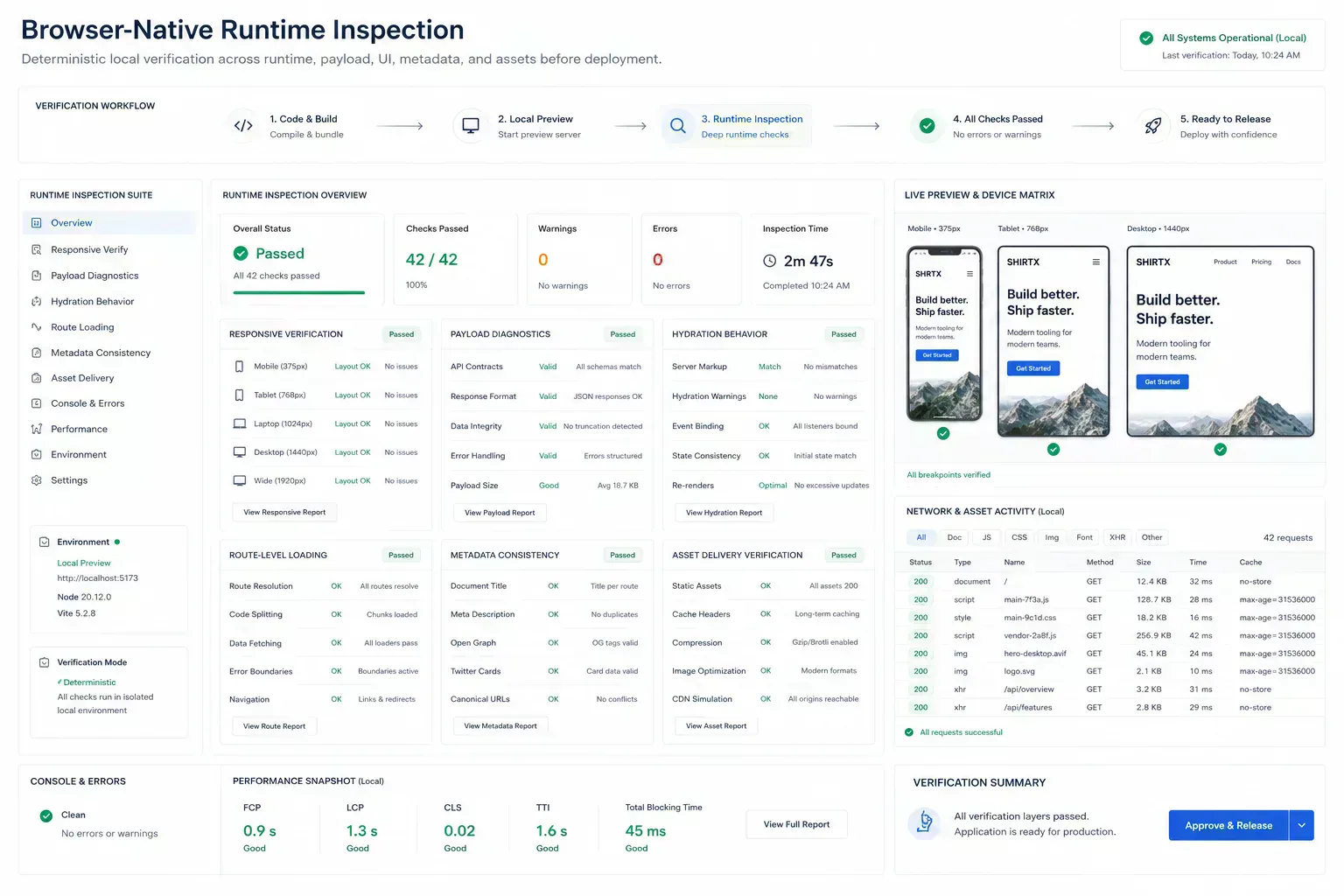
Confirm which work runs in the browser, which work runs on the server, and which work depends on third-party systems. A route can pass local tests while still failing because environment-specific behavior was never checked.
For browser-native tools, also verify that heavy work does not block interaction. Parsing, compression, and file inspection should provide clear feedback and predictable failure states. Route-level loading, hydration behavior, and client-only runtime assumptions need real browser checks beyond build success.
Stale Metadata Survives the Deploy
Before deployment, check canonical URLs, redirects, Open Graph images, Twitter cards, schema images, and sitemap output. These surfaces shape search and social previews long after the code deploys.
Tools such as Redirect Chain Checker, Canonical URL Generator, and SERP Preview Tool support this review when route changes touch discovery.
Metadata failures are easy to miss because the page can look correct. The preview can still be stale, the schema image can still point to an old asset, and caches can preserve the wrong version long enough to confuse release review.
Asset Mismatch Becomes Patch Work
Images and PDFs often enter late in the release. That is why they cause avoidable regressions: large PNG screenshots, inconsistent dimensions, missing alt text, or oversized PDFs linked from support pages.
Use Image Dimension Checker, Image Compressor, Image to WebP Converter, and File Size Analyzer before assets reach the build.
This is more than a performance step. Asset mismatches create runtime review noise: a screenshot shifts mobile layout, a CMS rejects an upload after copy is approved, or a support PDF becomes the reason for a late patch.
Structured Data Can Lag Behind the Interface
A page can render correctly while metadata is stale. Check title uniqueness, description alignment, schema type, image resolution, and visible content. If a tool changed positioning, the structured data should not describe the old workflow.
Content validation matters because search-facing pages are part of the product. A vague or outdated description can create user expectations the tool no longer matches.
Structured data is also release state. If the visible article, featured image, OG image, and schema image disagree, the deployment is not clean even when the route loads.
CI Should Not Discover the Obvious Miss
Pre-deployment work should catch predictable issues before CI becomes the only safety net. Format JSON fixtures, validate headers, inspect payload size, normalize filenames, and confirm example URLs with real values.
For developer handoffs, JSON Formatter & Validator, HTTP Header Parser, Regex Tester, and Filename Normalizer can reduce review friction.
The local pass should be boring and early. If a malformed payload or unsafe filename reaches deployment-night debugging, the checklist failed at the wrong point in the artifact lifecycle.
{
  "route": "/tools/example",
  "checks": ["metadata", "schemaImage", "payloadSize", "mobileLayout"],
  "runtime": {
    "hydrationChecked": true,
    "cacheVersionVisible": true
  }
}
Checklists Without Owners Turn Into Guesswork
A checklist without ownership becomes decorative. Assign each review item to the person closest to the failure mode: frontend for layout and metadata, content for copy and images, SEO for canonical behavior, backend for API contracts, and release owners for environment checks.
The output should be short: what changed, what was checked, what risk remains, and what should be watched after deploy.
Ownership matters after release too. If a cache invalidation issue, mobile layout break, or metadata mismatch appears, the team should know who can verify the runtime state without reconstructing the whole deployment.
After Distribution, Small Bugs Become Cross-Layer Debugging
The failure pattern behind a pre-deployment checklist for web developers is usually mundane. Teams do not need dramatic incidents to lose time. A stale canonical, oversized PNG, malformed JSON sample, unclear alt text, overbroad regex, or missing schema image can be enough to create avoidable review loops.
Practical authority comes from naming those small breaks clearly. They are the details that show the workflow has been tested against real handoffs rather than described from a distance.
For developer workflows, the useful lens is release ownership: route, payload, header, filename, asset, component, metadata, cache behavior, or deployment setting.
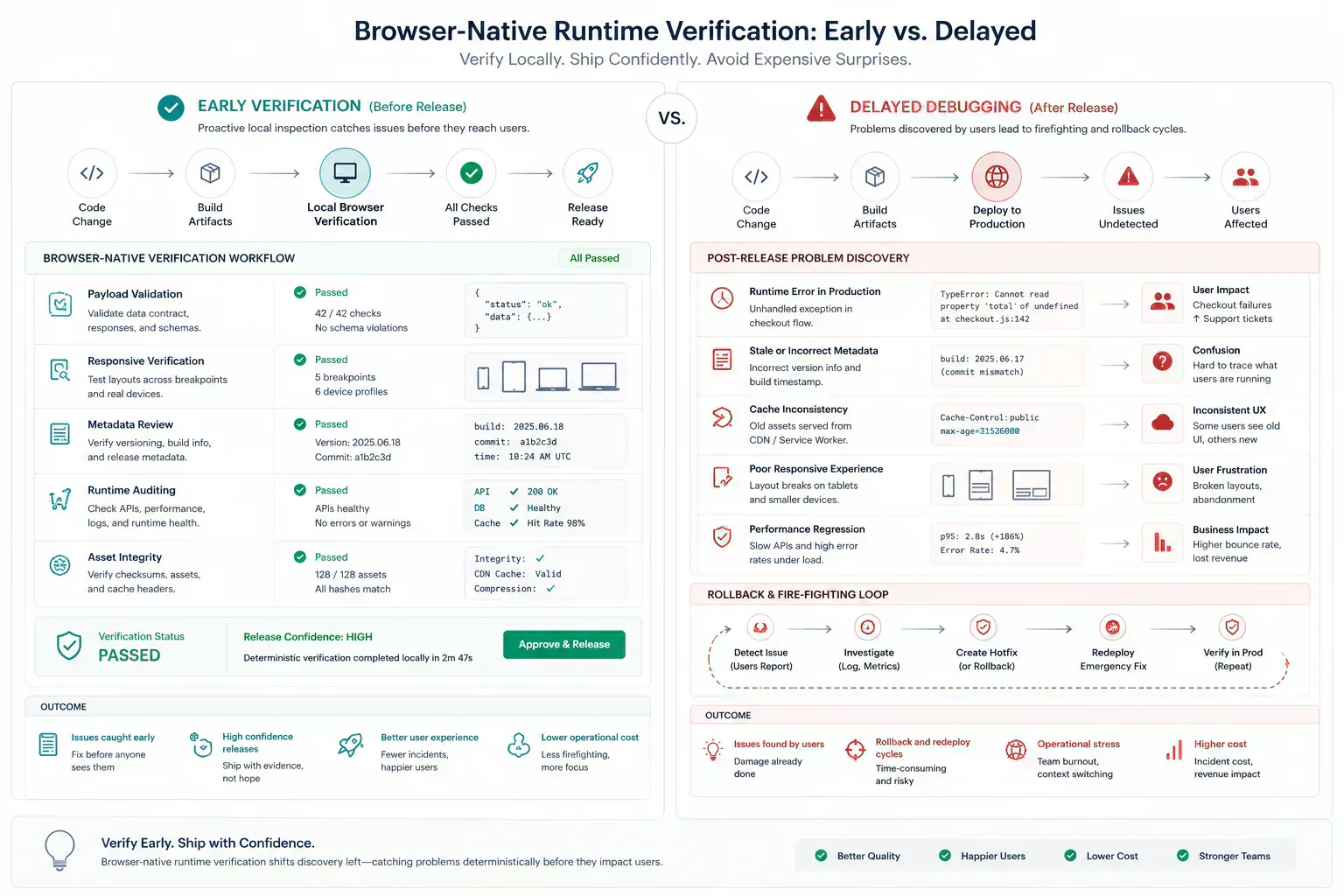
The expensive version is delayed discovery. A broken mobile layout after release creates patch pressure. A stale preview creates support confusion. A route that hydrates differently in production sends the team back through logs, browser state, and build output at the same time.
| Issue | Found Before Release | Found After Distribution |
|---|---|---|
| Wrong OG image | Metadata reference is corrected with the page open | Crawler cache and support screenshots disagree |
| Oversized asset | Payload is compressed before the build | Patch waits on a new export and review loop |
| Hydration mismatch | Route is checked in a real browser state | Debugging crosses logs, cache, and client runtime |
Use Tools at the Failure Surface
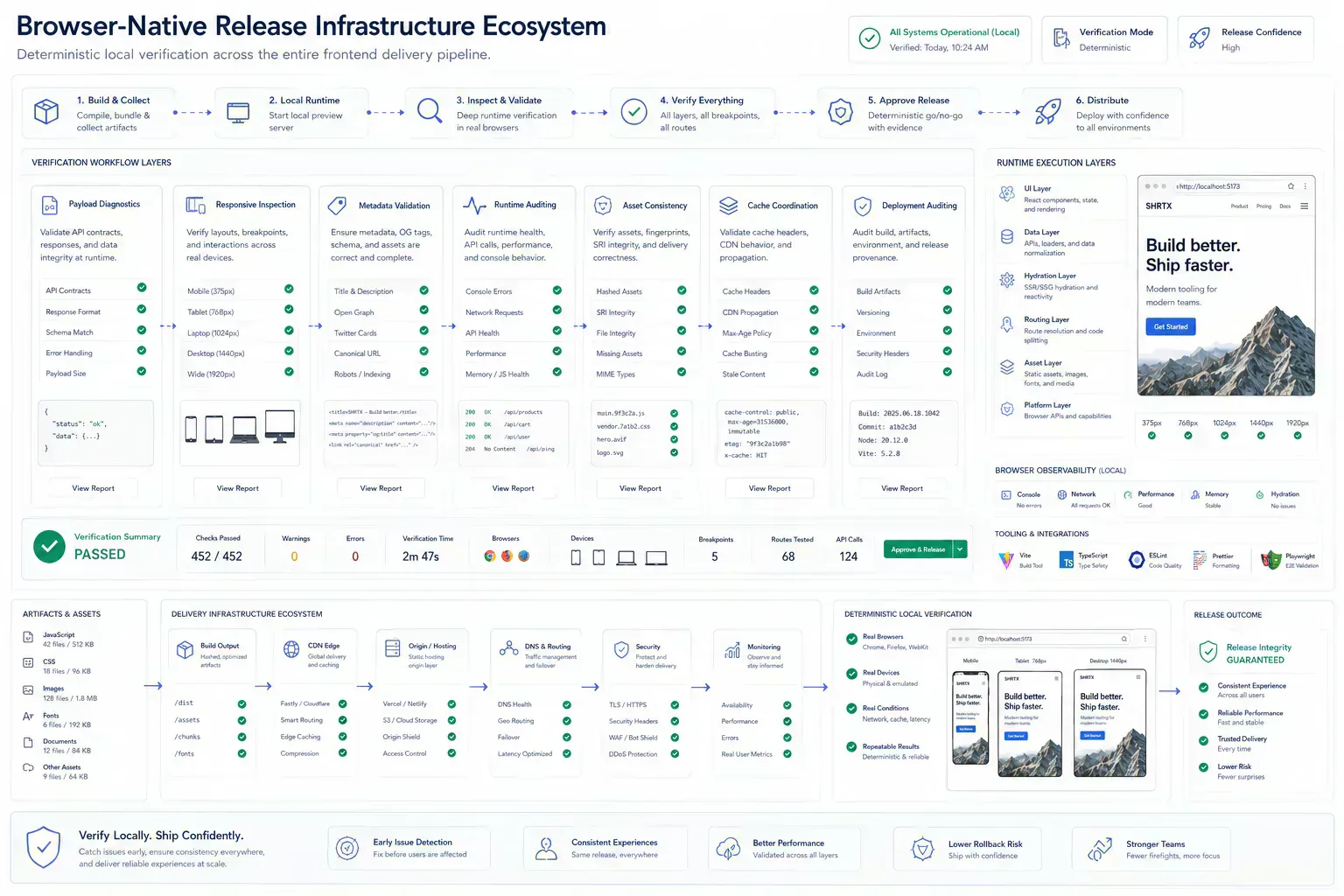
This topic belongs inside a broader browser-native system: local preparation, lightweight diagnostics, media hygiene, metadata alignment, URL review, runtime inspection, and content clarity. The ecosystem is useful only when those tools appear at the point where the reader needs them.
A payload issue can route to file-size inspection. A media issue can route to compression or dimensions. A route issue can route to redirect or canonical review. A schema issue can route to validation before indexing. The next step should feel obvious from the workflow context, not added as a utility list.
Trust the Release Only After the Artifact Holds Up
Strong implementation is usually small and consistent. Check the artifact before handoff. Preserve the processing boundary. Keep metadata aligned with visible content. Validate repeated failure modes automatically where possible. Use real examples rather than ideal samples.
That approach keeps the article grounded and gives readers a repeatable way to apply the topic in their own workflows. It also keeps deployment review tied to runtime behavior instead of turning the checklist into a document that nobody trusts under pressure.
The Fix Is Cheapest Before the Handoff
The handoff is where many workflow problems become visible. A file reaches a CMS before its size is understood. A route is linked before redirect behavior is clean. A draft reaches distribution before the headline matches the article. A component enters a release before responsive behavior has been tested with real content.
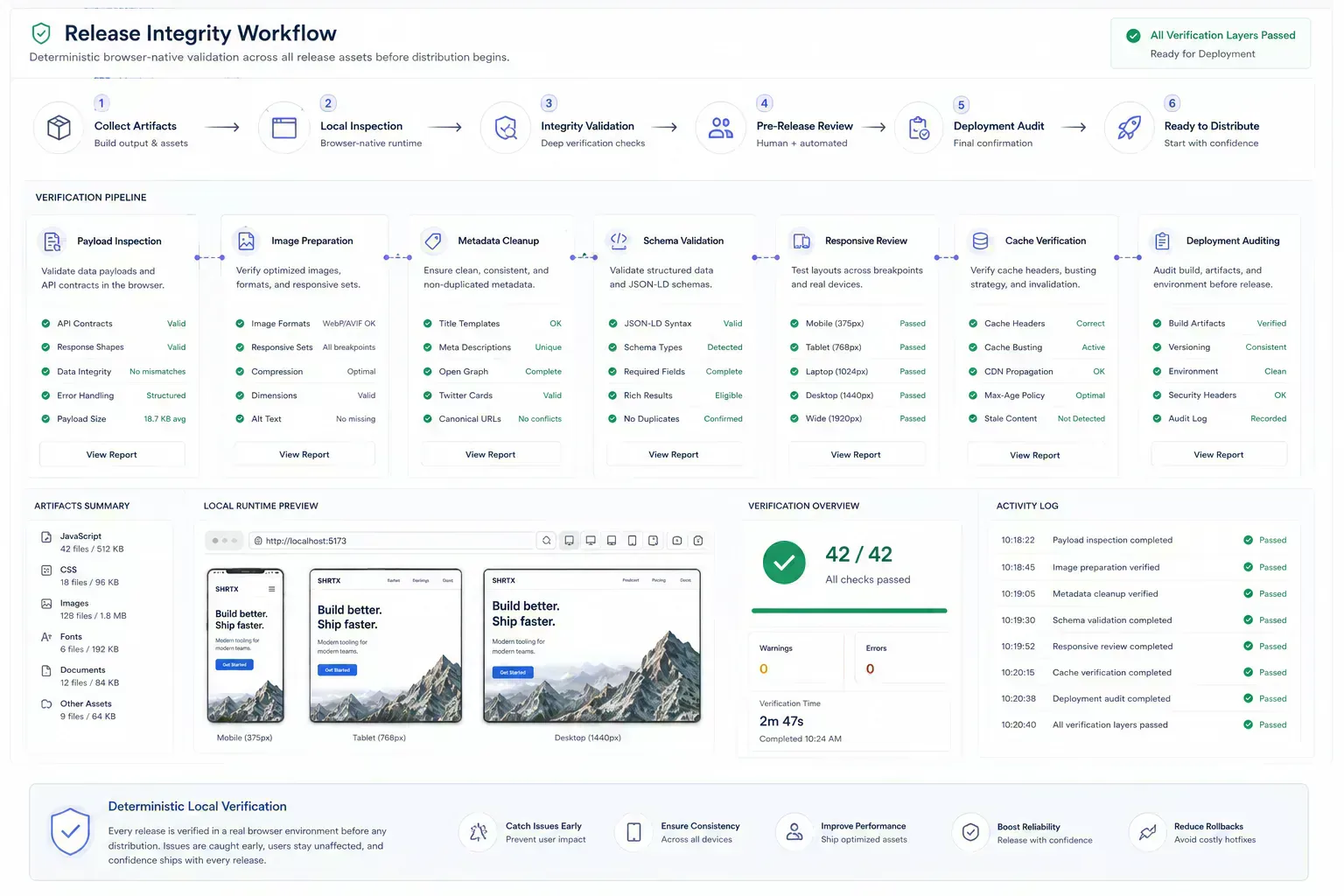
The practical answer is not to add process everywhere. It is to add the right check before the artifact leaves the person who can still fix it quickly. That check should be small enough to run consistently and specific enough to catch a predictable failure.
For deployments, that means checking the runtime surface, not just the source diff. Open the route, test the responsive state, inspect the preview metadata, confirm payload size, and verify that asset delivery matches the version being released.
Browser-Local Evidence Before Cache and Crawlers
A local-first lens does not mean every task must stay in the browser. It means the workflow should identify the point where local preparation is cheaper, safer, or clearer than remote processing. That point may be file inspection before upload, schema review before indexing, screenshot compression before publishing, JSON cleanup before API debugging, or headline review before distribution.
When the browser can provide the first useful answer, the workflow becomes easier to operate. The user can correct the artifact while context is still fresh. The team can avoid unnecessary retries. The platform can avoid receiving data it did not need.
The same lens keeps the guidance specific. It forces a boundary: before upload, before deployment, before indexing, before sharing, before publication, or before a remote system receives sensitive context. Once that boundary is clear, the article can stay useful without padding or keyword repetition.
Before deployment is one of those boundaries. Browser-local audits can catch payload, asset, metadata, and responsive issues before distribution begins and caches make the wrong state harder to reason about.
Mobile States and Cache Rules Need Shared Expectations
Real workflows have device limits, platform limits, team handoffs, old assets, inconsistent samples, and deadlines. Good guidance should survive those constraints. It should not assume perfect data, perfect network conditions, or a team with unlimited time to inspect every artifact manually.
That is why small browser-native checks matter. They give teams a way to reduce uncertainty while the artifact is still close to the source. The result is not a perfect process. It is a more reliable path from local preparation to the next system.
Deployment constraints are concrete. Mobile layouts can break after a content swap. Cache behavior can hide whether a fix is live. A page can pass build validation and still deliver the wrong OG image. Runtime verification is how teams find those issues before users do.
Runtime Drift Makes Rollback Pressure Worse
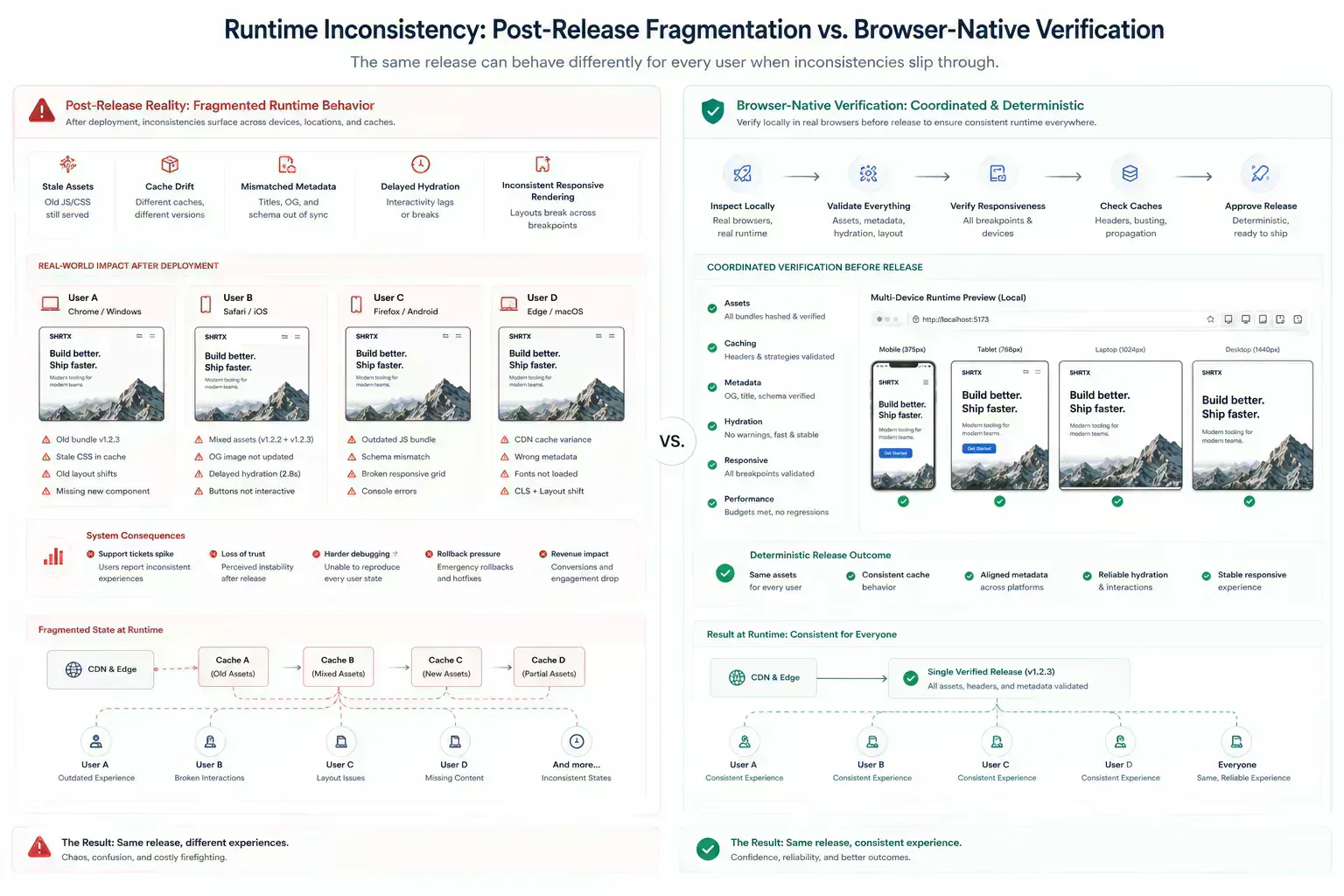
Runtime drift rarely starts as a large failure. It usually appears as a stale cache, a preview image that does not match the page, a responsive state that differs from review screenshots, or a client-side route that behaves differently after hydration.
That drift damages release confidence because nobody is sure which layer is wrong. The code may be deployed, the browser may still hold old assets, and the metadata crawler may have seen a different state.
Leave the Note Before the Patch Thread Starts
The useful documentation is short. Name the artifact, the destination, the check that was run, and the risk that remains. If a file was compressed, record that. If a redirect was verified, record the final destination. If a payload was cleaned, keep the representative sample. If a draft was adjusted for tone or accessibility, preserve the reason.
This creates continuity without turning the workflow into a report. The next person does not need to repeat the same diagnostic step, and the team has enough context to understand why the artifact is ready for release.
That context helps future maintenance because the reason for the check stays attached to the workflow rather than hidden in chat history. During patch reviews, metadata refreshes, asset replacements, and cache investigations, a short note can prevent the next maintainer from treating the release state as guesswork.
This is where release integrity and operational maintenance meet. The article records the reason for the workflow, and the tool ecosystem provides the checks that keep deployment review practical across future updates.
Release Readiness Is a Runtime Boundary
A strong pre-deployment checklist is a release boundary, not a productivity ritual. It keeps route behavior, metadata, assets, payloads, cache behavior, and browser execution visible before production makes small misses expensive.
Deployment quality depends on timing. The earlier runtime problems are found relative to the artifact lifecycle, the less likely they are to become rollback loops, post-release patches, or support-driven debugging.
Tools Referenced By Topic
Related Reading
Apr 18, 2026 • 10 min
Building a Custom Developer Toolbox with Browser Utilities
A practical guide to assembling browser-native developer workflows for formatting, validation, URL checks, payload preparation, security review, and deployment preflight.
Feb 9, 2026 • 12 min
Cleaning Messy JSON for API Performance and Reliability
A developer workflow guide to JSON cleanup, validation, schema alignment, payload size, and debugging API data before production handoff.
Mar 16, 2026 • 10 min
Identifying CSS Bloat in Modern UI Components
A frontend workflow guide to finding CSS bloat, reducing unused styles, controlling Tailwind utility growth, and keeping component systems maintainable.