
Developer
Identifying CSS Bloat in Modern UI Components
A frontend workflow guide to finding CSS bloat, reducing unused styles, controlling Tailwind utility growth, and keeping component systems maintainable.
Identifying CSS Bloat in Modern UI Components
A frontend workflow guide to finding CSS bloat, reducing unused styles, controlling Tailwind utility growth, and keeping component systems maintainable.

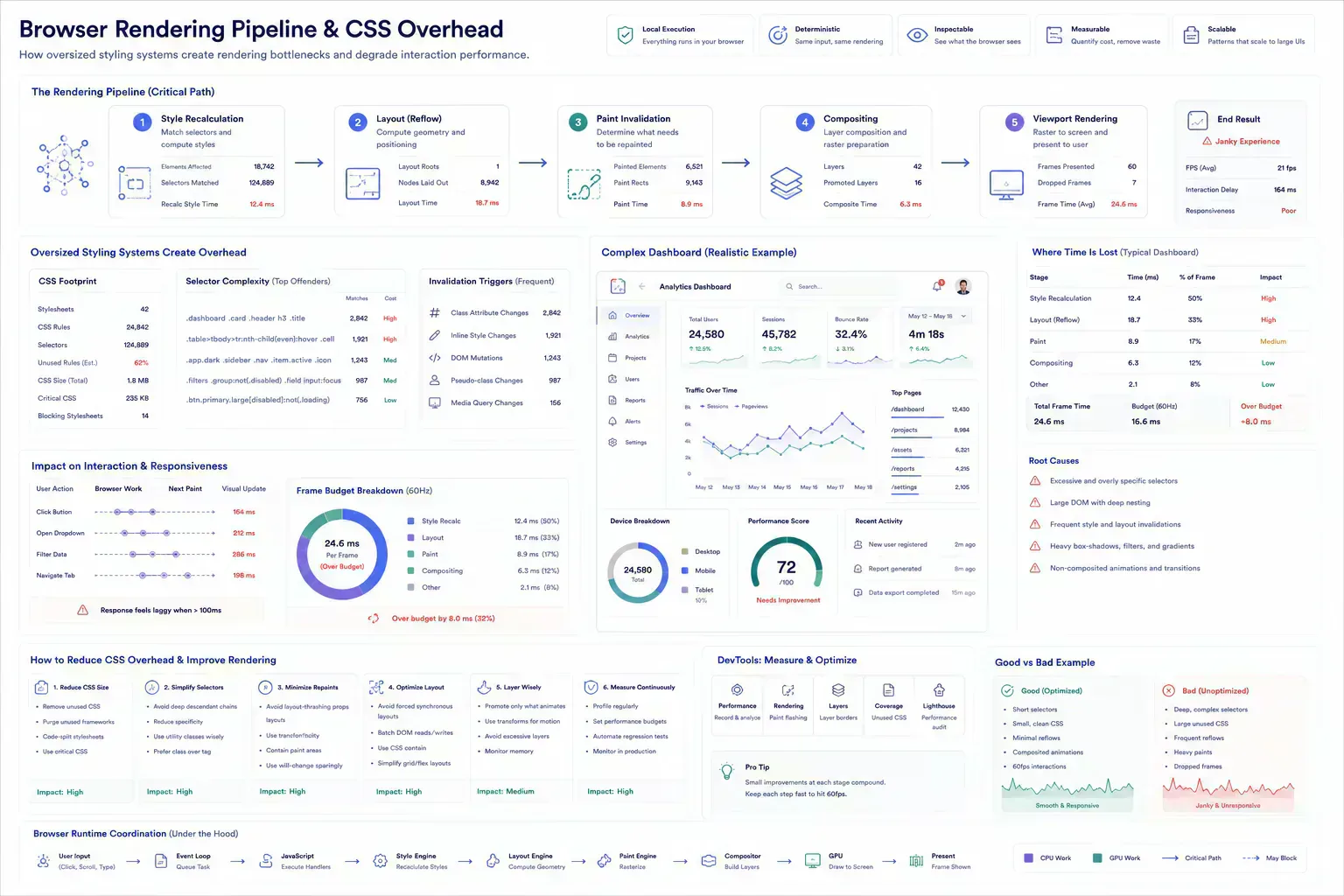
CSS bloat often hides inside good-looking components. A button ships with five variants nobody uses. A dashboard card carries layout rules for three contexts. A marketing section imports animation styles into an admin surface. The UI still works, but the styling system gets harder to reason about.
The cost extends beyond bytes. Bloated CSS slows iteration because developers hesitate to change rules they no longer understand. It also changes how the browser behaves: more style recalculation, more paint invalidation, more layout work, and more chances for interaction feedback to feel late.
A useful CSS audit connects stylesheet size to component ownership, responsive behavior, rendering cost, and design-system discipline.
Quick Answer
CSS bloat is a component-system maintenance signal. Audit ownership, responsive rules, unused variants, token drift, route-level style cost, and browser rendering behavior together.
The UI Works, Then the Browser Pays
CSS bloat usually comes from accumulation: abandoned variants, copied utility classes, global overrides, framework defaults, old responsive rules, and styles coupled to content that has changed.
In component systems, the bloat often survives because no single page appears broken. The problem is distributed across surfaces. That makes review harder unless the team audits by component and route class.
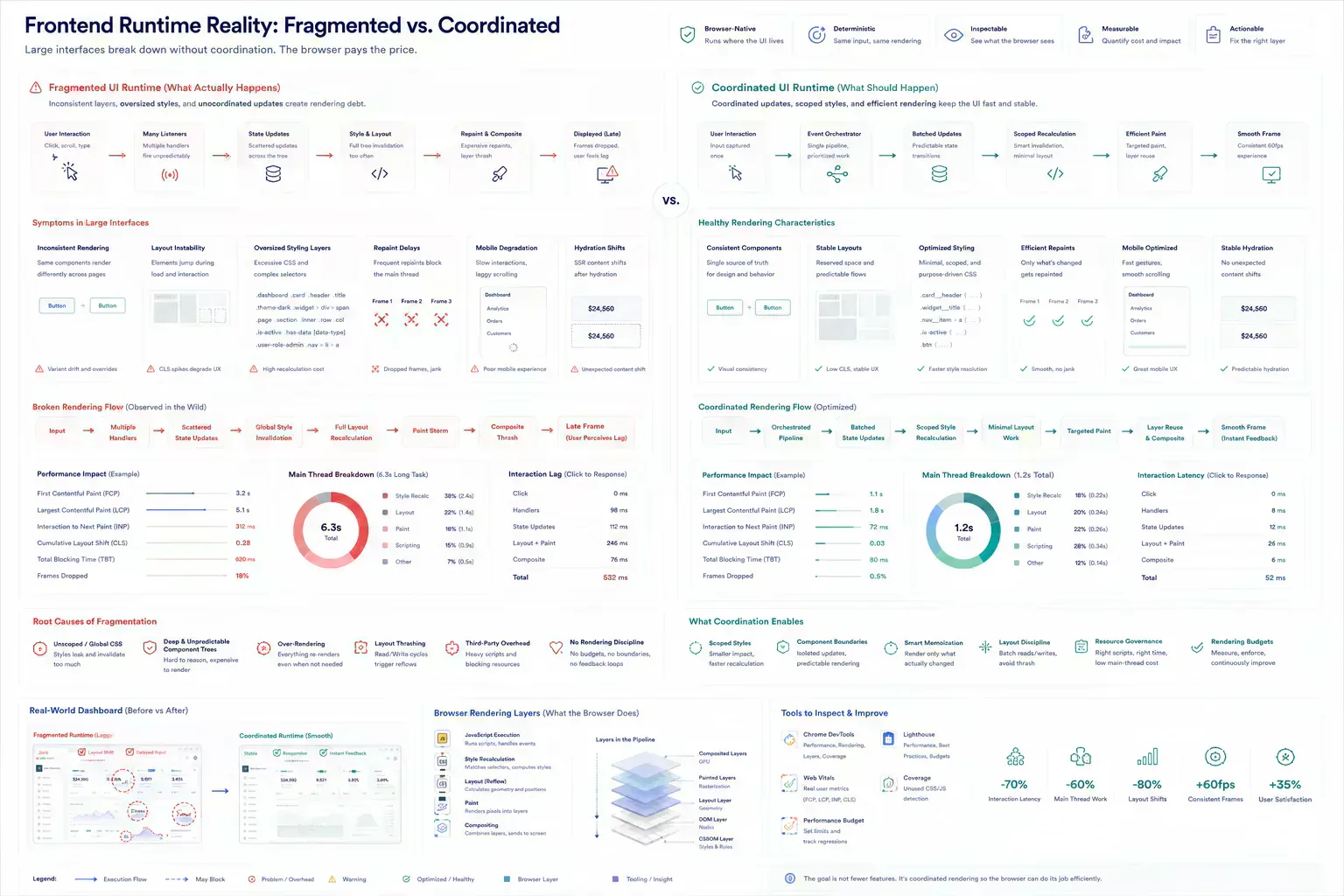
The operational signal is often not a broken layout. It is a dashboard that repaints slowly after filters change, an admin panel that feels sluggish on mobile, or a component that shifts during inspection because too many layout rules are fighting for control.
Breakpoint Drift Starts in Ordinary Cards
Responsive rules can multiply quickly. A card has mobile spacing, tablet grid spans, desktop layout, dark mode, hover states, reduced motion, and print behavior. Some of those rules are valid. Some are leftovers from earlier designs.
Tools such as Bento Grid Builder can help plan responsive card systems before Tailwind classes are committed. The value is catching span and hierarchy decisions before CSS becomes cleanup. In image-heavy dashboards, that planning also protects review workflows because card size, payload weight, and viewport behavior are related problems.
Token Drift Turns Refactors Into Archaeology
Color, spacing, radius, and shadow rules should come from a small set of decisions. When every component invents its own values, the CSS grows and the interface loses coherence.
Color Palette Creator, CSS Gradient Generator, and Color Contrast Checker fit this workflow when visual choices need validation before they become repeated styles.
Token drift also affects rendering consistency. A shadow or blur copied into the wrong surface can increase paint cost across repeated cards, especially in data-heavy interfaces where the same component renders dozens of times.
Look Where Recalc, Layout, and Paint Spike
Start by identifying unused selectors, large utility clusters, duplicate component variants, global overrides, and route-specific styles imported too broadly. Then compare what CSS ships to what the page actually renders.
The audit should include interaction states and breakpoints. Removing a rule that only appears on mobile can create a regression that desktop screenshots will miss.
It should also include runtime behavior. Watch for layout thrashing during resize, hydration states that change spacing after load, hover effects that trigger unnecessary repaint, and route-level CSS that arrives before the component that needs it.
const layoutShifts = []

new PerformanceObserver((list) => {
  for (const entry of list.getEntries()) {
    if (!entry.hadRecentInput) layoutShifts.push(entry.value)
  }
}).observe({ type: "layout-shift", buffered: true })

window.__uiAudit = () => ({
  shiftCount: layoutShifts.length,
  totalShift: layoutShifts.reduce((sum, value) => sum + value, 0)
})
Reused Components Hide Expensive Rules
The common failure is treating CSS size as a build-only problem. Purging unused CSS helps, but it does not fix unclear component ownership or inconsistent design tokens.
Another failure is over-abstracting. A universal card component can become larger than the pages it serves because it tries to support every possible layout. Sometimes two smaller components are cheaper to maintain.
The browser does not care that a component is elegant in the design system. If it causes repeated style recalculation, unstable layout, or expensive compositing in a dense admin view, the cost lands in the workflow. Auditors wait longer. Operators click twice. Mobile users see degraded response first.
Fix the Rule Before Rebuilding the Component
Reduce bloat by route and component, not by deleting rules blindly. Confirm the component contract, remove dead variants, consolidate tokens, isolate heavy visual effects, and verify responsive behavior with real content.
The goal is a styling system that developers can safely modify. Smaller CSS is useful. Clearer CSS is what keeps the system from regrowing the same debt.
For browser-native tools, the audit should also check the surrounding artifact. If a dashboard card is slow because screenshots are heavy, use payload diagnostics before rewriting the component. File Size Analyzer and image preparation workflows belong in the same review path when visual payload affects rendering quality.
Sluggish Dashboards Create Review Friction
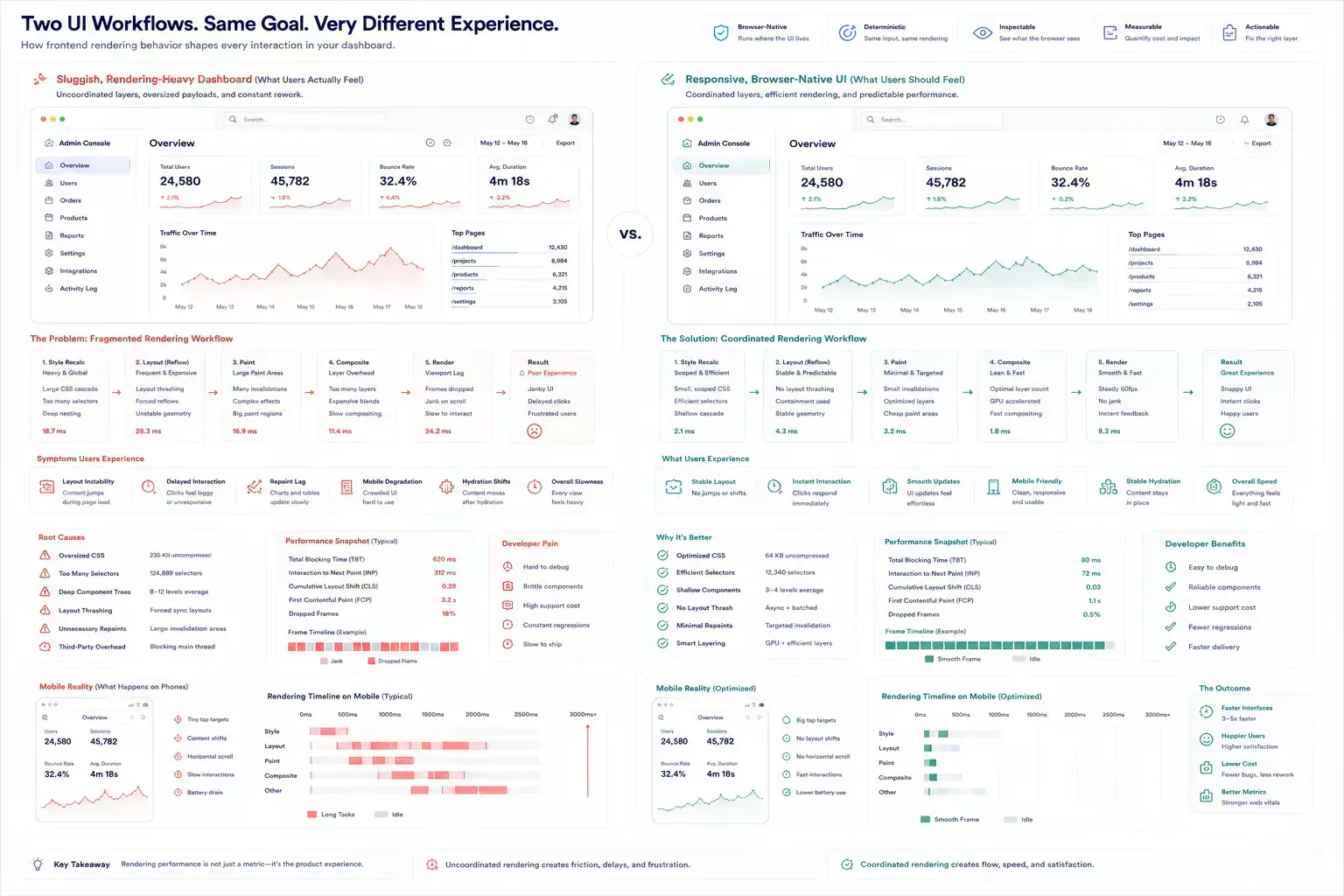
The failure pattern behind identifying CSS bloat in modern UI components is usually mundane. Teams do not need dramatic incidents to lose time. A dashboard repaints slowly during an audit. A mobile admin view collapses into awkward spacing. A route ships a utility cluster copied from a different surface. A component enters review with a stale screenshot and nobody knows whether the problem is CSS, content, or payload weight.
Practical authority comes from naming those small breaks clearly. They are the details that show the workflow has been tested against real handoffs rather than described from a distance.
For developer workflows, the useful lens is rendering ownership: component, route, breakpoint, token, payload, and interaction state.
| Rendering Symptom | Likely CSS Debt | Operational Cost |
|---|---|---|
| Slow filter interaction | Repeated style recalculation across dense cards | Dashboard review feels unreliable |
| Mobile spacing shifts | Breakpoint rules drifted from component contract | QA repeats the same viewport checks |
| Delayed hover or focus feedback | Paint-heavy shadows, blurs, or transitions | Operators lose confidence in interaction state |
Tool Links Belong at the Symptom
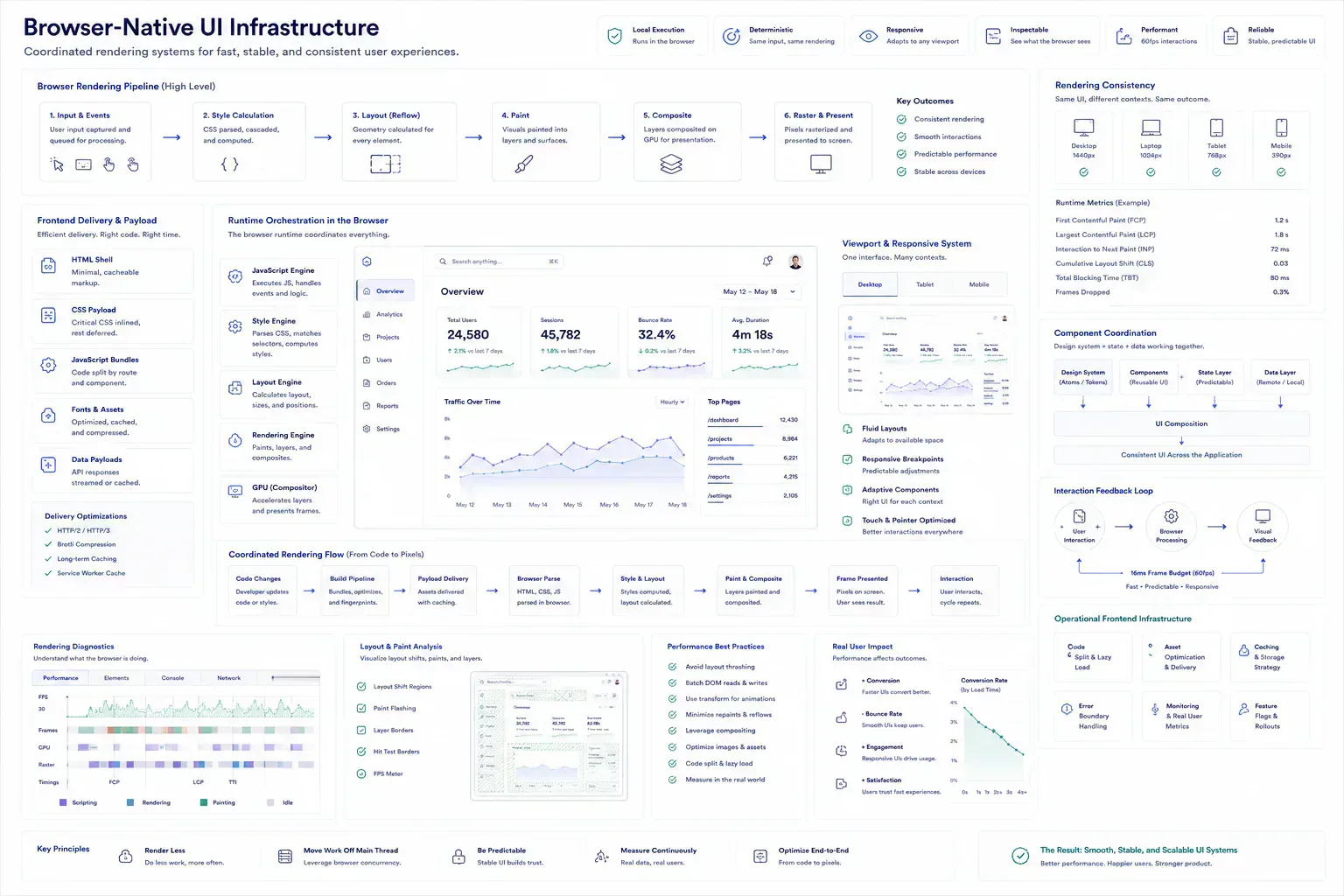
This topic belongs inside a broader browser-native system: local preparation, lightweight diagnostics, media hygiene, metadata alignment, responsive layout review, and content clarity. The ecosystem is useful only when those tools appear at the point where the reader needs them.
A rendering issue can route to responsive layout planning. A payload issue can route to file-size inspection. A media issue can route to compression or dimensions. A route issue can route to redirect or canonical review. The next step should feel obvious from the workflow context, not inserted as a tool list.
Fewer Escape Hatches Means Fewer Surprise Repaints
Strong implementation is usually small and consistent. Check the component before handoff. Preserve the rendering boundary. Keep tokens aligned with visible behavior. Validate repeated failure modes automatically where possible. Use real content, not ideal samples.
That approach keeps the article grounded and gives readers a repeatable way to apply the topic in their own workflows. It also keeps CSS review tied to interaction quality instead of turning it into a bundle-size ritual.
Catch Style Drift Before Release Review
The handoff is where many workflow problems become visible. A file reaches a CMS before its size is understood. A route is linked before redirect behavior is clean. A draft reaches distribution before the headline matches the article. A component enters a release before responsive behavior has been tested with real content.
The practical answer is not to add process everywhere. It is to add the right check before the artifact leaves the person who can still fix it quickly. That check should be small enough to run consistently and specific enough to catch a predictable failure.
For UI components, the check should include rendering behavior. Confirm the route loads only the styles it needs. Test the component with real copy, real counts, and mobile breakpoints. Watch whether interaction feedback feels delayed when the component is placed inside a dense surface.
Inspect Locally While the DOM Still Tells the Truth
A local-first lens does not mean every task must stay in the browser. It means the workflow should identify the point where local preparation is cheaper, safer, or clearer than remote processing. That point may be file inspection before upload, schema review before indexing, screenshot compression before publishing, JSON cleanup before API debugging, or headline review before distribution.
When the browser can provide the first useful answer, the workflow becomes easier to operate. The user can correct the artifact while context is still fresh. The team can avoid unnecessary retries. The platform can avoid receiving data it did not need.
The same lens keeps the guidance specific. It forces a boundary: before upload, before deployment, before indexing, before sharing, before publication, or before a remote system receives sensitive context. Once that boundary is clear, the article can stay useful without padding or keyword repetition.
Hydration Drift and Mobile Pressure Change the Audit
Real workflows have device limits, platform limits, team handoffs, old assets, inconsistent samples, and deadlines. Good guidance should survive those constraints. It should not assume perfect data, perfect network conditions, or a team with unlimited time to inspect every artifact manually.
That is why small browser-native checks matter. They give teams a way to reduce uncertainty while the artifact is still close to the source. The result is not a perfect process. It is a more reliable path from local preparation to the next system.
CSS bloat shows up under those constraints. A component that feels fine on a desktop monitor may degrade on a budget phone. A metadata-heavy dashboard may repaint slowly because every card shares an expensive visual effect. A hydrated route may shift because server and client states disagree about spacing or visibility.
Leave the Rendering Note the Next Refactor Needs
The useful documentation is short. Name the artifact, the destination, the check that was run, and the risk that remains. If a file was compressed, record that. If a redirect was verified, record the final destination. If a payload was cleaned, keep the representative sample. If a draft was adjusted for tone or accessibility, preserve the reason.
This creates continuity without turning the workflow into a report. The next person does not need to repeat the same diagnostic step, and the team has enough context to understand why the component is ready for the next system.
That context helps future maintenance because the reason for the CSS change stays attached to the workflow rather than hidden in chat history. During redesigns, design token migrations, dashboard refreshes, and mobile QA passes, a short note can prevent the next maintainer from treating a rendering decision as accidental.
This is where frontend quality and operational maintenance meet. The article records the reason for the rendering boundary, and the tool ecosystem provides the checks that keep the workflow practical across future updates.
CSS Audits Work When They Protect Runtime Behavior
CSS bloat is a maintenance signal. It shows where component responsibilities, responsive rules, rendering cost, and design tokens have drifted.
The durable fix is not minimal CSS for its own sake. It is a frontend workflow where visual decisions remain traceable, route-level styling stays intentional, and the browser can keep interaction quality stable while the UI ecosystem grows.
Tools Referenced By Topic
CSS Shadow Generator
Visually design complex box shadows and export the CSS code for your projects.
CSS Gradient Generator
Create beautiful linear and radial CSS gradients visually and export the code.
Fluid Typography (Clamp)
Generate responsive font-size CSS using the clamp() function for seamless scaling.
Related Reading
Feb 9, 2026 • 12 min
Cleaning Messy JSON for API Performance and Reliability
A developer workflow guide to JSON cleanup, validation, schema alignment, payload size, and debugging API data before production handoff.
Jan 28, 2026 • 10 min
A Pre-Deployment Checklist for Web Developers
A practical pre-deployment workflow for web developers covering routes, metadata, redirects, assets, payloads, environment variables, security headers, and validation checks.
Apr 18, 2026 • 10 min
Building a Custom Developer Toolbox with Browser Utilities
A practical guide to assembling browser-native developer workflows for formatting, validation, URL checks, payload preparation, security review, and deployment preflight.