
Insights
AI-Generated Content and Search Trust
A practical analysis of search trust, AI-generated content risk, operational authority, workflow specificity, and why generic articles underperform.
AI-Generated Content and Search Trust
A practical analysis of search trust, AI-generated content risk, operational authority, workflow specificity, and why generic articles underperform.

Search trust is not lost because a sentence was generated by a model. It is lost when the page feels detached from the work it claims to explain. The writing is fluent, but the workflow is vague. The definitions are correct, but the review path, artifact constraints, and operational tradeoffs are missing.
AI has made that easier to produce at scale. A draft can fill a page with smooth transitions, generic advice, and tidy summaries while avoiding the parts practitioners actually care about: CMS rejection after upload, stale screenshots in a guide, broken internal links after a slug change, metadata that no longer matches the page, repeated article structure across a cluster, or screenshots that show an older product state.
For technical sites, the answer is not theatrical humanization. It is operational trust formation. The article needs to show how the workflow behaves before it asks a reader, crawler, or retrieval system to trust the explanation.
Quick Answer
AI-generated content earns search trust only when editorial refinement adds real workflow context, failure modes, tradeoffs, source-of-truth boundaries, and useful next actions.
The Gaps Show Up After Upload, Review, Or Handoff
Weak articles often start with definitions, repeat search phrases, and avoid failure modes. They explain what something is without showing where it breaks, who handles it, or what decision the reader needs to make before the artifact moves to the next system.
That gap is visible in topics like file uploads, responsive layouts, deep links, JSON cleanup, cryptographic inspection, and privacy workflows. The article may sound complete while failing to help.
For example, a file-size article that never discusses attachment limits, transfer estimates, image payloads, CMS upload caps, or mobile retry loops is probably not describing the real workflow. A deep-link article that never tests fallback behavior, app-store routing, UTM handling, or mobile browser differences is doing the same thing. The page may be grammatically clean, but the operational model is thin.
Real Workflow Detail Leaves Fewer Hiding Places
Workflow authority names the operational setting. A file-size guide discusses CMS rejection, Slack upload friction, PDF size, image payloads, and transfer estimates. A bento grid guide discusses dashboard density, mobile collapse, equal-weight cards, and Tailwind span decisions. A PGP inspection article names the boundary between viewing key metadata locally and treating a key as trusted for a real communication workflow.
Those details matter because they show that the page understands the work, not just the keyword.
| Page pattern | How trust weakens | Operational repair |
|---|---|---|
| Generic AI article | Repeats definitions and abstract advice | Add artifact type, destination, constraint, and next check |
| Tool mention block | Links tools because they match keywords | Link only when the tool continues the workflow |
| Repeated section rhythm | Signals template-driven production | Vary structure based on the actual workflow pressure |
| Metadata-only update | Visible article changes but previews remain stale | Verify title, description, OG image, schema, and internal links together |
| Search-intent mismatch | Page ranks for a task it does not help complete | Reframe around the decision the reader is trying to make |
Link the Tool Where the Next Action Starts
A tool mention should answer why the reader would move there next. If the article discusses upload payloads, File Size Analyzer may belong because the reader needs local payload evidence before a CMS, email platform, API, or messaging app rejects the file. If the article discusses app routing, Deep Link Builder belongs only when the next workflow step is constructing, comparing, or validating a link path.
Forced links weaken trust because they expose the page’s commercial intent. Contextual links strengthen trust because they continue the workflow.
The same discipline applies to more technical workflows. PGP Key Viewer belongs in a browser-local inspection workflow where the user needs to inspect key metadata before deciding what external trust process comes next. JSON Schema Validator belongs when the article discusses payload review, API debugging, or schema mismatch before integration. Bento Grid Generator belongs when the next step is layout planning, responsive span validation, or dashboard hierarchy review, not when the article merely mentions frontend design.
Smooth Structure Can Expose Thin Operating Knowledge
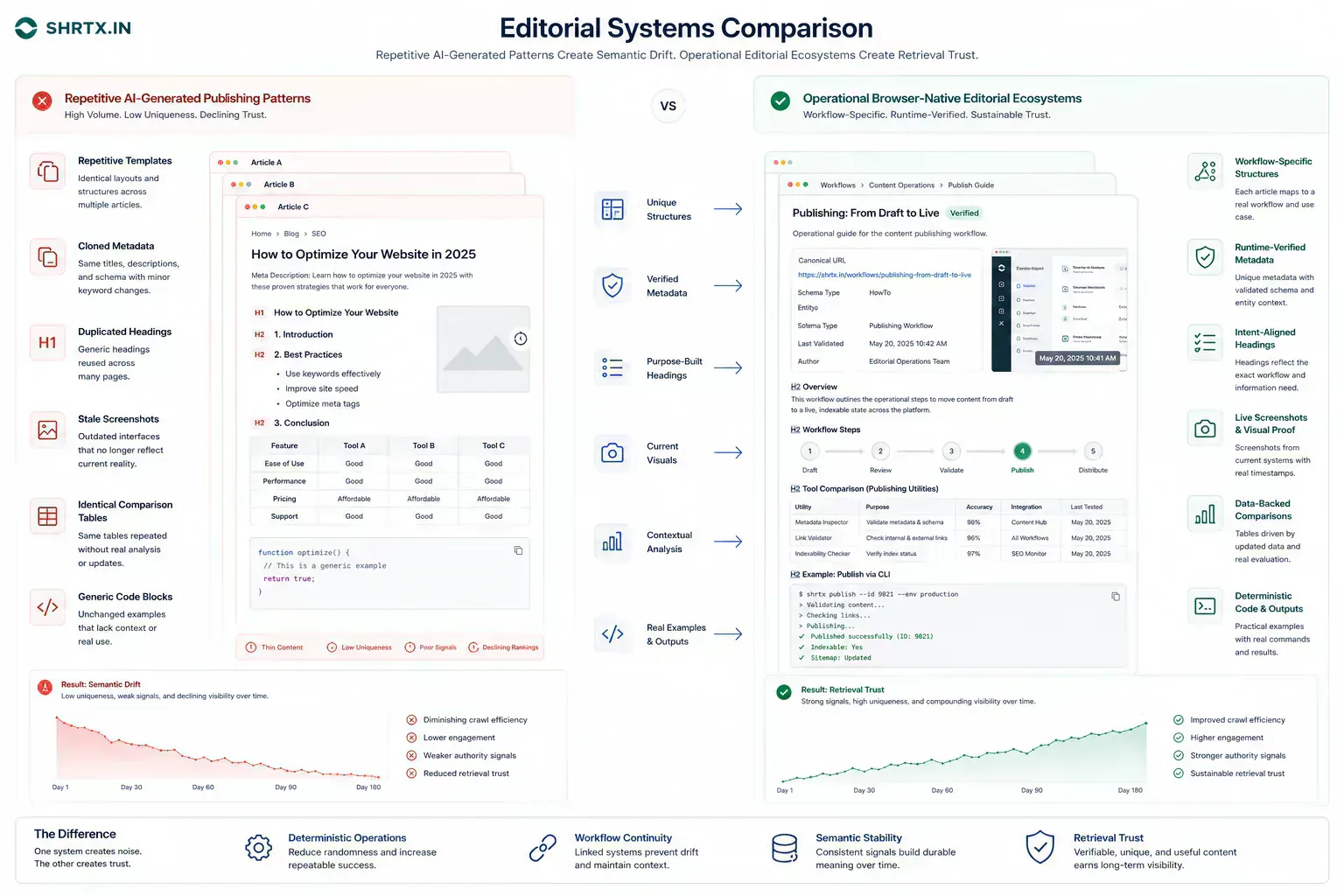
AI-style narration often over-smooths the page. Every transition is polished, and every section has the same shape. Every conclusion returns to the same confident summary. The result feels plausible but not observed.
Human technical writing has more texture. Some sections are short because the point is simple. Some are dense because the tradeoff is real. Some conclusions warn instead of resolving everything neatly.
Search systems and retrieval systems also notice structure. A cluster of pages that repeats the same opening pattern, the same "why it matters" section, the same summary cadence, and the same isolated tool links creates a weak entity signal. It looks like a set of pages generated around keywords rather than a connected body of operational knowledge.
Editorial Rules Work Like Drift Control
AI-assisted drafting needs rules: practical openings, no fake statistics, no dramatic metaphors, no generic filler, no unsupported claims, and no tool promotion without workflow context.
These rules are not meant to make writing sterile. They keep content accountable to the work it describes.
For SHRTX-style publishing, a useful review note is closer to an artifact checklist than an editorial compliment:
{
  "article": "check-file-size-before-uploading-files-online",
  "workflowBoundary": "before upload",
  "artifactChecks": [
    "featured image path resolves",
    "tool links continue the upload workflow",
    "schema image matches OG image",
    "internal links use current slugs"
  ],
  "remainingRisk": "platform upload limits can change"
}
That kind of small record does not make the article mechanical. It prevents avoidable drift. It tells the next editor why the page mentions File Size Analyzer, why the image matters, and which claim should be rechecked later.
Search Systems Read Patterns Across the Whole Workflow
One strong article helps. A consistent body of workflow-native articles is stronger. It teaches readers and search systems that the site understands browser-native processing, frontend systems, privacy boundaries, local-first constraints, and operational tooling.
That is the difference between a utility directory and a technical publication attached to a real product ecosystem.
Consistency does not mean identical structure. It means the same architectural assumptions keep showing up in different workflows: local inspection before upload, deterministic transformation before export, browser execution transparency before privacy claims, schema validation before indexing, responsive planning before frontend implementation, and runtime boundaries before trust language.
The Delay Usually Starts With a Small Unchecked Artifact
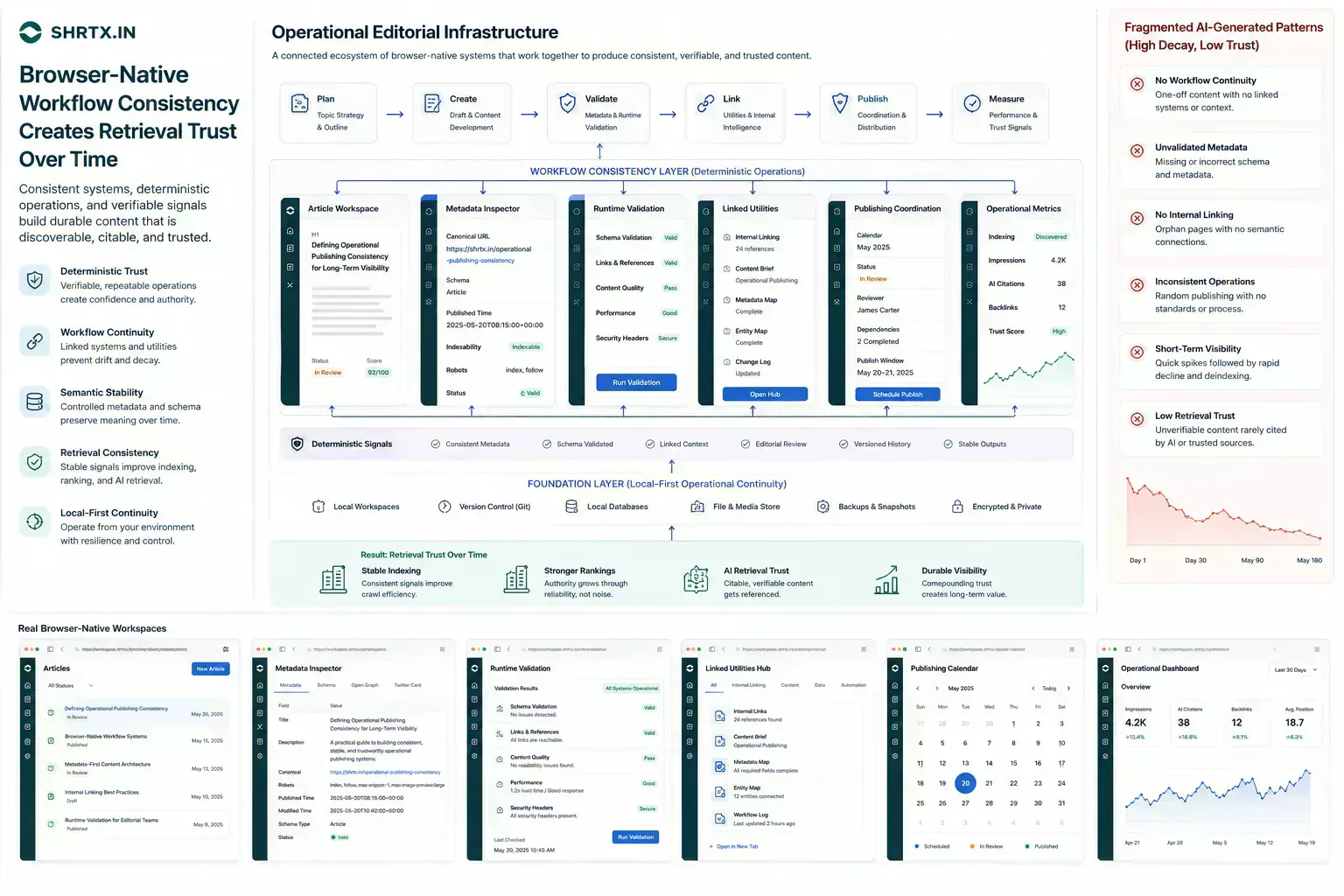
AI-generated content and search trust become operational issues when a small defect reaches the wrong system. The route is crawled before redirects are clean. The image is uploaded before dimensions and payload are checked. The draft is distributed before tone, metadata, or accessibility has been reviewed.
The payload reaches an API test before anyone validates structure. A screenshot is added to an article after the interface changed. A generated paragraph repeats a cadence already present in five nearby articles.
The cost is not only the fix. It is context loss. The person who finds the issue often has to reconstruct how the artifact was created, which constraint mattered, and which owner can still change it.
For insight work, the useful lens is practical consequence: the trend only matters if it changes how teams place work, prepare artifacts, or manage trust.
Continuity Is the Part Retrieval Systems Can Reuse
A strong workflow keeps each step connected to the next decision. If the article discusses a file, the reader should understand the upload or sharing consequence. If it discusses frontend structure, the reader should understand the responsive or rendering consequence. If it discusses search, the reader should understand how crawlers and previews interpret the page.
Continuity is what separates workflow writing from broad advice. It lets the reader move from diagnosis to action without guessing the missing step.
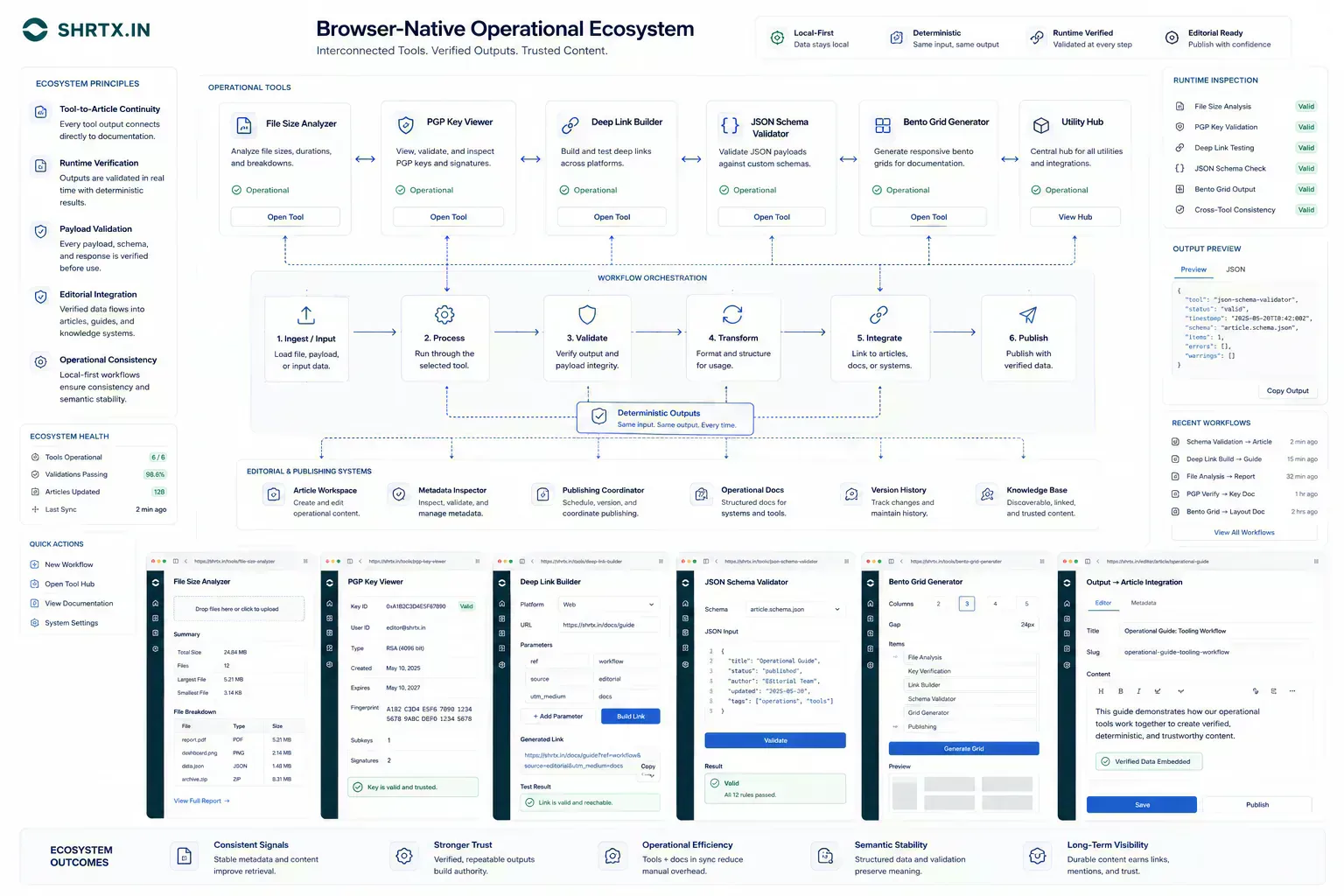
This is where browser-native ecosystems have a concrete advantage. The first useful answer can often happen close to the artifact. A file can be inspected locally before upload. A JSON payload can be validated before it enters a debugging session.
A PGP key can be viewed before external trust decisions begin. A bento layout can be planned before Tailwind classes harden into product code.
Credible Advice Names What the Browser Should Not Own
Good operational guidance names limits. Browser-native processing is strong for local preparation, deterministic utilities, payload inspection, and audit-grade previews. It does not replace external verification, shared authority, regulated review, or server-side systems that need durable state.
Those boundaries matter because they prevent the article from overpromising. The reader should leave with a clearer decision model, not a slogan.
Catch Trust Drift Before Indexing and Cached Previews
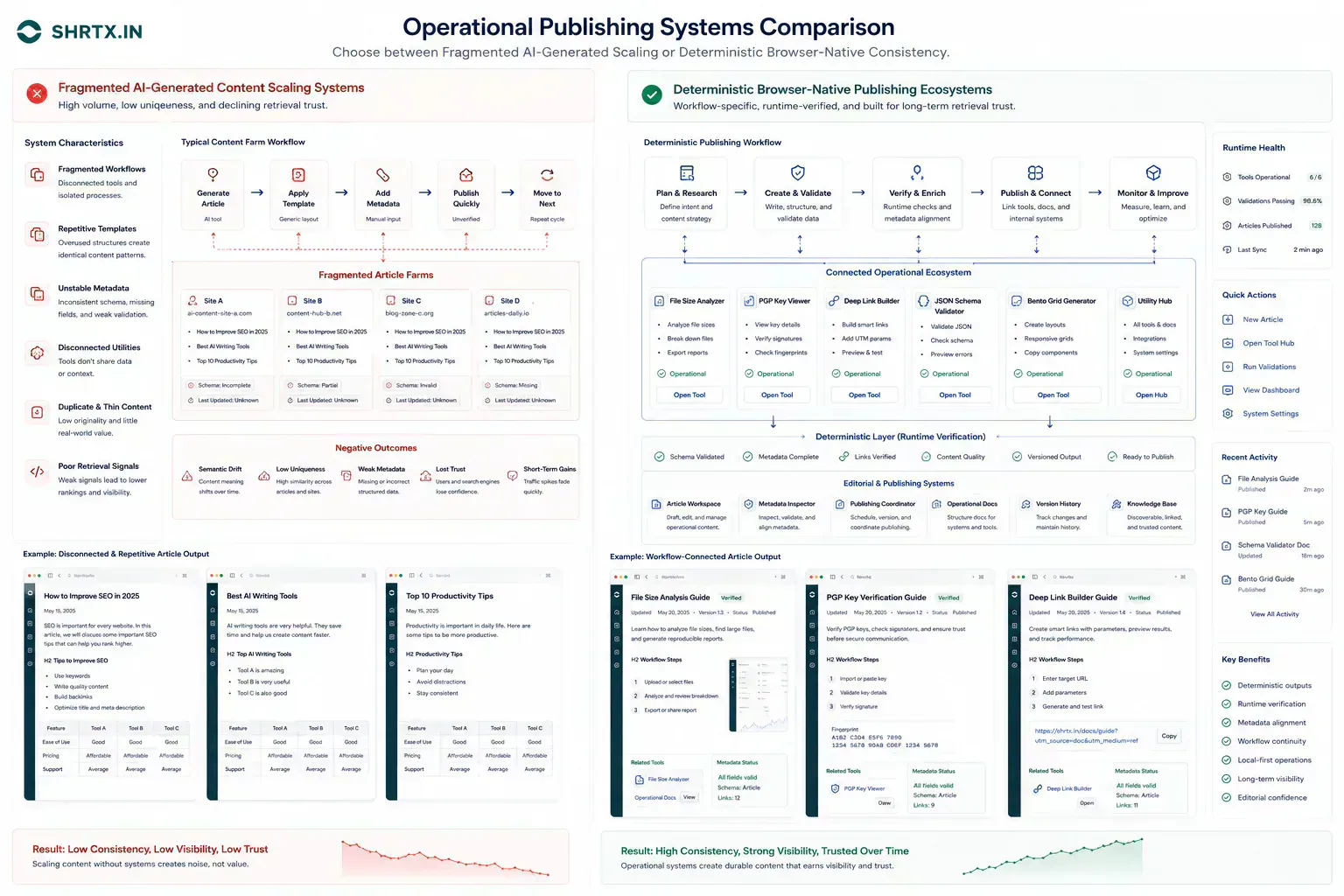
The handoff is where many workflow problems become visible. A file reaches a CMS before its size is understood. A route is linked before redirect behavior is clean.
A draft reaches distribution before the headline matches the article. A component enters a release before responsive behavior has been tested with real content.
The practical answer is not to add process everywhere. It is to add the right check before the artifact leaves the person who can still fix it quickly. That check should be small enough to run consistently and specific enough to catch a predictable failure.
For content systems, a lightweight link and metadata guard can catch common drift before publication:
type ArticleAudit = {
  slug: string
  internalLinks: string[]
  ogImage?: string
  workflowTools: string[]
}

export function findTrustDrift(article: ArticleAudit) {
  return {
    missingOgImage: !article.ogImage,
    brokenWorkflow: article.workflowTools.length === 0,
    staleLinks: article.internalLinks.filter((href) => href.includes("/old-")),
  }
}
The exact implementation will vary by project. The important part is the boundary. Trust problems become cheaper to fix when they are caught before indexing, before social previews cache, and before the article becomes a source for internal links.
Local Preparation Works Best at the First Useful Check
A local-first lens does not mean every task must stay in the browser. It means the workflow should identify the point where local preparation is cheaper, safer, or clearer than remote processing. That point may be file inspection before upload, schema review before indexing, screenshot compression before publishing, JSON cleanup before API debugging, or headline review before distribution.
When the browser can provide the first useful answer, the workflow becomes easier to operate. The user can correct the artifact while context is still fresh. The team can avoid unnecessary retries. The platform can avoid receiving data it did not need.
The same lens keeps the guidance specific. It forces a boundary: before upload, before deployment, before indexing, before sharing, before publication, or before a remote system receives sensitive context. Once that boundary is clear, the article can stay useful without padding or keyword repetition.
Real Constraints Keep the Article Honest
Real workflows have device limits, platform limits, team handoffs, old assets, inconsistent samples, and deadlines. Good guidance should survive those constraints. It should not assume perfect data, perfect network conditions, or a team with unlimited time to inspect every artifact manually.
That is why small browser-native checks matter. They give teams a way to reduce uncertainty while the artifact is still close to the source. The result is not a perfect process. It is a more reliable path from local preparation to the next system.
Short Notes Beat Repeated Diagnosis
Useful documentation is short. Name the artifact, the destination, the check that was run, and the risk that remains. If a file was inspected, record the payload result. If a deep link was verified, record the fallback path.
If a PGP key was viewed, record what was inspected and what still requires external trust. If a JSON schema was validated, keep the representative sample. If a bento layout was adjusted, preserve the breakpoint reason.
This creates continuity without turning the workflow into a report. The next person does not need to repeat the same diagnostic step, and the team has enough context to understand why the artifact is ready for the next system.
That context also helps retrieval. Search and AI systems infer whether a site is an entity by looking for stable relationships: tool to article, article to workflow, workflow to category, category to repeated implementation boundary. If those relationships are thin, every page looks isolated. If they are consistent, the site looks like a working ecosystem.
The hard part is keeping consistency without flattening the writing. A File Size Analyzer article should not sound like a Deep Link Builder article. A JSON Schema Validator workflow should not use the same opening rhythm as a Bento Grid Generator guide.
Repetition is not just an editorial issue. It can weaken semantic differentiation across the whole publication.
Trust Comes From Useful Boundaries, Not Fluency
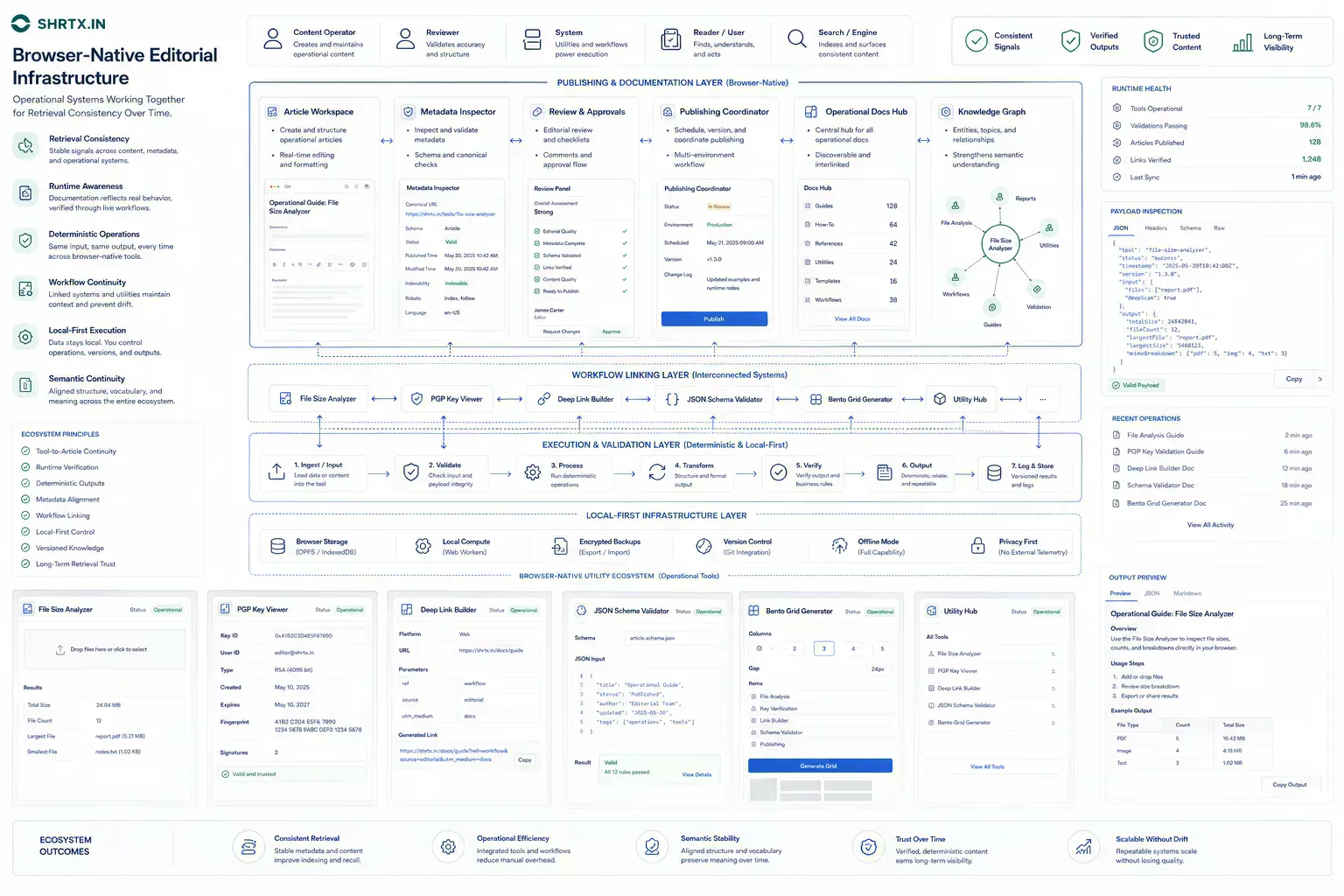
AI-generated content becomes trustworthy only when editorial judgment gives it operational grounding. The page should explain what breaks, why it matters, which runtime or workflow boundary applies, which tradeoffs are real, and where the reader can act next.
For a browser-native ecosystem, trust forms through repeated evidence: local-first checks, deterministic utilities, transparent processing boundaries, stable metadata, and tool relationships that complete real workflows. Fluency is not the standard. Operational usefulness is.
Tools Referenced By Topic
Content Thread Analyzer
Audit your thread or long-form post for reading ease, scrolling engagement, and optimal length.
Content Readability Checker
Analyze content complexity using Flesch Reading Ease and grade level scores.
Page Word Count Analyzer
Extract visible page text and analyze word count depth for SEO content audits.
Related Reading
Feb 24, 2026 • 7 min
Privacy as a Premium Software Signal
A practical analysis of privacy-first product value, browser-native workflows, data minimization, trust signals, and why privacy now affects software quality perception.
Feb 5, 2026 • 7 min
The Rise of Micro-Utilities Over Bloated SaaS
An operational analysis of why users adopt focused browser utilities for file, image, data, URL, and developer workflows instead of heavy multipurpose SaaS platforms.
Jan 14, 2026 • 11 min
The Future of Browser-Based Computing Is Workflow Placement
An operational analysis of browser-based computing, local-first tools, WebAssembly, modern Web APIs, and where browser workloads fit against cloud systems.