
Insights
Privacy as a Premium Software Signal
A practical analysis of privacy-first product value, browser-native workflows, data minimization, trust signals, and why privacy now affects software quality perception.
Privacy as a Premium Software Signal
A practical analysis of privacy-first product value, browser-native workflows, data minimization, trust signals, and why privacy now affects software quality perception.

Privacy has become part of how users judge software quality. Not because every user reads a policy, but because they recognize product behavior: unnecessary uploads, vague data claims, account prompts for simple tasks, unclear logging, and tools that ask for more access than the workflow needs.
Higher-trust software feels controlled. It explains what happens, minimizes surprise, and avoids collecting data just because it can.
For browser utilities, privacy is not a separate trust badge. It is part of the product experience.
Quick Answer
Privacy becomes a premium signal when software collects less, explains boundaries clearly, and keeps local tasks local where possible.
Browser-Local Processing Reduces Unnecessary Data Coordination
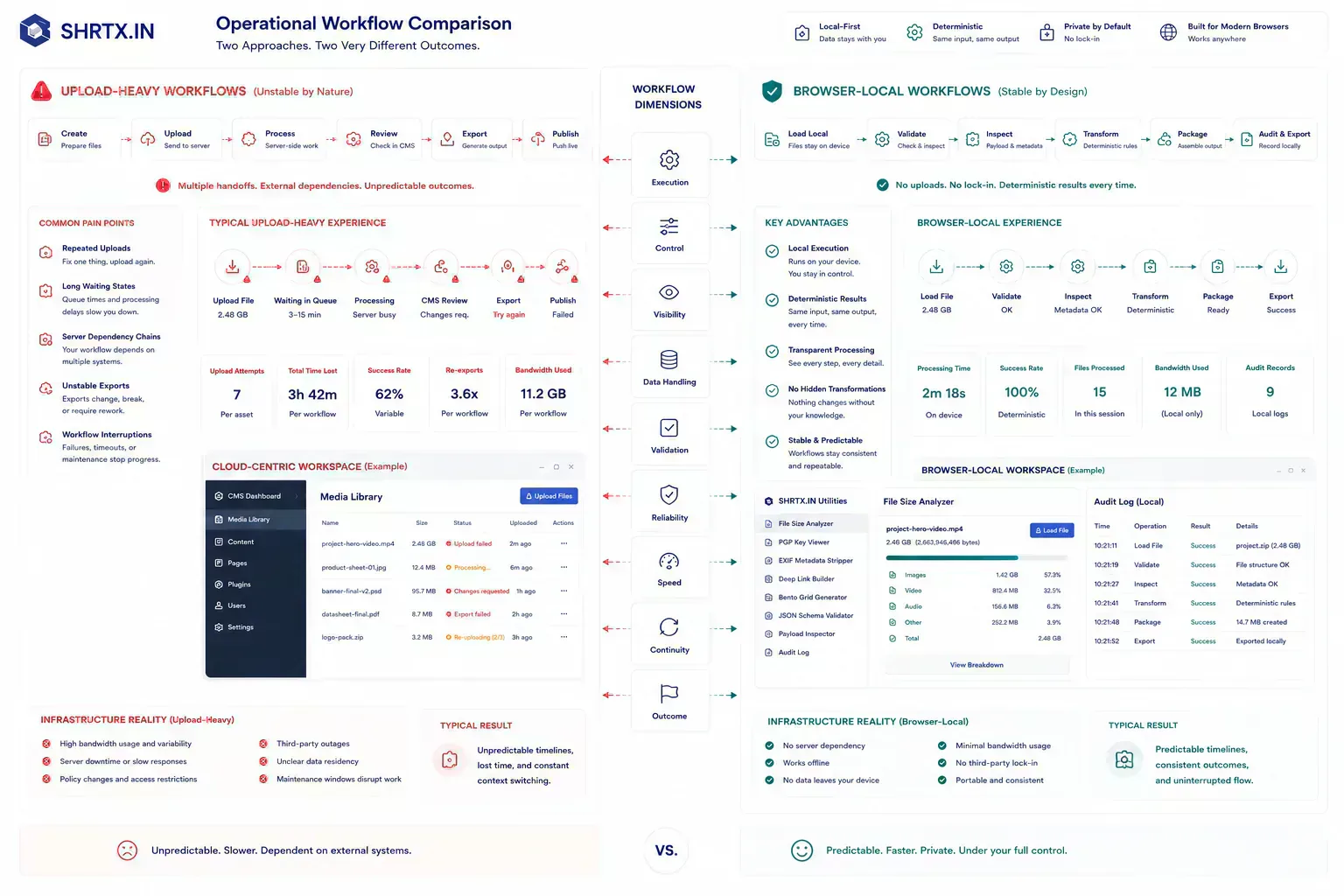
A product that avoids unnecessary data collection often feels faster and clearer. The user selects a file, the browser inspects it, and the answer appears without an upload. That is both privacy and usability.
Tools such as File Size Analyzer, EXIF Remover, and Image Compressor can support this pattern when processing happens locally.
Privacy Claims Need Runtime Evidence
A privacy claim is weak if the architecture does not make it easy to verify. If content says no upload is required, the workflow should not quietly send thumbnails, filenames, or payload snippets to a server.
Trust comes from alignment between copy, code, schema, and behavior. Users may not inspect every layer, but inconsistencies surface through previews, support questions, and repeated product use.
Predictable Runtime Boundaries Reduce Workflow Uncertainty
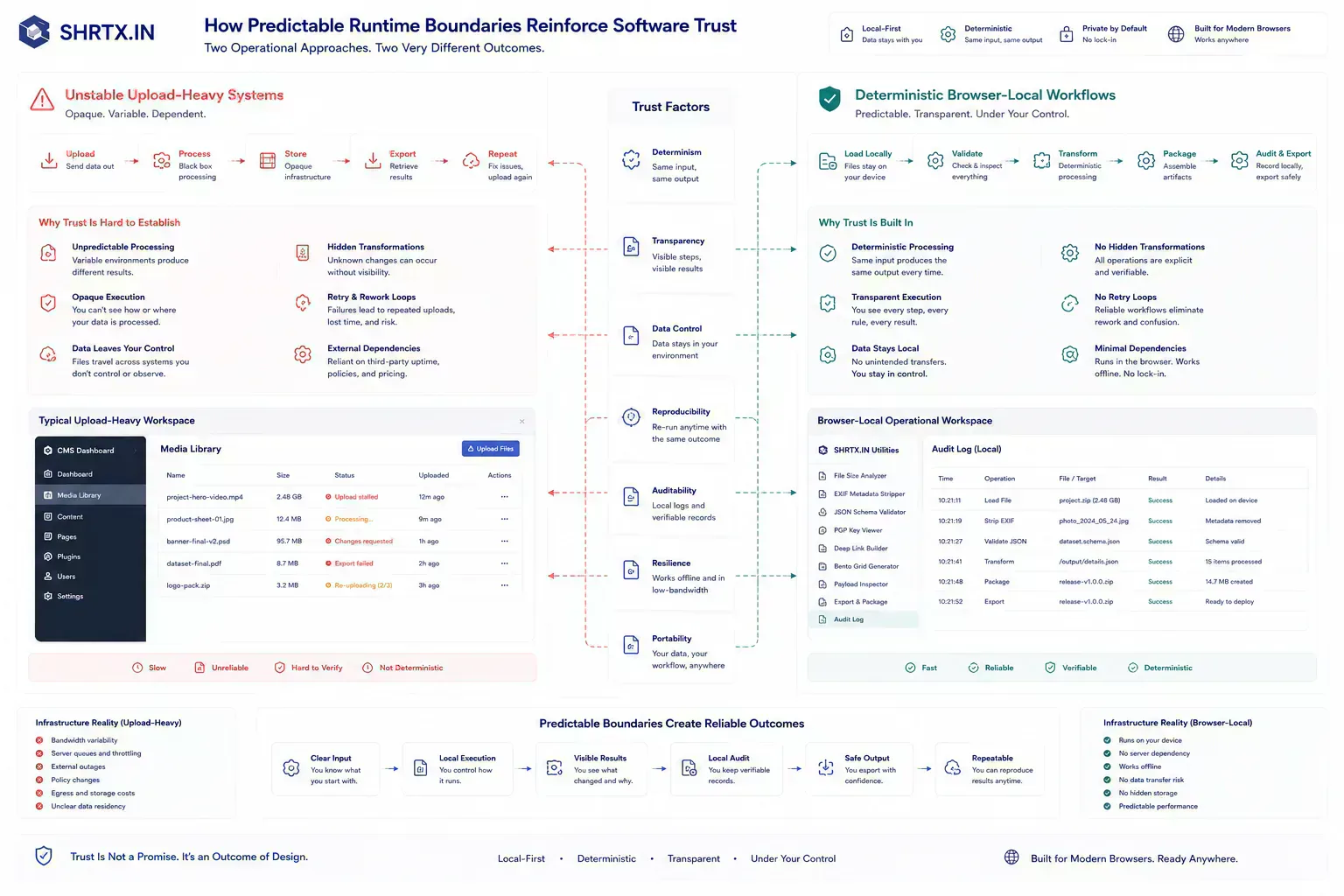
Users associate well-run software with control. They understand the task, the boundary, and the result. They are not forced into account creation, opaque processing, or unnecessary persistence for a one-time operation.
This matters for productivity tools because many tasks involve work-in-progress material. The user may not want the artifact to become part of another system.
Hidden Data Paths Break Operational Trust
The common failure is adding analytics, uploads, previews, or third-party widgets without rechecking the privacy promise. Another failure is using generic trust language that sounds strong but does not explain the processing boundary.
Privacy language should be calm and specific. Say what runs locally, what does not leave the browser, and where remote systems are actually involved.
Browser-Local Execution Makes Boundaries Visible
Browser-native execution can be a meaningful trust signal when it is real. It lets users inspect, transform, and prepare files before upload. It also reduces the number of systems involved in routine work.
The signal becomes stronger when adjacent tools follow the same pattern. File inspection, image cleanup, metadata removal, and filename normalization form a coherent privacy workflow.
Operational Restraint Creates Stronger Trust Signals Than Marketing Claims
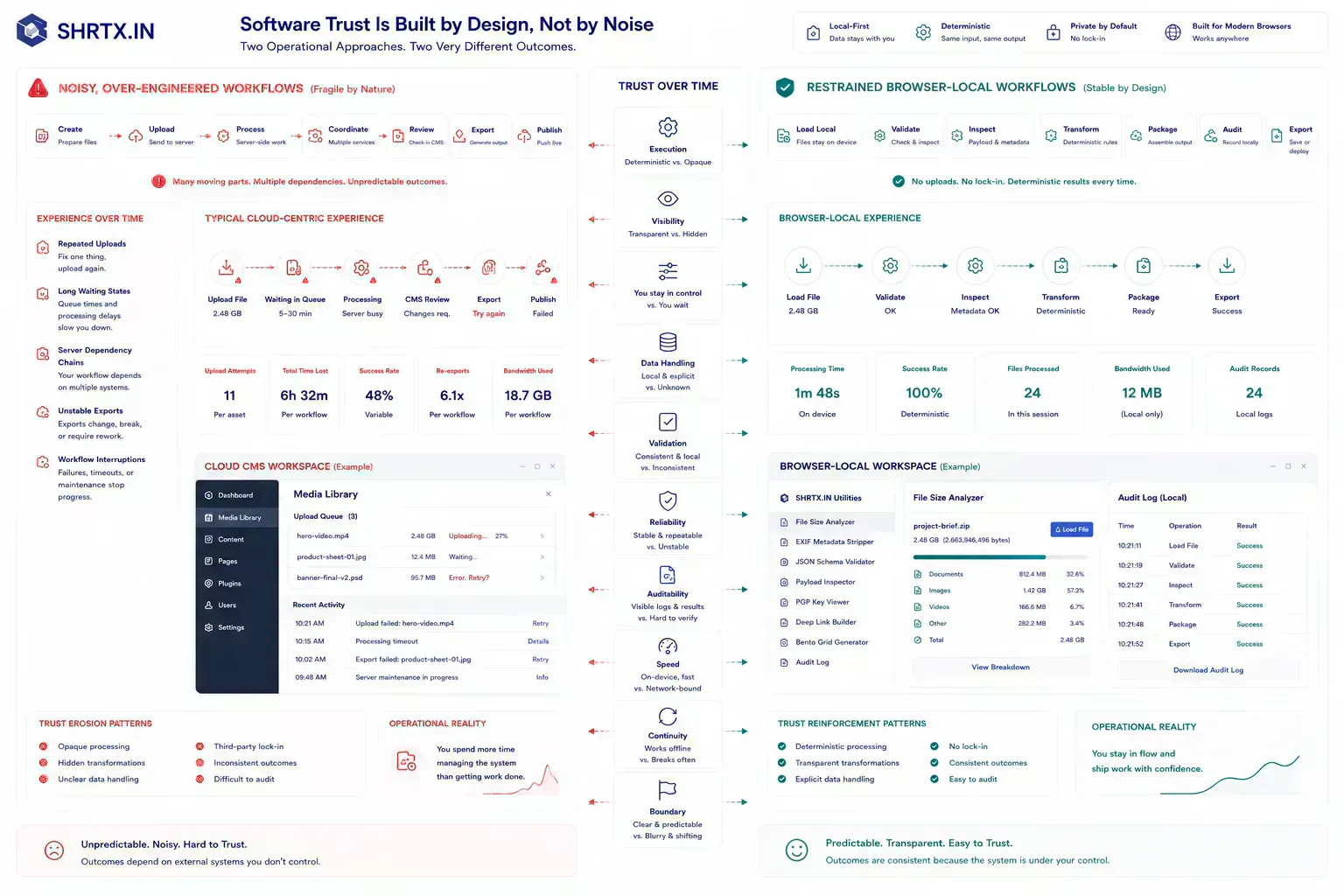
Privacy does not need dramatic claims. It needs restraint, clear boundaries, and fewer unnecessary data paths. That approach is more durable than exaggerated promises.
For SHRTX, the signal is practical: local-first tools, workflow-specific content, stable metadata, and no pressure to send files through a backend when the browser can do the work.
Small Drift Creates Privacy Review Loops
The failure pattern behind Privacy as a Premium Software Signal is usually mundane. Teams do not need dramatic incidents to lose time. A stale canonical, oversized PNG, malformed JSON sample, unclear alt text, overbroad regex, or missing schema image can be enough to create avoidable review loops.
Practical authority comes from naming those small breaks clearly. They are the details that show the workflow has been tested against real handoffs rather than described from a distance.
For insight work, the useful lens is practical consequence: the trend only matters if it changes how teams place work, prepare artifacts, or manage trust.
Workflow-Linked Tools Clarify Processing Boundaries
This topic belongs inside a broader browser-native system: local preparation, lightweight diagnostics, media hygiene, metadata alignment, URL review, and content clarity. The ecosystem is useful only when those tools appear at the point where the reader needs them.
A payload issue can route to file-size inspection. A media issue can route to compression or dimensions. A route issue can route to redirect or canonical review.
A writing issue can route to text diagnostics. The next step should feel obvious from the workflow context.
Strong Implementation Keeps Artifacts Near Their Source
Strong implementation is usually small and consistent. Check the artifact before handoff. Preserve the processing boundary. Keep metadata aligned with visible content.
Validate repeated failure modes automatically where possible. Use real examples rather than ideal samples.
That approach keeps the article grounded and gives readers a repeatable way to apply the topic in their own workflows.
Handoffs Need Boundary Checks Before Upload
The handoff is where many workflow problems become visible. A file reaches a CMS before its size is understood. A route is linked before redirect behavior is clean.
A draft reaches distribution before the headline matches the article. A component enters a release before responsive behavior has been tested with real content.
The practical answer is not to add process everywhere. It is to add the right check before the artifact leaves the person who can still fix it quickly. That check should be small enough to run consistently and specific enough to catch a predictable failure.
Local-First Processing Reduces Remote Exposure
A local-first lens does not mean every task must stay in the browser. It means the workflow should identify the point where local preparation is cheaper, safer, or clearer than remote processing. That point may be file inspection before upload, schema review before indexing, screenshot compression before publishing, JSON cleanup before API debugging, or headline review before distribution.
When the browser can provide the first useful answer, the workflow becomes easier to operate. The user can correct the artifact while context is still fresh. The team can avoid unnecessary retries. The platform can avoid receiving data it did not need.
The same lens keeps the guidance specific. It forces a boundary before upload, before deployment, before indexing, before sharing, before publication, or before a remote system receives sensitive context. Once that boundary is clear, the article can stay useful without padding or keyword repetition.
Runtime And Device Limits Shape Privacy Guarantees
Real workflows have device limits, platform limits, team handoffs, old assets, inconsistent samples, and deadlines. Good guidance should survive those constraints. It should not assume perfect data, perfect network conditions, or a team with unlimited time to inspect every artifact manually.
That is why small browser-native checks matter. They give teams a way to reduce uncertainty while the artifact is still close to the source. The result is not a perfect process. It is a more reliable path from local preparation to the next system.
Deterministic Workflows Reduce Trust Drift Across Operational Systems
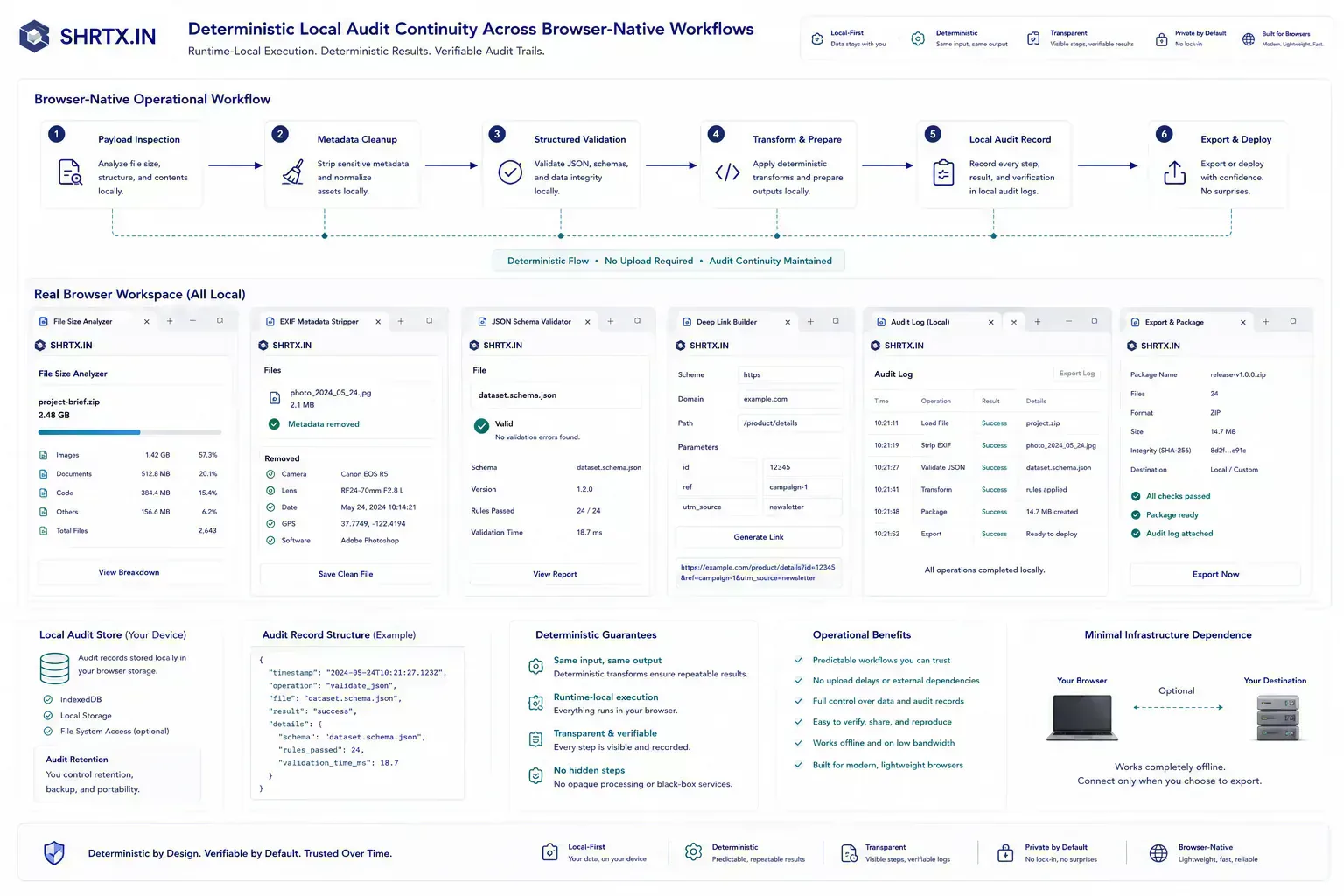
The useful documentation is short. Name the artifact, the destination, the check that was run, and the risk that remains. If a file was compressed, record that. If a redirect was verified, record the final destination.
If a payload was cleaned, keep the representative sample. If a draft was adjusted for tone or accessibility, preserve the reason.
This creates continuity without turning the workflow into a report. The next person does not need to repeat the same diagnostic step, and the team has enough context to understand why the artifact is ready for the next system.
That context also keeps privacy claims maintainable. During metadata refreshes, image replacement, analytics changes, and tool upgrades, a short note about what was checked prevents a local-first claim from drifting away from real product behavior.
Privacy Holds When Boundaries Stay Visible
Privacy becomes a meaningful software signal when it is built into workflow placement. The best products collect less, explain more clearly, and make routine local tasks possible without expanding the user’s data boundary.
Tools Referenced By Topic
Related Reading
Feb 5, 2026 • 7 min
The Rise of Micro-Utilities Over Bloated SaaS
An operational analysis of why users adopt focused browser utilities for file, image, data, URL, and developer workflows instead of heavy multipurpose SaaS platforms.
Jan 14, 2026 • 11 min
The Future of Browser-Based Computing Is Workflow Placement
An operational analysis of browser-based computing, local-first tools, WebAssembly, modern Web APIs, and where browser workloads fit against cloud systems.
Apr 4, 2026 • 10 min
India's Role in the Global Open-Source Web Utilities Ecosystem
An operational look at how Indian developers contribute to open-source utilities, browser tooling, local-first workflows, and practical web infrastructure.