
Insights
India's Role in the Global Open-Source Web Utilities Ecosystem
An operational look at how Indian developers contribute to open-source utilities, browser tooling, local-first workflows, and practical web infrastructure.
India's Role in the Global Open-Source Web Utilities Ecosystem
An operational look at how Indian developers contribute to open-source utilities, browser tooling, local-first workflows, and practical web infrastructure.

Open-source web utilities matter most where practical constraints are visible every day: mixed devices, variable networks, multilingual work, small teams, cost-sensitive infrastructure, and users who need specific tasks solved without heavy software.
India sits close to many of those constraints. Developers build for mobile-first audiences, education workflows, small businesses, government forms, creator publishing, and local operations where browser access is often the common denominator. The useful story is workflow fit.
That makes browser-native utility work more than a side project category. It is lightweight operational infrastructure for everyday digital work: inspect the file, clean the payload, validate the route, remove unnecessary metadata, prepare the image, and move the artifact to the next system with fewer retries.
Quick Answer
India’s open-source utility opportunity is practical: browser-local tools that respect bandwidth, mobile workflows, privacy boundaries, infrastructure cost, and everyday digital tasks.
Lightweight Utilities Reduce Workflow Load
A small business owner may need to inspect file size before a marketplace upload. A student may need to format a document on a shared device. A developer may need to validate JSON before testing an API.
A creator may need to strip EXIF metadata before publishing images. A product team may need to test a deep link before sharing it across mobile channels.
These are not abstract productivity cases. They are tasks that benefit from lightweight tools that run in the browser, avoid unnecessary transfer, and do not demand complex onboarding.
| Constraint | Heavy workflow failure | Browser-local utility response |
|---|---|---|
| Low bandwidth | Large files fail after repeated upload attempts | Inspect payload and compress before transfer |
| Mobile-first usage | Long jobs freeze, reload, or lose context | Use scoped checks with clear limits and recovery states |
| Infrastructure sensitivity | Every utility action becomes backend processing and storage | Run deterministic transforms locally where possible |
| Publishing friction | CMS rejects files late in the workflow | Validate size, metadata, filenames, and format before upload |
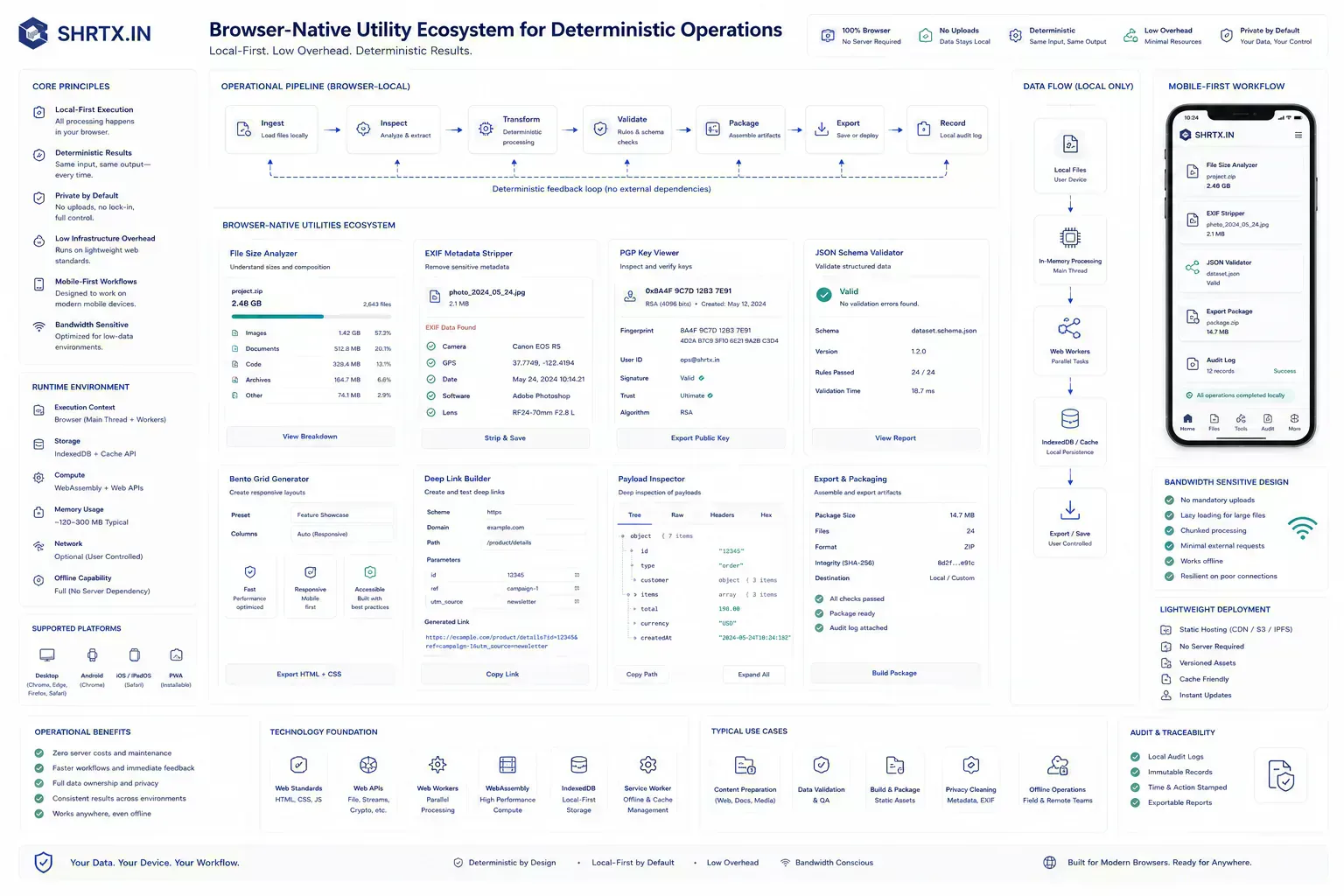
Open Source Tools Need Runtime Boundaries
Open-source utility projects often fail when they focus only on implementation and ignore the workflow. The code works, but the page does not explain who should use it, what problem it solves, what boundary it preserves, or what the user should do after the output is generated.
A strong utility ecosystem needs both engineering and editorial clarity. The tool should work. The surrounding content should help users understand when to trust it, when not to overtrust it, and which external system still owns final authority.
Browser-Local Execution Fits Cost-Sensitive Workflows
Browser-local tools reduce dependence on upload speed, server queues, and account systems. That matters where mobile networks, shared devices, privacy concerns, or cost-sensitive infrastructure shape behavior.
Tools such as File Size Analyzer, PGP Key Viewer, EXIF Metadata Stripper, Deep Link Builder, Bento Grid Generator, and JSON Schema Validator support preparation tasks without requiring a larger platform commitment.
{
  "workflow": "cms-image-publish",
  "localChecks": ["file-size", "exif-metadata", "filename", "format"],
  "executionBoundary": "browser",
  "handoff": "cms-upload",
  "remainingRisk": "destination limits and editorial approval"
}
This kind of record is small, but it captures the operational boundary. The browser can inspect and prepare. The publishing system still owns acceptance, access, and distribution.
Long-Tail Utility Work Needs Maintenance Discipline
The next step is not only more tools. It is better maintenance, stronger accessibility, clearer privacy claims, localized examples, stable metadata, and content that explains real workflows.
A utility platform becomes more useful when tools connect to each other through actual task sequences: inspect, optimize, normalize, validate, publish. The sequence matters because long-tail utility work often breaks at handoff points, not inside the core transform.
Runtime details also matter. WebAssembly can help CPU-heavy transforms. Streams can reduce peak memory for large payloads. Workers can keep the interface responsive.
Transferable objects can avoid unnecessary copying. None of that removes browser limits. It just makes local execution more realistic on mixed devices.
Workflow Graphs Prevent Utility Directory Drift
A large catalog without structure becomes hard to navigate. Users need clusters, related workflows, and guides that explain the path from problem to action.
This is where SHRTX can differentiate: local-first tools with operational guides, consistent metadata, and internal links that reflect real work rather than arbitrary categories.
The difference is visible in retrieval. A search or AI system can understand a site more clearly when File Size Analyzer connects to upload-readiness guides, PGP Key Viewer connects to local inspection boundaries, EXIF Metadata Stripper connects to publishing hygiene, Deep Link Builder connects to mobile routing workflows, Bento Grid Generator connects to responsive planning, and JSON Schema Validator connects to payload quality. The site stops looking like a random directory and starts looking like a workflow ecosystem.
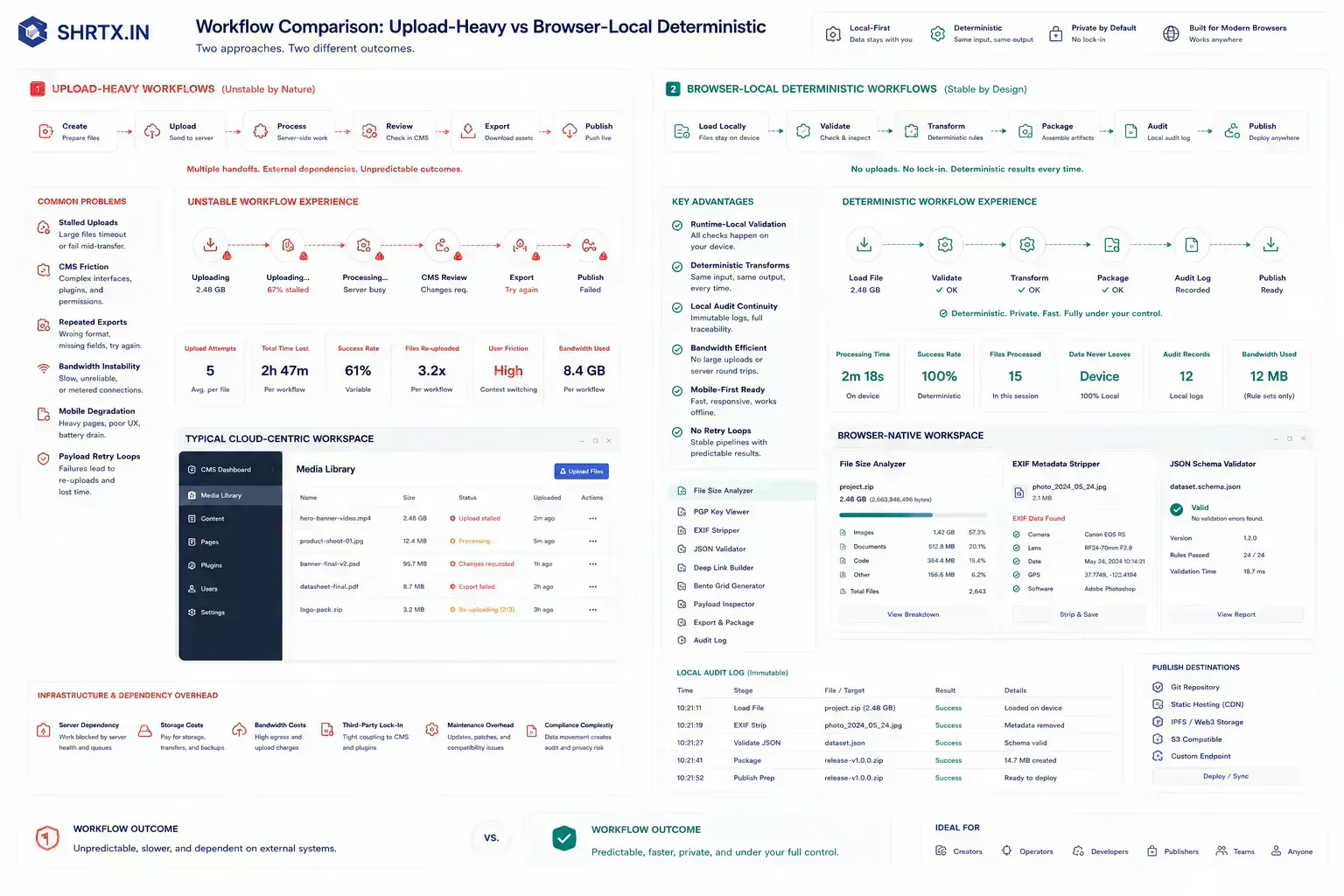
Deterministic Checks Become Local Infrastructure
The strongest open-source utility work feels close to the user's environment. It respects limited bandwidth, privacy concerns, fast handoffs, and the need for tools that work without procurement or training.
That does not make the work small. It makes it practical infrastructure.
async function inspectBeforeUpload(file: File) {
  return {
    name: file.name,
    type: file.type || "unknown",
    sizeBytes: file.size,
    shouldReview: file.size > 10 * 1024 * 1024,
  }
}
The code is ordinary by design. Utility ecosystems compound through small deterministic checks that run close to the artifact, not through large platform rituals.
Handoffs Expose Operational Weakness
India's role in the global open-source web utilities ecosystem becomes useful when the guidance survives a normal handoff. The artifact may be a file, route, payload, screenshot, draft, schema block, key block, or component state. The important point is that someone else will receive it and make a decision from it.
That is where vague advice fails. The next person needs to know what was checked, what risk remains, and which constraint can still break late. In practical teams, the best workflow guidance reduces repeated diagnosis rather than adding a decorative process layer.
For insight work, the useful lens is practical consequence: the trend only matters if it changes how teams place work, prepare artifacts, or manage trust.
Local Checks Prevent Late Upload Failure
Many failures are cheaper to catch while the artifact is still local. A file can be inspected before upload. A URL can be validated before indexing.
A JSON sample can be checked against a schema before it enters a ticket. A screenshot can be compressed before the CMS rejects the media batch.
Browser-local utilities fit this point in the workflow because they provide the first useful answer without making every small check a server-side event.
The failure pattern is often mundane: a mobile upload restarts, a CMS rejects a media file after review, a large PNG slows a publishing workflow, a malformed link goes into a campaign, or a payload sample hides the schema mismatch that breaks later. Local checks do not solve every issue, but they reduce late discovery.
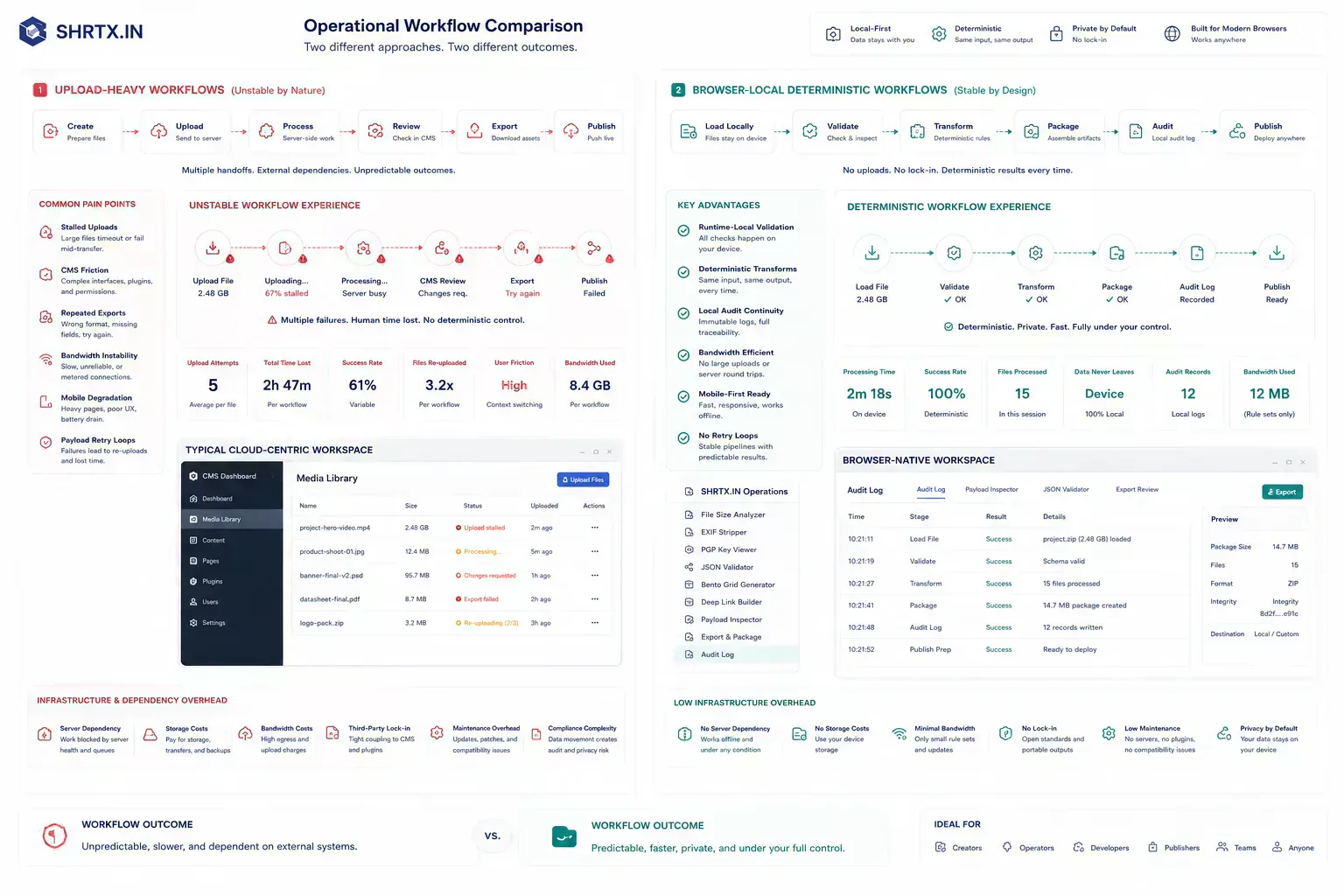
Classify Work By Execution Boundary
The article should give readers a way to classify the work in front of them. If the task is local, inspect it locally. If the task needs external authority, use the correct remote system. If the task affects publication, check metadata, payload, links, and visible output together.
That distinction keeps the guidance practical. It also keeps tool mentions honest because each link should continue the work rather than interrupt it.
Artifact Handoffs Need Small Preflight Checks
The handoff is where many workflow problems become visible. A file reaches a CMS before its size is understood. A route is linked before redirect behavior is clean.
A draft reaches distribution before the headline matches the article. A component enters a release before responsive behavior has been tested with real content.
The practical answer is not to add process everywhere. It is to add the right check before the artifact leaves the person who can still fix it quickly. That check should be small enough to run consistently and specific enough to catch a predictable failure.
Local-First Boundaries Reduce Transfer Friction
A local-first lens does not mean every task must stay in the browser. It means the workflow should identify the point where local preparation is cheaper, safer, or clearer than remote processing. That point may be file inspection before upload, schema review before indexing, screenshot compression before publishing, JSON cleanup before API debugging, or headline review before distribution.
When the browser can provide the first useful answer, the workflow becomes easier to operate. The user can correct the artifact while context is still fresh. The team can avoid unnecessary retries. The platform can avoid receiving data it did not need.
The same lens keeps the guidance specific. It forces a boundary: before upload, before deployment, before indexing, before sharing, before publication, or before a remote system receives sensitive context. Once that boundary is clear, the article can stay useful without padding or keyword repetition.
Mobile And Runtime Constraints Shape Trust
Real workflows have device limits, platform limits, team handoffs, old assets, inconsistent samples, and deadlines. Good guidance should survive those constraints. It should not assume perfect data, perfect network conditions, or a team with unlimited time to inspect every artifact manually.
That is why small runtime-local checks matter. They give teams a way to reduce uncertainty while the artifact is still close to the source. The result is not a perfect process. It is a more reliable path from local preparation to the next system.
The constraint is real. Mobile browsers can discard tabs under memory pressure. Large image transforms can make Canvas pipelines expensive.
WebAssembly still needs loading and fallback states. Long-tail utility work stays trustworthy when these limits are named rather than hidden.

Audit Notes Preserve Workflow Continuity
Useful documentation is short. Name the artifact, the destination, the check that was run, and the risk that remains. If a file was inspected, record the payload result. If a deep link was verified, record the fallback path.
If EXIF metadata was stripped, record the boundary. If a PGP key was viewed, record what was inspected and what still requires external trust. If a schema was validated, keep the representative sample.
This creates continuity without turning the workflow into a report. The next person does not need to repeat the same diagnostic step, and the team has enough context to understand why the artifact is ready for the next system.
That context matters in open-source utility ecosystems because maintenance is often uneven. A small note about what was checked helps future contributors understand the runtime boundary, the publishing context, and the reason the tool belongs near adjacent workflows.
Lightweight Local Utilities Fit Real Operating Conditions
India's role in the web utilities ecosystem is tied to practical constraints and everyday digital work. Open, workflow-aware, browser-local tools can support that environment better than heavy software that assumes stable bandwidth, accounts, and centralized processing for every small task.
The durable opportunity is operational: low-overhead publishing infrastructure, deterministic local transforms, audit-oriented utilities, and tool ecosystems that respect real device, network, and maintenance constraints.
Tools Referenced By Topic
Related Reading
Feb 5, 2026 • 7 min
The Rise of Micro-Utilities Over Bloated SaaS
An operational analysis of why users adopt focused browser utilities for file, image, data, URL, and developer workflows instead of heavy multipurpose SaaS platforms.
Jan 14, 2026 • 11 min
The Future of Browser-Based Computing Is Workflow Placement
An operational analysis of browser-based computing, local-first tools, WebAssembly, modern Web APIs, and where browser workloads fit against cloud systems.
Feb 24, 2026 • 7 min
Privacy as a Premium Software Signal
A practical analysis of privacy-first product value, browser-native workflows, data minimization, trust signals, and why privacy now affects software quality perception.