
Privacy
Digital Sovereignty in AI Productivity Workflows
A practical privacy analysis of data control, browser-native tooling, file handling, and workflow boundaries in AI-era productivity systems.
Digital Sovereignty in AI Productivity Workflows
A practical privacy analysis of data control, browser-native tooling, file handling, and workflow boundaries in AI-era productivity systems.
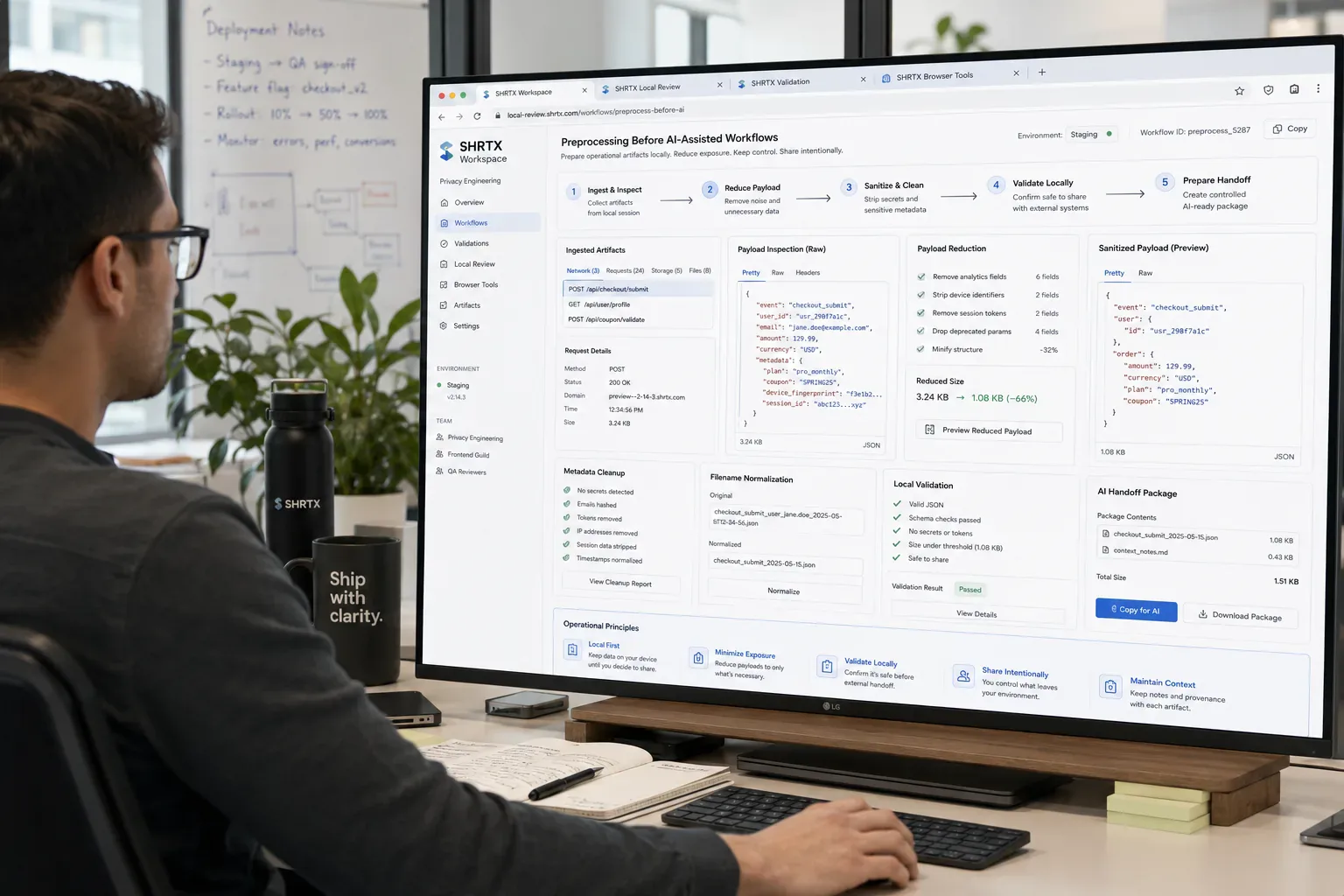
AI productivity workflows move quickly. Notes become prompts, prompts become summaries, summaries become documents, and documents move into email, dashboards, tickets, or publishing systems. The speed is useful, but it also makes data boundaries harder to see.
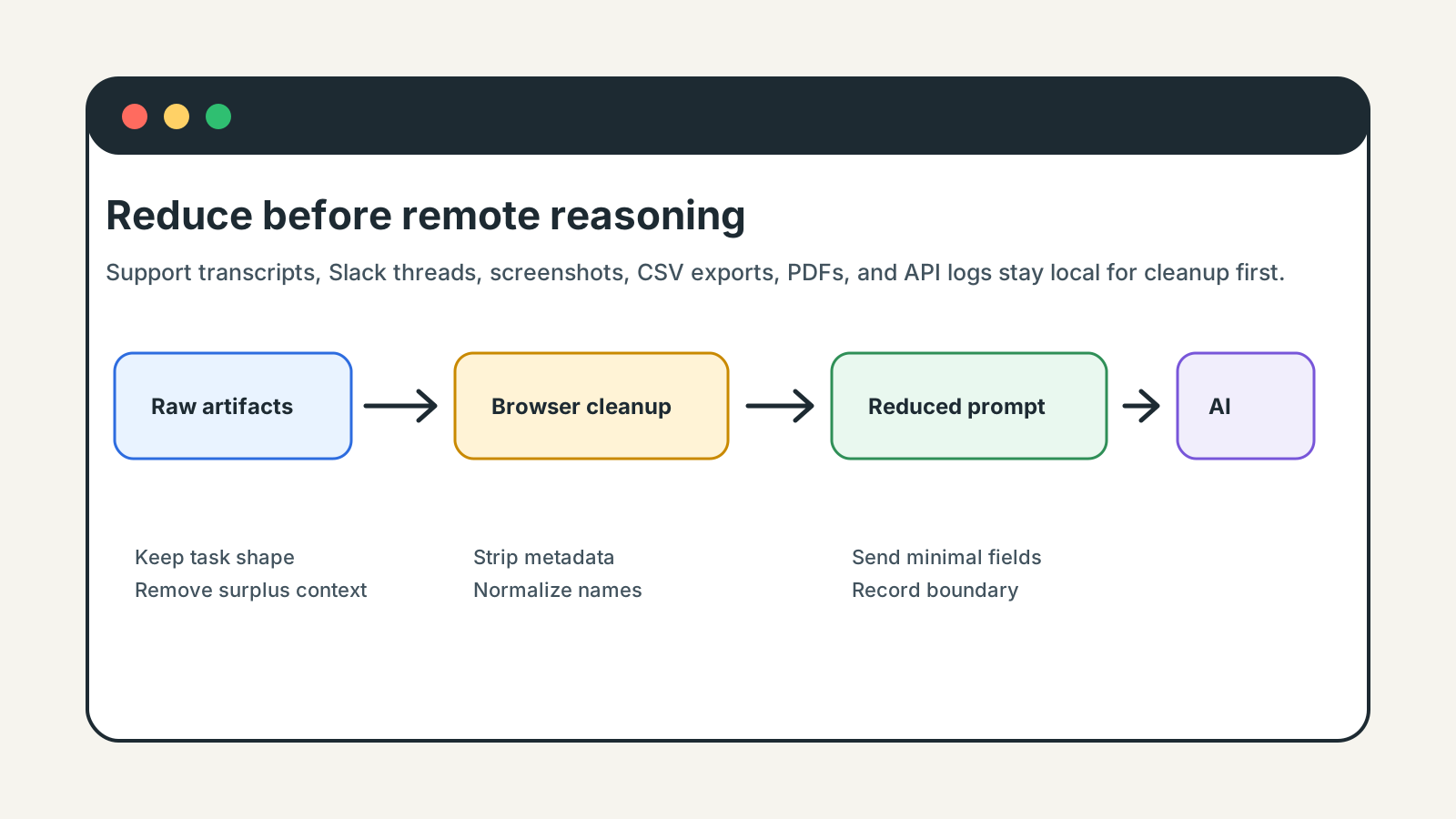
Digital sovereignty in this context is operational control over context. A support transcript, copied Slack thread, uploaded screenshot, analytics CSV export, staging dashboard capture, or API log should be reduced before a remote system sees it.
The practical question is simple: can the team prepare the artifact locally before asking a remote system to reason over it. That does not mean avoiding AI. It means sending the smallest useful packet instead of the whole working mess.
Quick Answer
Digital sovereignty in AI workflows means controlled reduction before transmission. Prepare files, text, screenshots, payloads, metadata, and prompt context locally, then send only the task-specific material a remote model needs.
AI Workflows Increase Data Drift
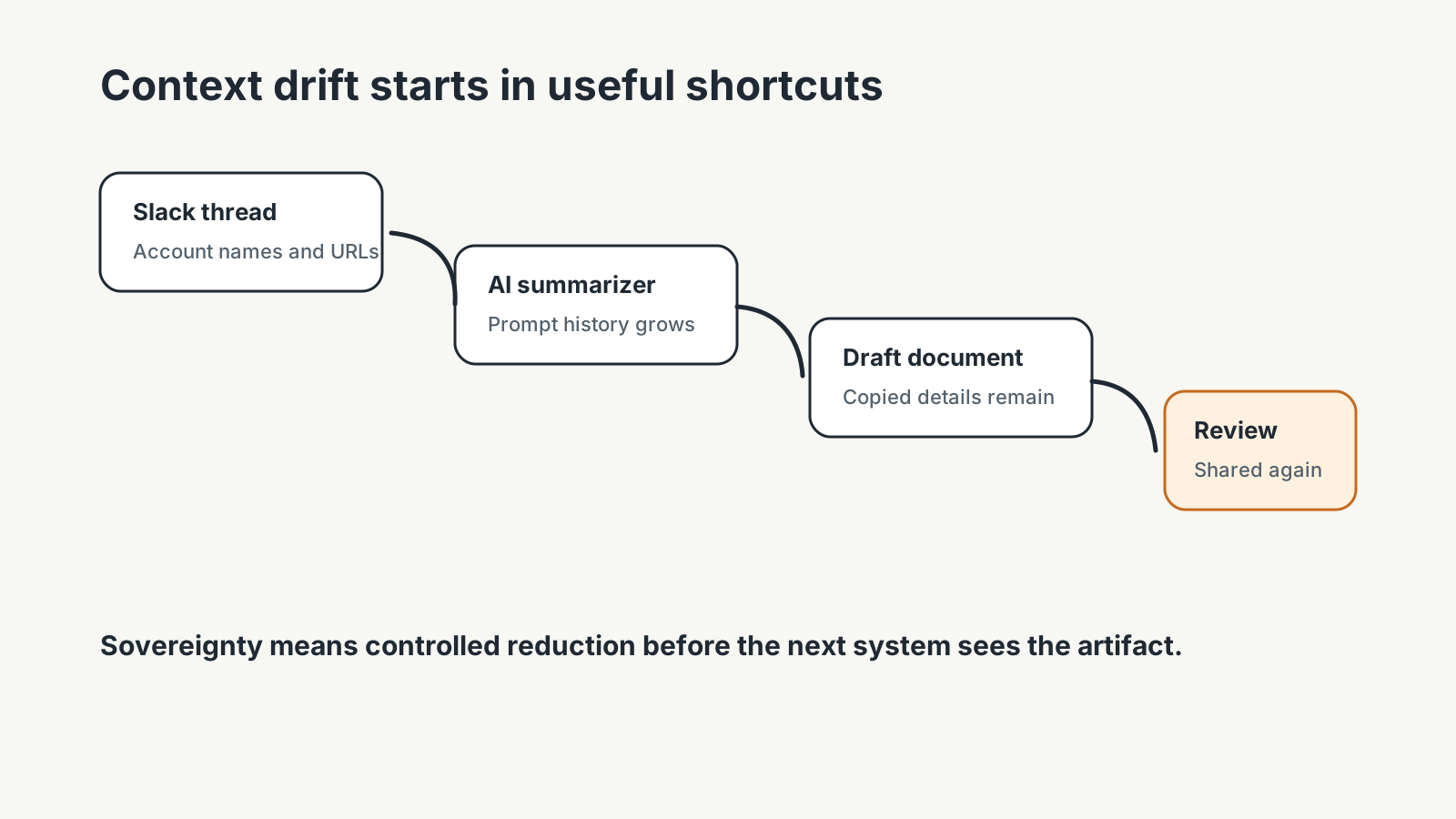
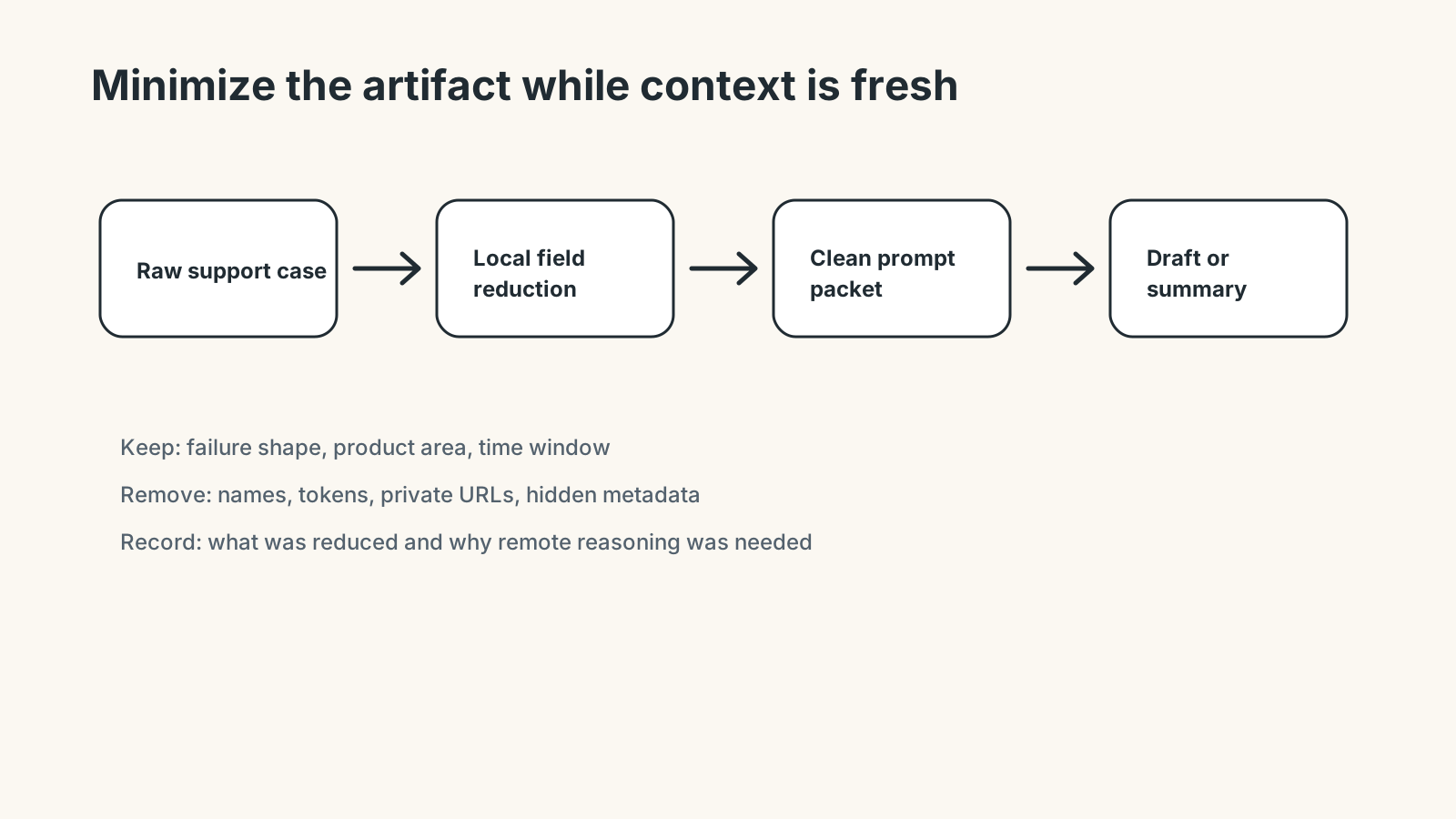
AI tools encourage copying context because more detail often produces a better first answer. A customer-support draft may begin with a pasted transcript, then grow to include a Slack thread, an internal note, and a screenshot from a staging dashboard. The model may need the failure pattern, but it does not need every name, tab title, private URL, or account field.
Context drift also appears in AI note summarizers, browser sidebar copilots, collaborative editing loops, and meeting-summary systems. Prompts accumulate hidden operational context because teams paste more than they intend to preserve. Sovereignty is the habit of reducing that context before the next system stores, summarizes, or reuses it.
Local Preparation Before Remote Intelligence
A browser-native preflight can strip or reduce data before remote processing. EXIF Remover can remove metadata from uploaded screenshots or PDFs converted from images. Filename Normalizer can remove client names from batches before an AI documentation workflow sees them. File Size Analyzer can show whether a media set is too large, duplicated, or poorly composed before upload.
For image-heavy work, Image Compressor and Image to WebP Converter can prepare screenshots before they enter a publishing or AI-assisted review flow. For copied API logs, JSON Formatter & Validator belongs before the prompt, not after the model has already received raw fields.
Sovereignty Is a Workflow Property
A team does not gain sovereignty by writing a policy that nobody can execute. It gains sovereignty by making the safer path convenient at the point of work.
That means classifying artifacts quickly, reducing unnecessary fields, removing metadata, validating payloads, and keeping local transformations local. The goal is to move less sensitive material through remote systems, not to pretend remote systems have no role.
type PromptPacket = Record<string, string | number | boolean | null>

const allowedPromptFields = [
  "error_code",
  "component",
  "browser",
  "time_window",
  "expected_behavior",
  "actual_behavior"
]

const emailPattern = /[A-Z0-9._%+-]+@[A-Z0-9.-]+\.[A-Z]{2,}/gi
const tokenPattern = /(bearer|token|secret|api_key)[=: ]+[A-Za-z0-9._-]+/gi

function reducePromptContext(source: PromptPacket) {
  return Object.fromEntries(
    Object.entries(source)
      .filter(([key, value]) => allowedPromptFields.includes(key) && value !== null)
      .map(([key, value]) => {
        if (typeof value !== "string") return [key, value]

        return [
          key,
          value
            .replace(emailPattern, "[email]")
            .replace(tokenPattern, "[credential]")
            .slice(0, 1200)
        ]
      })
  )
}
Failure Modes in AI-Era File Handling
Common failures are mundane. A dashboard screenshot contains customer names, an analytics CSV sample includes real emails, and a PDF keeps author metadata. A support log may include tokens, while a prompt carries a private URL into shared conversation history.
These mistakes usually happen under time pressure. The strongest response is a repeatable local cleanup workflow rather than asking every user to remember every risk manually. Preparation needs to happen while the artifact is still in the browser tab, not after the AI draft has entered a shared document.
Where Remote Systems Still Belong
AI systems can be useful for summarization, classification, drafting, and pattern analysis. Some workflows need that remote intelligence. The sovereignty question is whether the input has been shaped before it leaves local control.
A prepared artifact should contain enough context for the task and no more. That is a smaller, more defensible boundary than uploading raw files because cleanup felt inconvenient.
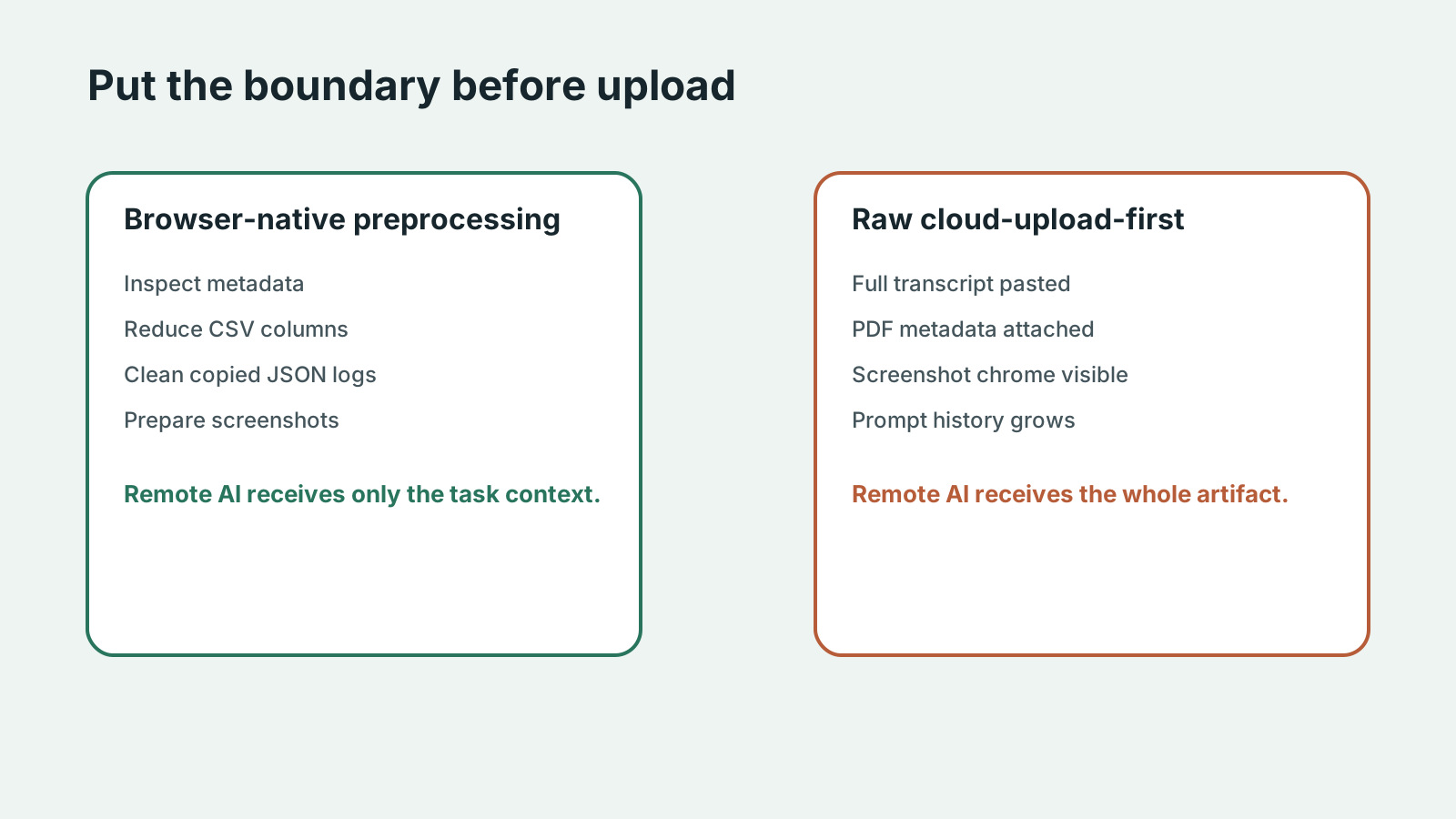
| Workflow Dimension | Browser-Native Preprocessing | Raw Cloud-Upload-First AI |
|---|---|---|
| Metadata exposure | Image, PDF, and filename context can be removed before upload | Metadata travels with the artifact unless the AI platform strips it |
| Prompt persistence | Prompt packets are reduced before they enter history | Raw transcripts and logs may remain in prompt history |
| Context reduction | Only task fields, failure shape, and needed examples are sent | Teams paste full threads because reduction happens too late |
| Review visibility | The operator can inspect the artifact before handoff | The first review often happens after remote processing |
| Operational auditability | SHRTX Local Review can record what was cleaned and why | Audit detail depends on external logs and shared conversations |
Operational Governance Without Blocking Work
Teams need lightweight rules: remove metadata before sharing images, avoid production secrets in prompts, inspect file size before upload, normalize filenames before client handoff, and document when sensitive data was intentionally included.
These rules work because they attach to real actions. A customer-support writer can reduce a transcript before drafting. A frontend engineer can clean copied API logs before asking for debugging help. A content lead can strip PDF metadata before asking an AI note system to summarize.
Where Teams Usually Lose Time
Digital sovereignty becomes visible when a small issue reaches the wrong system. A screenshot is uploaded before its metadata is stripped, or a copied Slack thread reaches an AI sidebar before names are removed. A draft may be distributed before prompt history is checked, while an API log enters a debugging prompt before anyone validates the structure.
The cost is not only the fix. It is context loss. The person who finds the issue often has to reconstruct how the artifact was created, which constraint mattered, and which owner can still change it.
For privacy workflows, the useful lens is custody: what data enters the workflow, what remains local, what leaves the browser, and what claim the product can honestly support.
Operational Continuity
A strong workflow keeps each step connected to the next decision. If the team discusses a file, the upload or sharing consequence should be clear. If it discusses a payload, the field reduction should be clear. If it discusses an AI draft, the source context should still be traceable.
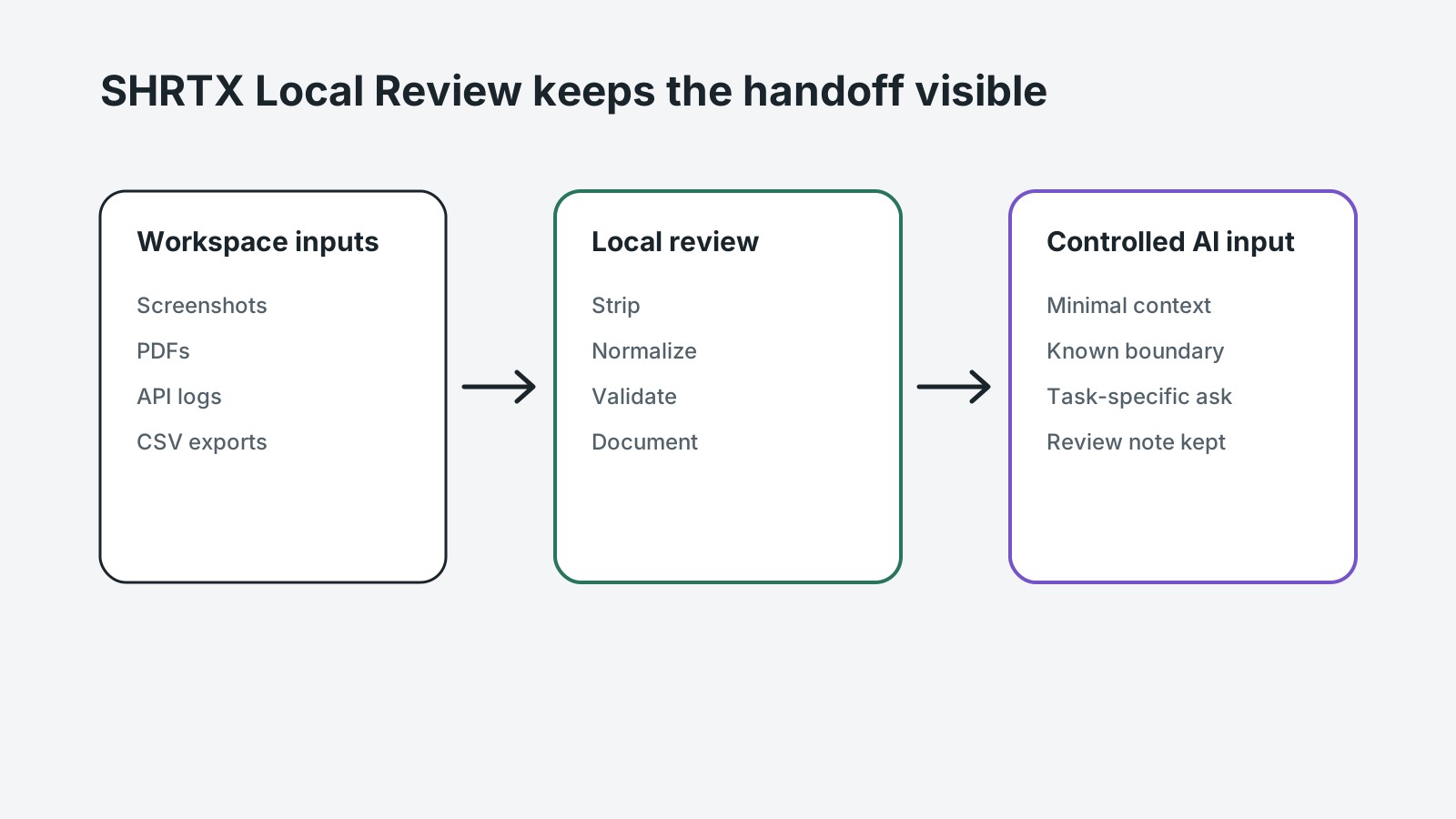
Continuity is what separates operational practice from broad advice. In SHRTX Workspace reviews, the artifact should move from local inspection to AI handoff with the boundary still visible.
Boundaries That Make the Advice Credible
Good operational guidance names limits. Browser-native processing is strong for local preparation, but it does not replace external verification, shared state, or regulated review. Automation catches repeatable drift, but human judgment still handles ambiguous meaning.
Those boundaries matter because they prevent the workflow from overpromising. A local tool can reduce a prompt packet, strip metadata, or validate JSON. It cannot decide whether a regulated case belongs in a remote summarizer.
Handoff Discipline
The handoff is where many workflow problems become visible. A pasted transcript reaches an AI meeting-summary system before names are removed. A screenshot reaches a shared draft before browser tabs are cropped. A PDF reaches a collaborative editor before author metadata is checked.
The practical answer is not to add process everywhere. It is to add the right check before the artifact leaves the person who can still fix it quickly. That check should be small enough to run consistently and specific enough to catch a predictable failure.
Local-First Workflow Lens
A local-first lens does not mean every task must stay in the browser. It means the workflow should identify the point where local preparation is cheaper, safer, or clearer than remote processing. That point may be screenshot preparation before upload, CSV minimization before analysis, JSON cleanup before API debugging, or prompt reduction before customer-support drafting.
When the browser can provide the first useful answer, the workflow becomes easier to operate. The user can correct the artifact while context is still fresh. The team can avoid unnecessary retries. The platform can avoid receiving data it did not need.
The same lens keeps the guidance specific. It forces a boundary: before upload, before deployment, before indexing, before sharing, before publication, or before a remote system receives sensitive context. Once that boundary is clear, the article can stay useful without padding or keyword repetition.
Operating With Real Constraints
Real workflows have device limits, platform limits, team handoffs, old assets, inconsistent samples, and deadlines. Good guidance should survive those constraints. It should not assume perfect data, perfect network conditions, or a team with unlimited time to inspect every artifact manually.
That is why small browser-native checks matter. They give teams a way to reduce uncertainty while the artifact is still close to the source. The result is not a perfect process. It is a more reliable path from local preparation to the next system.
What to Document
The useful documentation is short. Name the artifact, the destination, the reduction step, and the risk that remains. If a transcript was cleaned, record what fields were removed. If a screenshot was prepared, record whether metadata and browser chrome were checked.
This creates continuity without turning the workflow into a report. The next person does not need to repeat the same diagnostic step, and the team has enough context to understand why the artifact was ready for AI handoff. In SHRTX Validation, that note keeps the boundary attached to the artifact instead of burying it in chat history.
Final Takeaway
Digital sovereignty in AI productivity work is a matter of placement and preparation. Keep local cleanup local, reduce context before transmission, and send only what the remote system needs for the task.
The durable habit is controlled context transfer. Browser-native preprocessing gives teams a practical boundary before prompts, uploads, summaries, and collaborative AI drafts leave the local workflow. That is sovereignty as daily operating discipline, not anti-AI rhetoric.
Tools Referenced By Topic
File Encryption (local)
Securely encrypt or decrypt any file locally using military-grade AES-GCM 256-bit encryption.
Browser Fingerprint
Audit your unique hardware and software identity for privacy leaks.
Bulk File Renamer
Apply complex naming patterns, prefixes, and numbering to groups of files locally.
Related Reading
Jan 23, 2026 • 10 min
The Hidden Costs of Free Cloud File Converters
A practical privacy guide to the operational risks behind free cloud file converters, upload-based processing, metadata exposure, and browser-native alternatives.
Apr 2, 2026 • 12 min
Why Browser-Based Data Masking Fits Secure Enterprise Workflows
A practical guide to browser-based data masking, PII cleanup, redaction workflows, and local-first preparation before sharing operational datasets.
Feb 12, 2026 • 10 min
Zero-Log Architecture for Browser-Native Tools
An engineering-focused privacy guide to building browser tools that minimize server visibility, avoid unnecessary file custody, and keep processing boundaries auditable.